


|
|
Elecrow CrowPanel 2.1inch-HMI ESP32 Rotary Display 480*480 |
x 1 | |
|
|
tea5767 FM Radio module |
x 1 | |
|
|
pam8403 amplifier module |
x 1 | |
|
|
Speaker: 0.25W, 8 ohms |
x 1 |

|
Soldering Iron Kit |
|

|
arduino IDEArduino
|
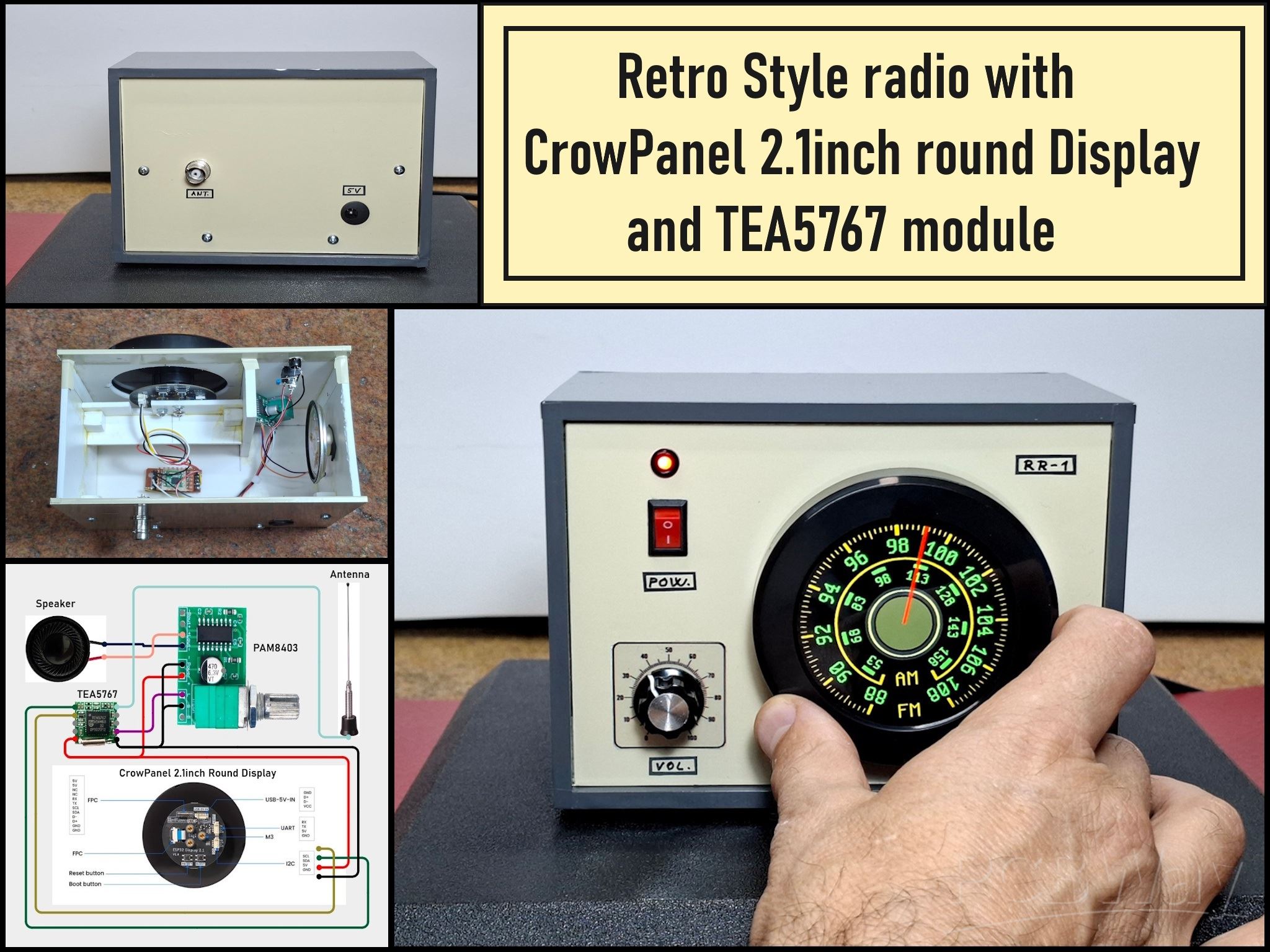
Retro Style radio with CrowPanel 2.1inch round Display (TEA5767)
Some time ago I presented you a clock project with CrowPanel 2.1inch-HMI ESP32 Rotary Display 480*480. In that project I did not use additional external components, but the display module itself downloads the data from the internet and displays it on the screen.
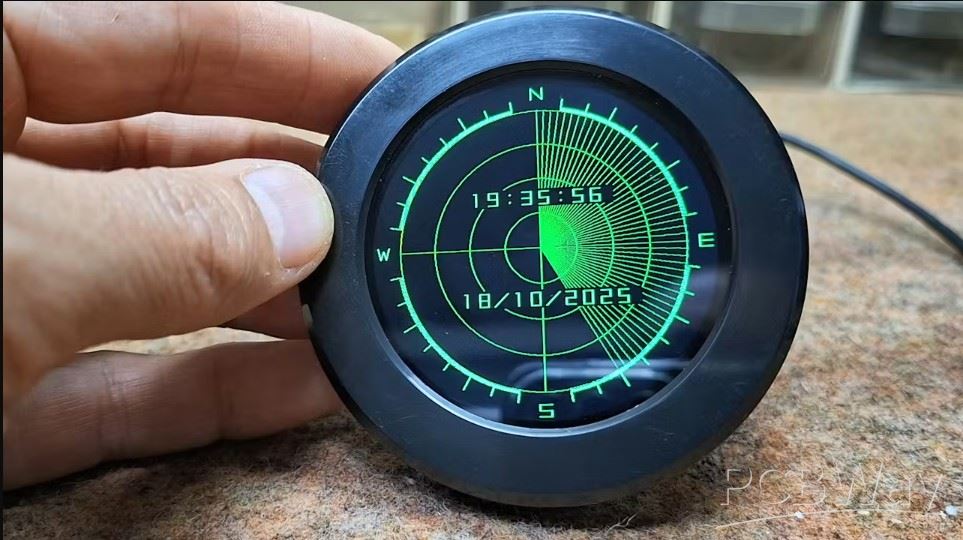
The module also has the ability to communicate with an external device via I2C, so this time I decided to create a project that will demonstrate this ability. As you can see in my previous projects, I have made several radio receivers so this time the choice was again a radio receiver but this time with an interesting retro scale for selecting stations because the circular shape of this display is perfect for this purpose.
From 1st September 2025 to 31st Januarry 2026 PCBWay organizes the 8th project design contest. All interested participants can compete in 3 categories: Electronic Project, Mechanical Project or AIoT Project. The best projects will receive valuable prizes in cash, value coupons, and development boards. Don't miss this unique opportunity and submit your project as soon as possible. PCBWay has all the services you need to create your project at the best price.
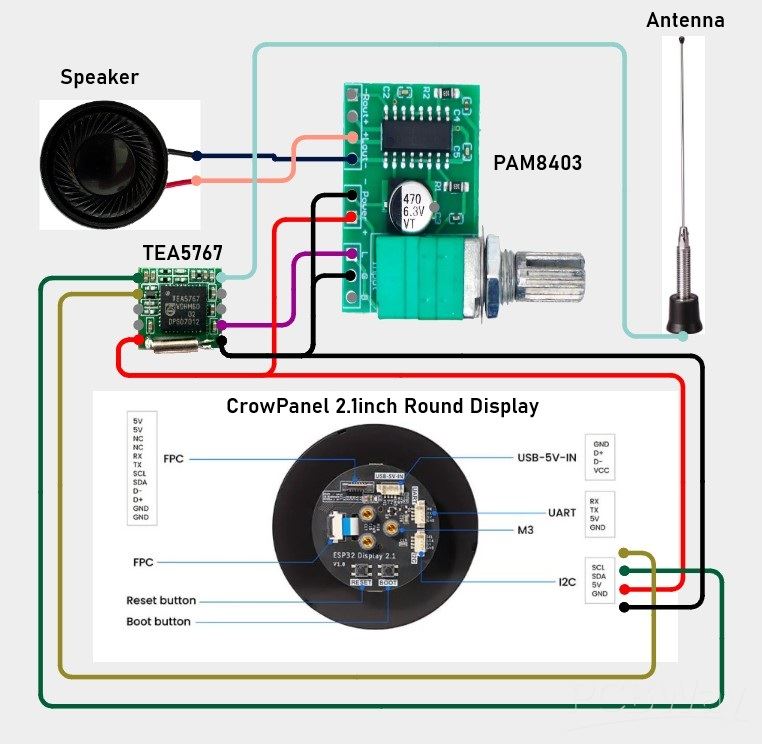
As you can imagine, the device is extremely simple to make, considering that the microcontroller and display are built into the module itself. We only need to add a Radio module and an amplifier with a speaker. The radio module is a TEA5767, and the amplifier is a cheap PAM8403 class D module with a potentiometer. The housing acts like a sound box, so the sound comes out through the holes around the module. The display module has a marked connector that serves for I2C communication plus power, to which the FM radio module is connected.
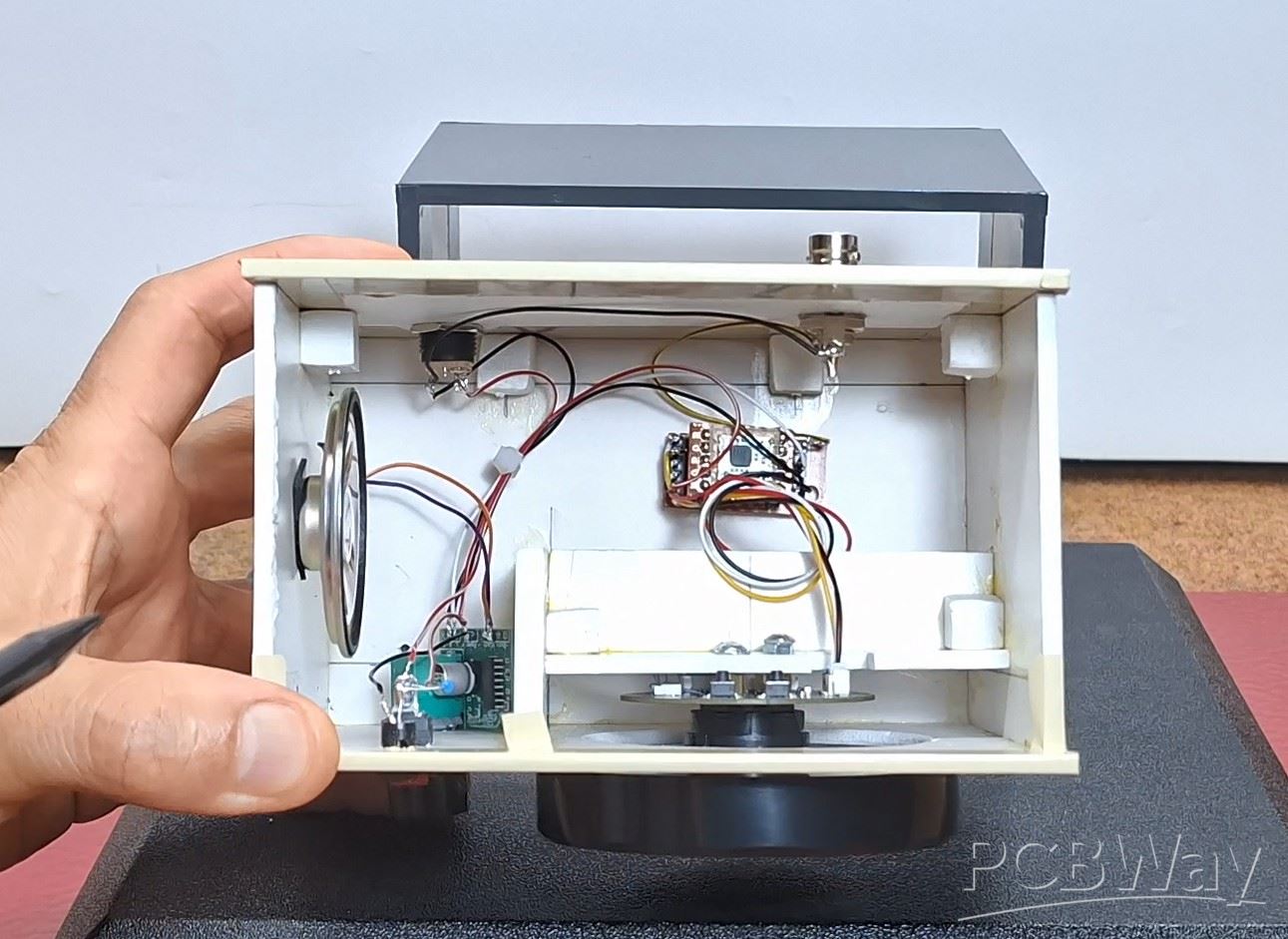
As you can imagine, the device is extremely simple to make, considering that the microcontroller and display are built into the module itself. We only need to add a Radio module and an amplifier with a speaker. The radio module is a TEA5767, and the amplifier is a cheap PAM8403 class D module with a potentiometer. The housing acts like a sound box, so the sound comes out through the holes around the module. The display module has a marked connector that serves for I2C communication plus power, to which the FM radio module is connected.
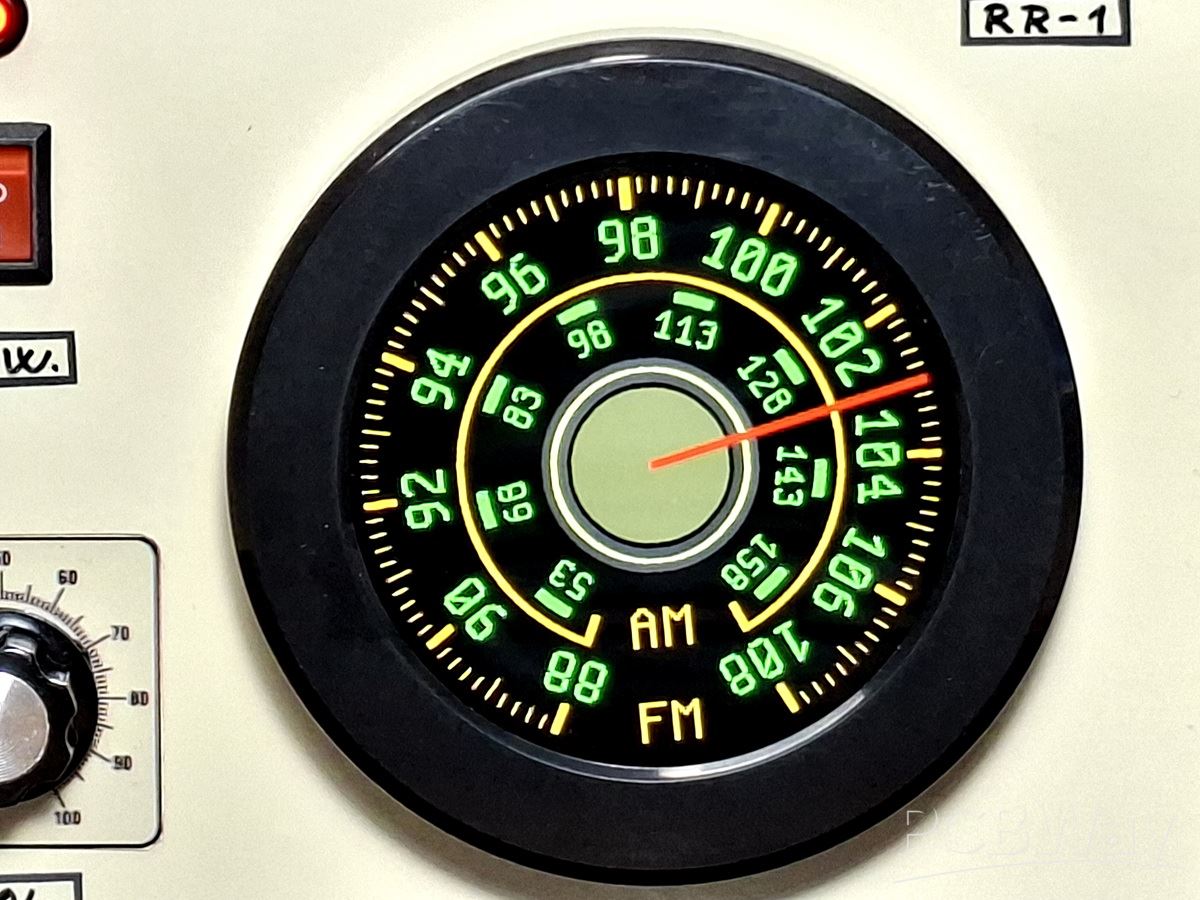
As you can imagine, the device is extremely simple to make, considering that the microcontroller and display are built into the module itself. We only need to add a Radio module and an amplifier with a speaker. The radio module is a TEA5767, and the amplifier is a cheap PAM8403 class D module with a potentiometer. The housing acts like a sound box, so the sound comes out through the holes around the module. The display module has a marked connector that serves for I2C communication plus power, to which the FM radio module is connected.
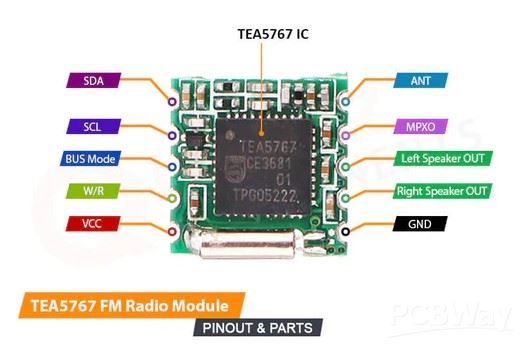
As you can imagine, the device is extremely simple to make, considering that the microcontroller and display are built into the module itself. We only need to add a Radio module and an amplifier with a speaker. The radio module is a TEA5767, and the amplifier is a cheap PAM8403 class D module with a potentiometer. The housing acts like a sound box, so the sound comes out through the holes around the module. The display module has a marked connector that serves for I2C communication plus power, to which the FM radio module is connected.
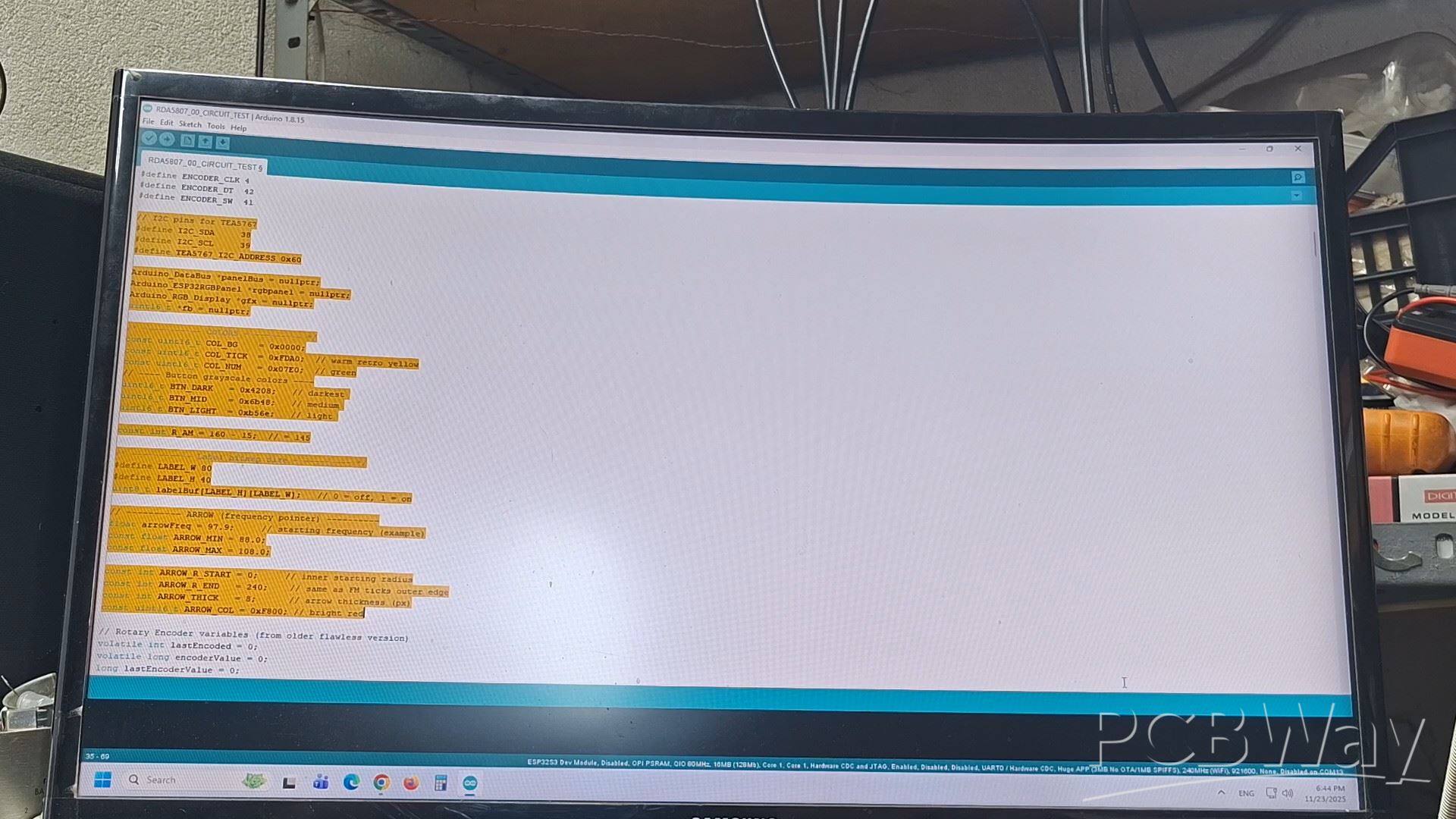
The sensitivity of the receiver primarily depends on the radio module, and of course on the receiving antenna. Selecting stations is really easy and almost realistically emulates the original way of selecting on a retro radio. Each step of the rotary encoder changes the frequency by 100 Kilohertz, so all active stations on the FM band are covered.
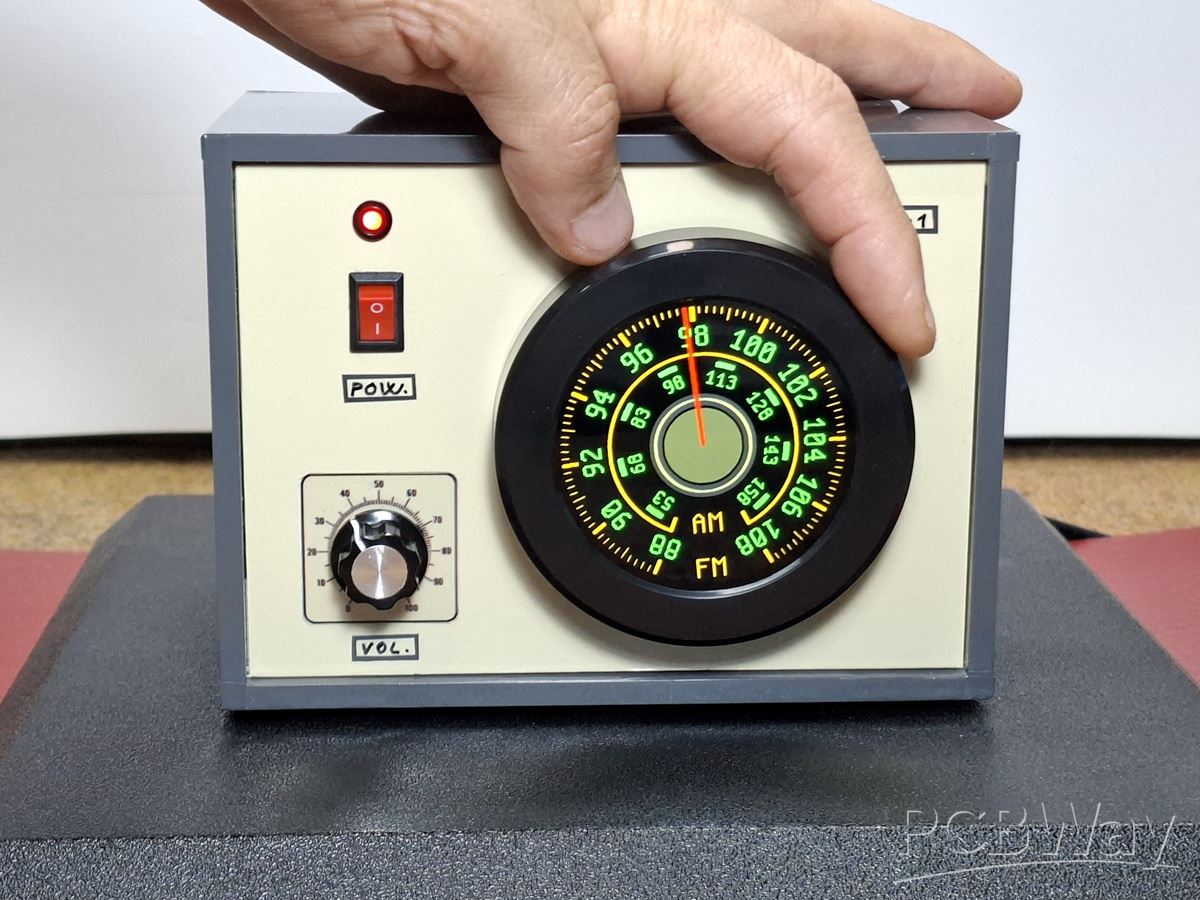
And finally a short conclusion. This project combines the modern capabilities of the CrowPanel ESP32 Display module with a true retro radio, focusing on the manual, drawn-scale station selection. The simple hardware setup means anyone can create this vintage-style audio device and enjoy the realistic emulation of classic radio tuning.
/*==============================================================
   RETRO RADIO DIAL – Tangential FM Labels via 80x40 bitmap
   ESP32-S3 + CrowPanel 2.1" + Arduino_GFX 1.4.4
   V1.6: Retro narrow font + 17px mid tick + inner yellow arc
   + Rotary Encoder Control
   + TEA5767 Radio Module
   + AM/FM Horizontal Labels         by mircemk November 2025
==============================================================*/

#include <Arduino.h>
#include <Arduino_GFX_Library.h>
#include <Wire.h>

#define DISPLAY_WIDTH 480
#define DISPLAY_HEIGHT 480
#define CX 240
#define CY 240

// Panel pins -------
#define TYPE_SEL   7
#define PCLK_NEG   1
#define BL_PIN     6
#define PANEL_CS   16
#define PANEL_SCK  2
#define PANEL_SDA  1
// ------------------

// Rotary Encoder pins
#define ENCODER_CLK 4
#define ENCODER_DT  42
#define ENCODER_SW  41

// I2C pins for TEA5767
#define I2C_SDA     38
#define I2C_SCL     39
#define TEA5767_I2C_ADDRESS 0x60

Arduino_DataBus *panelBus = nullptr;
Arduino_ESP32RGBPanel *rgbpanel = nullptr;
Arduino_RGB_Display *gfx = nullptr;
uint16_t *fb = nullptr;

/* ----------- COLORS ----------- */
const uint16_t COL_BG    = 0x0000;
const uint16_t COL_TICK  = 0xFDA0;  // warm retro yellow
const uint16_t COL_NUM   = 0x07E0;  // green
// ---- Button grayscale colors ----
uint16_t BTN_DARK   = 0x4208;   // darkest
uint16_t BTN_MID    = 0x6b48;   // medium
uint16_t BTN_LIGHT  = 0xb56e;   // light

const int R_AM = 160 - 15;  // = 145

/* ----------- Label bitmap size ----------- */
#define LABEL_W 80
#define LABEL_H 40
uint8_t labelBuf[LABEL_H][LABEL_W];   // 0 = off, 1 = on

// ---------- ARROW (frequency pointer) ----------
float arrowFreq = 97.9;     // starting frequency (example)
const float ARROW_MIN = 88.0;
const float ARROW_MAX = 108.0;

const int ARROW_R_START = 0;     // inner starting radius
const int ARROW_R_END   = 240;    // same as FM ticks outer edge
const int ARROW_THICK   = 8;      // arrow thickness (px)
const uint16_t ARROW_COL = 0xF800; // bright red

// Rotary Encoder variables (from older flawless version)
volatile int lastEncoded = 0;
volatile long encoderValue = 0;
long lastEncoderValue = 0;
int lastMSB = 0;
int lastLSB = 0;

// Radio state
bool radioInitialized = false;

float fmFreqToAngle(float f)
{
    // clamp
    if (f < ARROW_MIN) f = ARROW_MIN;
    if (f > ARROW_MAX) f = ARROW_MAX;

    // linear interpolation from 88..108 MHz → -155..+155 degrees
    float t = (f - 88.0f) / (108.0f - 88.0f);
    return -155.0f + t * (155.0f - (-155.0f));
}

/*==============================================================
   TEA5767 RADIO FUNCTIONS
==============================================================*/

void tea5767_setFrequency(float frequency) {
  unsigned int freqB = 4 * (frequency * 1000000 + 225000) / 32768;
  byte frequencyH = freqB >> 8;
  byte frequencyL = freqB & 0xFF;

  byte data[5] = {
    frequencyH,
    frequencyL,
    0xB0,  // Normal mode, stereo, port1 high, port2 high
    0x10,  // 75µs de-emphasis, 32.768kHz crystal, soft mute off, high side LO
    0x00   // No stereo noise canceling, no search mode
  };

  Wire.beginTransmission(TEA5767_I2C_ADDRESS);
  Wire.write(data, 5);
  Wire.endTransmission();
  delay(100); // Delay for radio to settle
}

bool tea5767_init() {
  Wire.beginTransmission(TEA5767_I2C_ADDRESS);
  byte error = Wire.endTransmission();
  return (error == 0);
}

bool initRadio() {
  Serial.println("Initializing TEA5767 radio...");

  Wire.begin(I2C_SDA, I2C_SCL);
  Wire.setClock(100000);

  if (!tea5767_init()) {
    Serial.println("TEA5767 not detected!");
    return false;
  }

  // Set initial frequency
  tea5767_setFrequency(arrowFreq);

  Serial.println("TEA5767 initialized successfully!");
  return true;
}

/*==============================================================
   BASIC FUNCTIONS
==============================================================*/

static inline void putpix(int x, int y, uint16_t c) {
  if ((unsigned)x < DISPLAY_WIDTH && (unsigned)y < DISPLAY_HEIGHT)
    fb[y * DISPLAY_WIDTH + x] = c;
}

void draw_arrow_pointer(float freq)
{
    float angDeg = fmFreqToAngle(freq);
    float a = angDeg * PI / 180.0f;

    int x1 = CX + (int)(ARROW_R_START * sin(a));
    int y1 = CY - (int)(ARROW_R_START * cos(a));

    int x2 = CX + (int)(ARROW_R_END * sin(a));
    int y2 = CY - (int)(ARROW_R_END * cos(a));

    // draw thickness
    for (int w = -ARROW_THICK/2; w <= ARROW_THICK/2; w++)
    {
        draw_line(
            x1 + (int)(w * cos(a)),
            y1 + (int)(w * sin(a)),
            x2 + (int)(w * cos(a)),
            y2 + (int)(w * sin(a)),
            ARROW_COL
        );
    }
}

void draw_filled_circle(int cx, int cy, int r, uint16_t col)
{
  for(int y = -r; y <= r; y++)
    for(int x = -r; x <= r; x++)
      if(x*x + y*y <= r*r)
        putpix(cx + x, cy + y, col);
}

void draw_ring(int cx, int cy, int rOuter, int thickness, uint16_t col)
{
  int rInner = rOuter - thickness;
  int rOuter2 = rOuter * rOuter;
  int rInner2 = rInner * rInner;

  for(int y = -rOuter; y <= rOuter; y++)
  {
    int yy = y * y;
    for(int x = -rOuter; x <= rOuter; x++)
    {
      int rr = x*x + yy;
      if(rr <= rOuter2 && rr >= rInner2)
        putpix(cx + x, cy + y, col);
    }
  }
}

void draw_line(int x0,int y0,int x1,int y1,uint16_t c){
  int dx=abs(x1-x0), sx=x0<x1?1:-1;
  int dy=-abs(y1-y0), sy=y0<y1?1:-1;
  int err=dx+dy, e2;
  for(;;){
    putpix(x0,y0,c);
    if(x0==x1 && y0==y1) break;
    e2=2*err;
    if(e2>=dy){ err+=dy; x0+=sx; }
    if(e2<=dx){ err+=dx; y0+=sy; }
  }
}

/* ----------- RETRO NARROW 8x12 DIGIT FONT ----------- */
const uint8_t RETRO_DIGIT[10][12] PROGMEM = {
  {0x3C,0x42,0x46,0x4A,0x52,0x62,0x42,0x42,0x42,0x42,0x3C,0x00}, // 0
  {0x08,0x18,0x28,0x48,0x08,0x08,0x08,0x08,0x08,0x08,0x3E,0x00}, // 1
  {0x3C,0x42,0x02,0x02,0x04,0x08,0x10,0x20,0x40,0x40,0x7E,0x00}, // 2
  {0x3C,0x42,0x02,0x02,0x1C,0x02,0x02,0x02,0x02,0x42,0x3C,0x00}, // 3
  {0x04,0x0C,0x14,0x24,0x44,0x44,0x7E,0x04,0x04,0x04,0x1F,0x00}, // 4
  {0x7E,0x40,0x40,0x40,0x7C,0x02,0x02,0x02,0x02,0x42,0x3C,0x00}, // 5
  {0x1C,0x20,0x40,0x40,0x7C,0x42,0x42,0x42,0x42,0x42,0x3C,0x00}, // 6
  {0x7E,0x02,0x04,0x04,0x08,0x08,0x10,0x10,0x20,0x20,0x20,0x00}, // 7
  {0x3C,0x42,0x42,0x42,0x3C,0x42,0x42,0x42,0x42,0x42,0x3C,0x00}, // 8
  {0x3C,0x42,0x42,0x42,0x42,0x3E,0x02,0x02,0x02,0x04,0x38,0x00}  // 9
};

/* ----------- SIMPLE 8x12 LETTER FONT (A, M, F) ----------- */
const uint8_t RETRO_LETTER[3][12] PROGMEM = {
  {0x18,0x24,0x42,0x42,0x7E,0x42,0x42,0x42,0x42,0x42,0x42,0x00}, // A - FIXED
  {0x41,0x63,0x55,0x49,0x41,0x41,0x41,0x41,0x41,0x41,0x41,0x00}, // M - FIXED
  {0x7F,0x40,0x40,0x40,0x7C,0x40,0x40,0x40,0x40,0x40,0x40,0x00}  // F - FIXED (was 0x7E, now 0x7F for full left bar)
};

// ... [REST OF THE DRAWING FUNCTIONS REMAIN THE SAME AS YOUR ORIGINAL WORKING CODE]

/*==============================================================
   Create horizontal label into 80x40 bitmap (using RETRO_DIGIT)
==============================================================*/
void buildLabelBitmap(const char *text, int scale)
{
  for (int y = 0; y < LABEL_H; y++)
    for (int x = 0; x < LABEL_W; x++)
      labelBuf[y][x] = 0;

  int len = strlen(text);
  if (len <= 0) return;

  const int glyphW = 8;
  const int glyphH = 12;

  int digitW = glyphW * scale;
  int digitH = glyphH * scale;
  int gap    = scale;
  int labelW = len * digitW + (len - 1) * gap;

  int startX = (LABEL_W - labelW) / 2;
  int startY = (LABEL_H - digitH) / 2;

  for (int d = 0; d < len; d++) {
    int digit = text[d] - '0';
    if (digit < 0 || digit > 9) continue;
    const uint8_t *glyph = RETRO_DIGIT[digit];

    int x0 = startX + d * (digitW + gap);

    for (int row = 0; row < glyphH; row++) {
      uint8_t bits = pgm_read_byte(&glyph[row]);
      for (int col = 0; col < glyphW; col++) {
        if (bits & (0x80 >> col)) {
          for (int sx = 0; sx < scale; sx++) {
            for (int sy = 0; sy < scale; sy++) {
              int xx = x0 + col * scale + sx;
              int yy = startY + row * scale + sy;
              if (xx >= 0 && xx < LABEL_W && yy >= 0 && yy < LABEL_H)
                labelBuf[yy][xx] = 1;
            }
          }
        }
      }
    }
  }
}

/*==============================================================
   Draw rotated label
   angleDeg = tangential FM angle (0° = top)
==============================================================*/
void blitLabelRotated(const char *text,
                      float angleDeg,
                      int radius,
                      int scale,
                      uint16_t col)
{
  buildLabelBitmap(text, scale);

  float theta = angleDeg * PI / 180.0f;   // screen rotation
  float ct = cos(theta);
  float st = sin(theta);

  // Center position of label on the dial
  float a = angleDeg * PI / 180.0f;
  float cx_label = CX + radius * sin(a);
  float cy_label = CY - radius * cos(a);

  float cxLocal = LABEL_W  / 2.0f;
  float cyLocal = LABEL_H / 2.0f;

  for (int by = 0; by < LABEL_H; by++) {
    for (int bx = 0; bx < LABEL_W; bx++) {
      if (!labelBuf[by][bx]) continue;

      float lx = bx - cxLocal;
      float ly = by - cyLocal;

      float rx = lx*ct - ly*st;
      float ry = lx*st + ly*ct;

      int sx = (int)(cx_label + rx);
      int sy = (int)(cy_label + ry);

      putpix(sx, sy, col);
    }
  }
}

/*==============================================================
   Draw horizontal text (for AM/FM labels) - FIXED VERSION
==============================================================*/
void drawHorizontalText(const char *text, int x, int y, int scale, uint16_t col) {
  int len = strlen(text);
  if (len <= 0) return;

  const int glyphW = 8;
  const int glyphH = 12;

  for (int d = 0; d < len; d++) {
    char c = text[d];
    const uint8_t *glyph;

    // Select appropriate glyph
    switch(c) {
      case 'A': glyph = RETRO_LETTER[0]; break;
      case 'M': glyph = RETRO_LETTER[1]; break;
      case 'F': glyph = RETRO_LETTER[2]; break;
      default: continue;
    }

    int x0 = x + d * (glyphW * scale + scale);

    for (int row = 0; row < glyphH; row++) {
      uint8_t bits = pgm_read_byte(&glyph[row]);
      for (int col_bit = 0; col_bit < glyphW; col_bit++) {
        if (bits & (0x80 >> col_bit)) {
          for (int sx = 0; sx < scale; sx++) {
            for (int sy = 0; sy < scale; sy++) {
              int xx = x0 + col_bit * scale + sx;
              int yy = y + row * scale + sy;
              if (xx >= 0 && xx < DISPLAY_WIDTH && yy >= 0 && yy < DISPLAY_HEIGHT)
                putpix(xx, yy, col);
            }
          }
        }
      }
    }
  }
}

/*==============================================================
   Helper: inner yellow arc with thickness
==============================================================*/

void draw_inner_arc()
{
  const float A0 = -155.0f;
  const float A1 =  155.0f;

  const int R_ARC     = 160;  // radius of the arc (slightly smaller than ticks)
  const int TH_ARC    = 3;    // thickness of the arc

  const int rOuter = R_ARC;
  const int rInner = R_ARC - TH_ARC;

  const float step = 0.2f;   // degrees, smaller = smoother

  for (float angDeg = A0; angDeg <= A1; angDeg += step) {
    float a = angDeg * PI / 180.0f;

    int xOuter = CX + (int)(rOuter * sin(a));
    int yOuter = CY - (int)(rOuter * cos(a));
    int xInner = CX + (int)(rInner * sin(a));
    int yInner = CY - (int)(rInner * cos(a));

    // small radial segment, repeated along the arc → thick band
    draw_line(xInner, yInner, xOuter, yOuter, COL_TICK);
  }
}

//--------------------------------------------------
//  Draw a short arc segment (for AM green arcs)
//--------------------------------------------------
void draw_short_arc(int cx, int cy, int r,
                    float angStart, float angEnd,
                    int thickness, uint16_t col)
{
  float step = 0.5;

  for (int t = 0; t < thickness; t++)
  {
    int rr = r - t;    // inner offset → makes arc thicker

    for (float a = angStart; a <= angEnd; a += step)
    {
      float ang = a * PI / 180.0f;
      int x = cx + rr * sin(ang);
      int y = cy - rr * cos(ang);
      putpix(x, y, col);
    }
  }
}

/*==============================================================
   ROTARY ENCODER FUNCTIONS (from older flawless version)
==============================================================*/

void updateEncoder() {
  int MSB = digitalRead(ENCODER_CLK);
  int LSB = digitalRead(ENCODER_DT);

  int encoded = (MSB << 1) | LSB;
  int sum = (lastEncoded << 2) | encoded;

  if (sum == 0b1101 || sum == 0b0100 || sum == 0b0010 || sum == 0b1011) {
    encoderValue++;
  }
  if (sum == 0b1110 || sum == 0b0111 || sum == 0b0001 || sum == 0b1000) {
    encoderValue--;
  }

  lastEncoded = encoded;
}

void handleEncoder() {
  noInterrupts();
  long currentValue = encoderValue;
  interrupts();

  if (currentValue != lastEncoderValue) {
    // Calculate frequency change (0.1 MHz per step)
    float freqChange = (currentValue - lastEncoderValue) * 0.1;
    arrowFreq += freqChange;

    // Clamp frequency to valid range
    if (arrowFreq < ARROW_MIN) arrowFreq = ARROW_MIN;
    if (arrowFreq > ARROW_MAX) arrowFreq = ARROW_MAX;

    // Update TEA5767 radio module
    if (radioInitialized) {
      tea5767_setFrequency(arrowFreq);
    }

    // Redraw the dial with new arrow position
    draw_dial();
    gfx->draw16bitRGBBitmap(0, 0, fb, DISPLAY_WIDTH, DISPLAY_HEIGHT);

    Serial.printf("Frequency: %.1f MHz\n", arrowFreq);

    lastEncoderValue = currentValue;
  }
}

/*==============================================================
   DRAW FULL FM DIAL
==============================================================*/

void draw_dial()
{
  // Clear framebuffer
  for (int i = 0; i < DISPLAY_WIDTH * DISPLAY_HEIGHT; i++)
    fb[i] = COL_BG;

  // ----- COMMON CONSTANTS -----
  const int   MAJ       = 11;
  const float A0        = -155.0f;
  const float A1        =  155.0f;

  const int R_OUT       = 240;
  const int TICK_LONG   = 25;  // main tick length
  const int TICK_SHORT  = 11;  // short tick length
  const int TICK_MID    = 20;  // mid tick length (5th division)
  const int TH_LONG     = 7;   // main tick thickness
  const int TH_SHORT    = 2;   // short & mid tick thickness

  const int R_TEXT      = R_OUT - 53;
  const int SCALE       = 3;

  // ----- 1) INNER YELLOW ARC -----
  draw_inner_arc();

  // ----- 2) FM TICKS (MAIN + MINOR + MID) -----
  for (int i = 0; i < MAJ; i++)
  {
    float angDeg = A0 + i * (A1 - A0) / (MAJ - 1);
    float a = angDeg * PI / 180.0f;

    int x1 = CX + (int)((R_OUT - TICK_LONG) * sin(a));
    int y1 = CY - (int)((R_OUT - TICK_LONG) * cos(a));
    int x2 = CX + (int)(R_OUT * sin(a));
    int y2 = CY - (int)(R_OUT * cos(a));

    // main thick tick
    for (int w = -TH_LONG / 2; w <= TH_LONG / 2; w++)
    {
      draw_line(
        x1 + (int)(w * cos(a)), y1 + (int)(w * sin(a)),
        x2 + (int)(w * cos(a)), y2 + (int)(w * sin(a)),
        COL_TICK
      );
    }

    // minor ticks + mid (5th) tick
    if (i < MAJ - 1)
    {
      float a0 = angDeg * PI / 180.0f;
      float a1 = (A0 + (i + 1) * (A1 - A0) / (MAJ - 1)) * PI / 180.0f;

      for (int j = 1; j < 10; j++)
      {
        float aj = a0 + (a1 - a0) * (j / 10.0f);

        int tickLen = (j == 5) ? TICK_MID : TICK_SHORT;  // 5th tick longer

        int xi = CX + (int)((R_OUT - tickLen) * sin(aj));
        int yi = CY - (int)((R_OUT - tickLen) * cos(aj));
        int xo = CX + (int)(R_OUT * sin(aj));
        int yo = CY - (int)(R_OUT * cos(aj));

        for (int w = -TH_SHORT / 2; w <= TH_SHORT / 2; w++)
        {
          draw_line(
            xi + (int)(w * cos(aj)), yi + (int)(w * sin(aj)),
            xo + (int)(w * cos(aj)), yo + (int)(w * sin(aj)),
            COL_TICK
          );
        }
      }
    }
  } // <-- end FM ticks loop

  /****************************************************
     AM BORDER TICKS (correct radius at AM arc)
  ****************************************************/
  {
    const float borders[2] = { -155.0f, 155.0f };

    const int R_AM_BORDER = 160;   // <-- THIS radius is used below
    const int AM_TICK_LEN = 25;
    const int AM_TICK_TH  = 7;

    for (int b = 0; b < 2; b++)
    {
      float angDeg = borders[b];
      float a = angDeg * PI / 180.0f;

      // --------- USE R_AM_BORDER HERE (not R_AM) ---------
      int x1 = CX + (int)((R_AM_BORDER - AM_TICK_LEN) * sin(a));
      int y1 = CY - (int)((R_AM_BORDER - AM_TICK_LEN) * cos(a));

      int x2 = CX + (int)(R_AM_BORDER * sin(a));
      int y2 = CY - (int)(R_AM_BORDER * cos(a));
      // ----------------------------------------------------

      for (int w = -AM_TICK_TH/2; w <= AM_TICK_TH/2; w++)
      {
        draw_line(
          x1 + (int)(w * cos(a)), y1 + (int)(w * sin(a)),
          x2 + (int)(w * cos(a)), y2 + (int)(w * sin(a)),
          COL_TICK
        );
      }
    }
  }

  // ----- 4) AM GREEN ARCS (8 PIECES, MEDIUM WIDTH) -----
  {
    const int   AM_ARCS   = 8;
    const float AM_A0     = -140.0f;
    const float AM_A1     =  140.0f;
    const int   AM_TH     = 8;
    const float ARC_WIDTH = 12.0f;

    for (int i = 0; i < AM_ARCS; i++)
    {
      float base = AM_A0 + i * (AM_A1 - AM_A0) / (AM_ARCS - 1);

      float angStart = base - ARC_WIDTH / 2;
      float angEnd   = base + ARC_WIDTH / 2;

      draw_short_arc(
        CX, CY,
        R_AM,       // global const R_AM = 145
        angStart, angEnd,
        AM_TH,
        COL_NUM
      );
    }
  }

  // ----- 5) AM LABELS (TANGENTIAL, RETRO FONT, SCALE 2) -----
  {
    const int   AM_ARCS    = 8;
    const int   AM_FREQ[8] = { 53, 68, 83, 98, 113, 128, 143, 158 };
    const float AM_A0      = -140.0f;
    const float AM_A1      =  140.0f;
    const int   R_AM_TEXT  = 115;  // radius for AM text
    const int   SCALE_AM   = 2;

    for (int i = 0; i < AM_ARCS; i++)
    {
      float angDeg = AM_A0 + i * (AM_A1 - AM_A0) / (AM_ARCS - 1);

      char buf[8];
      sprintf(buf, "%d", AM_FREQ[i]);

      blitLabelRotated(
        buf,
        angDeg,
        R_AM_TEXT,
        SCALE_AM,
        COL_NUM
      );
    }
  }

  /****************************************************
     3–RING GRAY BUTTON  (Customizable)
  ****************************************************/
  {
    // --- Radii (you can adjust anytime) ---
    int R_OUTER   = 90;   // outside radius
    int R_INNER   = 65;   // inner filled disk
    int R_LIGHT   = 82;   // light ring radius (midway)
    int LIGHT_W   = 3;    // light ring thickness
    int OUTER_W   = 20;   // outer ring thickness

    // --- Draw dark outer ring (thick) ---
    draw_ring(CX, CY, R_OUTER, OUTER_W, BTN_DARK);

    // --- Draw light thin ring (for highlight) ---
    draw_ring(CX, CY, R_LIGHT, LIGHT_W, BTN_LIGHT);

    // --- Draw full inner medium disk ---
    draw_filled_circle(CX, CY, R_INNER, BTN_MID);
  }

  // ----- 6) FM LABELS (TANGENTIAL, RETRO FONT, SCALE 3) -----
  {
    const int FM[11] = { 88,90,92,94,96,98,100,102,104,106,108 };

    for (int i = 0; i < MAJ; i++)
    {
      float angDeg = A0 + i * (A1 - A0) / (MAJ - 1);

      char buf[8];
      sprintf(buf, "%d", FM[i]);

      blitLabelRotated(
        buf,
        angDeg,
        R_TEXT,
        SCALE,
        COL_NUM
      );
    }
  }

  // ----- 7) AM/FM HORIZONTAL LABELS (FIXED POSITIONING) -----
  {
    const int LABEL_SCALE = 3; // Larger size for better visibility

    // "AM" label - positioned near the yellow AM arc (top)
    int amX = CX - 30; // Centered horizontally (2 chars * 8px * 4 scale / 2)
    int amY = CY + 120; // Position above center, near AM arc

    // "FM" label - positioned above FM scale numbers (bottom)
    int fmX = CX - 30; // Centered horizontally
    int fmY = CY + 200; // Position below center, above FM numbers

    drawHorizontalText("AM", amX, amY, LABEL_SCALE, COL_TICK);
    drawHorizontalText("FM", fmX, fmY, LABEL_SCALE, COL_TICK);
  }

  // ----- 8) DRAW THE ARROW POINTER (LAST - ON TOP OF EVERYTHING) -----
  draw_arrow_pointer(arrowFreq);
}

/*==============================================================
   DISPLAY INITIALIZATION
==============================================================*/

void init_display() {
  pinMode(BL_PIN, OUTPUT);
  digitalWrite(BL_PIN, HIGH);

  panelBus = new Arduino_SWSPI(
    GFX_NOT_DEFINED, PANEL_CS, PANEL_SCK, PANEL_SDA, GFX_NOT_DEFINED);

  rgbpanel = new Arduino_ESP32RGBPanel(
      40,7,15,41,
      46,3,8,18,17,
      14,13,12,11,10,9,
      5,45,48,47,21,
      1,50,10,50,
      1,30,10,30,
      PCLK_NEG,8000000UL );

#if TYPE_SEL == 7
  gfx = new Arduino_RGB_Display(
    DISPLAY_WIDTH, DISPLAY_HEIGHT, rgbpanel, 0, true,
    panelBus, GFX_NOT_DEFINED,
    st7701_type7_init_operations, sizeof(st7701_type7_init_operations)
  );
#else
  gfx = new Arduino_RGB_Display(
    DISPLAY_WIDTH, DISPLAY_HEIGHT, rgbpanel, 0, true,
    panelBus, GFX_NOT_DEFINED,
    st7701_type5_init_operations, sizeof(st7701_type5_init_operations)
  );
#endif

  gfx->begin(16000000);

  fb = (uint16_t*)ps_malloc(DISPLAY_WIDTH * DISPLAY_HEIGHT * 2);
}

/*==============================================================
   SETUP / LOOP
==============================================================*/

void setup() {
  Serial.begin(115200);

  // Initialize rotary encoder pins
  pinMode(ENCODER_CLK, INPUT_PULLUP);
  pinMode(ENCODER_DT, INPUT_PULLUP);
  pinMode(ENCODER_SW, INPUT_PULLUP);

  // Attach interrupt for encoder (flawless version)
  attachInterrupt(digitalPinToInterrupt(ENCODER_CLK), updateEncoder, CHANGE);
  attachInterrupt(digitalPinToInterrupt(ENCODER_DT), updateEncoder, CHANGE);

  // Initialize display
  init_display();

  // Initialize TEA5767 radio
  radioInitialized = initRadio();

  // Draw initial display
  draw_dial();
  gfx->draw16bitRGBBitmap(0, 0, fb, DISPLAY_WIDTH, DISPLAY_HEIGHT);

  Serial.println("Radio Dial Ready - Rotate encoder to change frequency");
  Serial.printf("Initial frequency: %.1f MHz\n", arrowFreq);
  if (radioInitialized) {
    Serial.println("TEA5767 Radio: INITIALIZED");
  } else {
    Serial.println("TEA5767 Radio: NOT FOUND - Display only mode");
  }
}

void loop() {
  handleEncoder();
  delay(2); // Small delay to debounce
}
Retro Style radio with CrowPanel 2.1inch round Display (TEA5767)









Raspberry Pi 5 7 Inch Touch Screen IPS 1024x600 HD LCD HDMI-compatible Display for RPI 4B 3B+ OPI 5 AIDA64 PC Secondary Screen(Without Speaker)
BUY NOW


- Comments(1)
- Likes(0)
More by Mirko Pavleski
-
 Arduino 3D Printed self Balancing Cube
Self-balancing devices are electronic devices that use sensors and motors to keep themselves balanc...
Arduino 3D Printed self Balancing Cube
Self-balancing devices are electronic devices that use sensors and motors to keep themselves balanc...
-
 DIY ESP32 Universal Timer with Touchscreen & Rotary Encoder
In several of my previous videos, I presented different projects based on the CrowPanel 2.1-inch HM...
DIY ESP32 Universal Timer with Touchscreen & Rotary Encoder
In several of my previous videos, I presented different projects based on the CrowPanel 2.1-inch HM...
-
 Build a Real 5-Band Parametric EQ with ESP32 + WM8960 - Stereo DSP Audio Processor
Audio equalizer (EQ) is an electronic device that allows control over the strength of different fre...
Build a Real 5-Band Parametric EQ with ESP32 + WM8960 - Stereo DSP Audio Processor
Audio equalizer (EQ) is an electronic device that allows control over the strength of different fre...
-
 Bass Reflex vs Sealed vs Horn – Same 2 inch Speaker Test
In one of the previous videos I presented the making of a miniature Horn type speaker box with a 2 ...
Bass Reflex vs Sealed vs Horn – Same 2 inch Speaker Test
In one of the previous videos I presented the making of a miniature Horn type speaker box with a 2 ...
-
 Building a Mini Fostex Horn Speaker with a 2-Inch Full-Range Driver
A back-loaded horn speaker is a loudspeaker design that channels the rear sound wave of a driver th...
Building a Mini Fostex Horn Speaker with a 2-Inch Full-Range Driver
A back-loaded horn speaker is a loudspeaker design that channels the rear sound wave of a driver th...
-
 ESP32 Moon Lamp That Shows the Real Moon Phase on Crowpanel Round Dispaly
Recently on the Hackaday portal I came across a very interesting project called Moon Display by aut...
ESP32 Moon Lamp That Shows the Real Moon Phase on Crowpanel Round Dispaly
Recently on the Hackaday portal I came across a very interesting project called Moon Display by aut...
-
 40-Year-Old DIY Power Amplifiers – Do They Still Work - 500W MOSFET & Transistor Amps
This time I want to describe my two DIY super powerful audio amplifiers that I made about 40 years ...
40-Year-Old DIY Power Amplifiers – Do They Still Work - 500W MOSFET & Transistor Amps
This time I want to describe my two DIY super powerful audio amplifiers that I made about 40 years ...
-
 Wi-Fi HaLow Explained! Long-Range Camera Test up to 300m (ESP32 + ThinkNode G4 from ELECROW)
I recently needed to install a security camera at a relatively large distance from my home, more pre...
Wi-Fi HaLow Explained! Long-Range Camera Test up to 300m (ESP32 + ThinkNode G4 from ELECROW)
I recently needed to install a security camera at a relatively large distance from my home, more pre...
-
 Simple Object Recognition with the UNIHIKER K10 – No TensorFlow, No Internet, No Cloud AI
Object recognition has become one of the most popular applications of artificial intelligence and em...
Simple Object Recognition with the UNIHIKER K10 – No TensorFlow, No Internet, No Cloud AI
Object recognition has become one of the most popular applications of artificial intelligence and em...
-
 DIY PCL82 Tube Amplifier, Single-Ended Amp with Amazing Sound
The idea for this project came from a local electronics magazine called EMITER, issue 12/13 from 20...
DIY PCL82 Tube Amplifier, Single-Ended Amp with Amazing Sound
The idea for this project came from a local electronics magazine called EMITER, issue 12/13 from 20...
-
 Simple MCP2036 SDR Radio - The Most Unusual Software Defined Radio
SDR (Software Defined Radio) is a radio communication system where many of the key electronic compo...
Simple MCP2036 SDR Radio - The Most Unusual Software Defined Radio
SDR (Software Defined Radio) is a radio communication system where many of the key electronic compo...
-
 Elecrow All-in-One Arduino Starter Kit Review - 20 Projects & 16 Modules
This time I will describe a simple and practical way to enter the world of microcontrollers, specif...
Elecrow All-in-One Arduino Starter Kit Review - 20 Projects & 16 Modules
This time I will describe a simple and practical way to enter the world of microcontrollers, specif...
-
 ESP32-C3 Color Detector with TCS34725, Real-Time RGB Detection & Web Interface
Color detection is a fundamental task in many embedded systems – from industrial sorting machines t...
ESP32-C3 Color Detector with TCS34725, Real-Time RGB Detection & Web Interface
Color detection is a fundamental task in many embedded systems – from industrial sorting machines t...
-
 DIY ESP32 Telegram Flood Protection System - Smart Home Automation
Recently I had an unpleasant experience in my home, specifically my ground floor was flooded as a r...
DIY ESP32 Telegram Flood Protection System - Smart Home Automation
Recently I had an unpleasant experience in my home, specifically my ground floor was flooded as a r...
-
 Real-Time Air Traffic Radar using ESP32 + ADS-B Data
ADS-B, which stands for Automatic Dependent Surveillance-Broadcast, is the modern standard for trac...
Real-Time Air Traffic Radar using ESP32 + ADS-B Data
ADS-B, which stands for Automatic Dependent Surveillance-Broadcast, is the modern standard for trac...
-
 DIY Green Laser Night Sky Object Finder - Find Stars & Galaxies Instantly with great accuracy
As an amateur astronomer, especially at the beginning, the most difficult part of observing the nig...
DIY Green Laser Night Sky Object Finder - Find Stars & Galaxies Instantly with great accuracy
As an amateur astronomer, especially at the beginning, the most difficult part of observing the nig...
-
 DIY Avionics Simulator with ESP32 - Artificial Horizon, Compass & Altimeter
The inspiration for this project comes from classical aircraft cockpit instruments used for navigat...
DIY Avionics Simulator with ESP32 - Artificial Horizon, Compass & Altimeter
The inspiration for this project comes from classical aircraft cockpit instruments used for navigat...
-
 DIY Miniature X-Ray Machine using a TV Vacuum Tube DY86
An X-ray machine (or radiograph) is a quick, painless medical test that produces images of the struc...
DIY Miniature X-Ray Machine using a TV Vacuum Tube DY86
An X-ray machine (or radiograph) is a quick, painless medical test that produces images of the struc...
-
Émetteur Récepteur Optique Expérimental (communication UART ATtiny + fibre optique)
142 0 1 -
SmallOLED - Live PC Stats, Animated Clocks & Audio Visualizer
990 0 3 -
"Talking Multimeter": Arduino-Based Speech Add-on for Multimeters with SCPI Protocol
568 0 1 -
Programmable Mist Maker - XIAO / QT PY Extension
3038 2 3 -
RadioHAT - Raspberry Pi radio development platform
2584 0 4 -
-
-



















