





|
KiCad 9.0 |
|

|
PlatformIOPlatformIO Labs
|
|

|
Autodesk Fusion 360Autodesk
|
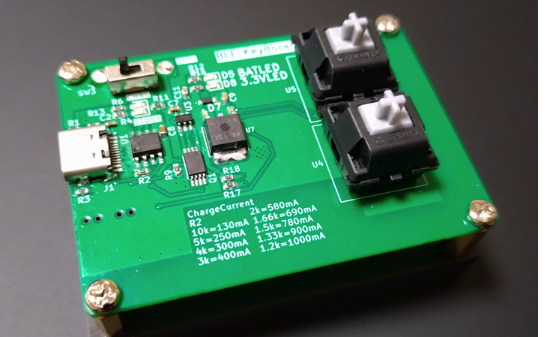
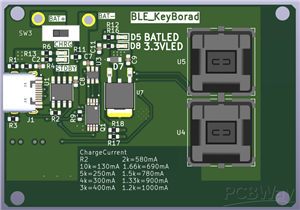
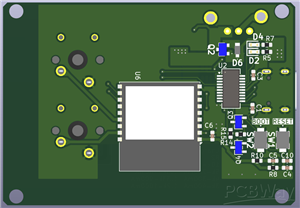
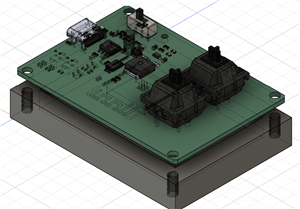
ESP32-C3 BLE Keyboard - Battery Powered with USB-C Charging
## Project Motivation
While working, I often needed a simple Bluetooth keyboard with customizable shortcut keys.
Instead of buying an expensive commercial product, I decided to create my own compact
2-key BLE keyboard using ESP32-C3.
## Key Features
This project successfully achieves the following:
✅ **2-Key Bluetooth HID Keyboard** - Works as a standard Bluetooth keyboard with any PC/Mac
✅ **Battery Powered** - Fully portable with integrated Li-ion battery support
✅ **USB Type-C Charging** - Convenient charging with built-in charging circuit
✅ **Safe Operation** - Protection IC prevents overcurrent and overvoltage
✅ **Auto Programming** - No need to press BOOT/EN buttons during firmware upload
✅ **Compact Design** - Small PCB footprint, easy to carry
## Technical Details
### Power Management
- **Charging IC**: TP4056 with protection IC
- **Battery**: Single-cell Li-ion battery (3.7V)
- **Voltage Regulation**: Stable 3.3V output for ESP32-C3
- **USB Type-C**: Charging and power supply with proper CC pin configuration
### Programming Interface
- **USB-UART Bridge**: FT231XS (or CH340/CP2102) for serial communication
- **Auto-Reset Circuit**: DTR/RTS controlled BOOT/EN pins for automatic programming
- **Manual Override**: Physical BOOT and EN buttons included for troubleshooting
### Bluetooth Operation
- **BLE HID Profile**: Standard Bluetooth Low Energy keyboard implementation
- **Key Assignment**: 2 programmable keys (fully customizable via firmware)
- **Low Power**: BLE enables extended battery life
- **Wide Compatibility**: Works with Windows, macOS, Linux, Android, iOS
## How It Works
1. **Connect via Bluetooth**: Pair with any device supporting BLE keyboards
2. **Assign Keys**: Program your preferred shortcuts (Enter, Space, Ctrl+C, etc.)
3. **Use Wirelessly**: Press keys to send commands to your computer
4. **Recharge Easily**: Plug in USB-C cable when battery runs low
## Use Cases
- Quick access to frequently used shortcuts during work
- Custom macro pad for video editing, CAD, or programming
- Minimalist desk setup with wireless control
- Educational project for learning ESP32 BLE programming
#include <Arduino.h>

/*
 * ESP32-C3 2キーBluetoothキーボード(セキュリティ設定修正版)
 * GPIO1: ENTERキー
 * GPIO3: スペースキー
 *
 * 必要なライブラリ:
 * - ESP32-BLE-Keyboard by T-vK
 *   Arduino IDEのライブラリマネージャーからインストール可能
 *
 * 配線:
 * - タクトスイッチ1の片側: GPIO1
 * - タクトスイッチ1のもう片側: GND
 * - タクトスイッチ2の片側: GPIO3
 * - タクトスイッチ2のもう片側: GND
 * - ESP32-C3の3V3とGNDに電源を供給
 */

#include <BleKeyboard.h>
#include <NimBLEDevice.h>

// ピン設定
const int BUTTON_ENTER_PIN = 1;  // ENTERキー用タクトスイッチ
const int BUTTON_SPACE_PIN = 3;  // スペースキー用タクトスイッチ

// チャタリング防止用の設定
const unsigned long DEBOUNCE_DELAY = 50;  // 50ミリ秒

// ENTER用のチャタリング管理
unsigned long lastDebounceTimeEnter = 0;
int lastButtonStateEnter = HIGH;
int buttonStateEnter = HIGH;

// スペース用のチャタリング管理
unsigned long lastDebounceTimeSpace = 0;
int lastButtonStateSpace = HIGH;
int buttonStateSpace = HIGH;

// BLEキーボードの初期化
BleKeyboard bleKeyboard("ESP32 Keyboard", "Espressif", 100);

void setup() {
  // シリアル通信の初期化(デバッグ用)
  Serial.begin(115200);
  delay(1000);
  Serial.println("ESP32-C3 2-Key BLE Keyboard Starting...");

  // ボタンピンの設定(内部プルアップ抵抗を有効化)
  pinMode(BUTTON_ENTER_PIN, INPUT_PULLUP);
  pinMode(BUTTON_SPACE_PIN, INPUT_PULLUP);

  // BLEセキュリティ設定を変更(ペアリング簡易化)
  Serial.println("Configuring BLE Security (No PIN required)...");

  // NimBLEのセキュリティ設定を変更
  NimBLEDevice::setSecurityAuth(false, false, true);  // bonding=false, mitm=false, sc=true
  NimBLEDevice::setSecurityIOCap(BLE_HS_IO_NO_INPUT_OUTPUT);  // PIN入力なし

  // BLEキーボードの開始
  Serial.println("Initializing BLE Keyboard...");
  bleKeyboard.begin();

  Serial.println("Ready! Waiting for Bluetooth connection...");
  Serial.println("Please pair from your device's Bluetooth settings.");
  Serial.println("No PIN required!");
}

void loop() {
  // BLE接続状態の確認
  if(bleKeyboard.isConnected()) {

    // ========== ENTERキーの処理 ==========
    int readingEnter = digitalRead(BUTTON_ENTER_PIN);

    if (readingEnter != lastButtonStateEnter) {
      lastDebounceTimeEnter = millis();
    }

    if ((millis() - lastDebounceTimeEnter) > DEBOUNCE_DELAY) {
      if (readingEnter != buttonStateEnter) {
        buttonStateEnter = readingEnter;

        if (buttonStateEnter == LOW) {
          Serial.println("ENTER key pressed!");
          bleKeyboard.write(KEY_RETURN);
          delay(100);
        }
      }
    }

    lastButtonStateEnter = readingEnter;

    // ========== スペースキーの処理 ==========
    int readingSpace = digitalRead(BUTTON_SPACE_PIN);

    if (readingSpace != lastButtonStateSpace) {
      lastDebounceTimeSpace = millis();
    }

    if ((millis() - lastDebounceTimeSpace) > DEBOUNCE_DELAY) {
      if (readingSpace != buttonStateSpace) {
        buttonStateSpace = readingSpace;

        if (buttonStateSpace == LOW) {
          Serial.println("SPACE key pressed!");
          bleKeyboard.write(' ');  // スペースキー
          delay(100);
        }
      }
    }

    lastButtonStateSpace = readingSpace;

  } else {
    // 接続待ち状態
    static unsigned long lastPrintTime = 0;
    if (millis() - lastPrintTime > 5000) {
      Serial.println("Waiting for Bluetooth connection...");
      lastPrintTime = millis();
    }
  }

  // CPU負荷を下げるための短い待機時間
  delay(10);
}
ESP32-C3 BLE Keyboard - Battery Powered with USB-C Charging
Project images are for reference only. Actual production is based on the manufacturing files on the project page.
Please review the designer's notes (e.g., PCB thickness) and select the appropriate options.
PCBWay is not responsible
for issues caused by unsuitable parameter selections.
For more important ordering information, please refer to
Read More









Raspberry Pi 5 7 Inch Touch Screen IPS 1024x600 HD LCD HDMI-compatible Display for RPI 4B 3B+ OPI 5 AIDA64 PC Secondary Screen(Without Speaker)
BUY NOW

- Comments(0)
- Likes(2)
More by KAZUMA KURATA
-
SmallOLED - Live PC Stats, Animated Clocks & Audio Visualizer
753 0 3 -
"Talking Multimeter": Arduino-Based Speech Add-on for Multimeters with SCPI Protocol
428 0 1 -
Programmable Mist Maker - XIAO / QT PY Extension
2877 2 3 -
RadioHAT - Raspberry Pi radio development platform
2463 0 4 -
-
-
-
ARPS-2 – Arduino-Compatible Robot Project Shield for Arduino UNO
4546 0 6


















