


|
|
Espressif ESP32 Development Board |
x 1 | |
|
|
Si5351 Clock Generator module |
x 1 | |
|
|
smartphone |
x 1 |

|
Soldering Iron Kit |
|

|
arduino IDEArduino
|
The Ultimate Smartphone VFO ESP32 & Si5351 Wireless Control
Variable frequency oscillators (VFOs) are commonly used in radio transmitters and receivers, especially superheterodyne receivers, where they allow the adjustment of the operating frequency. They are essential for amateur radio, communication systems, and test electronics. In several of my previous videos I have shown you several different ways to create VFOs which basically differ in the way the generated frequency is displayed.
This time I will again describe a way to make such a device, but now significantly different and more practical than the previous ones.
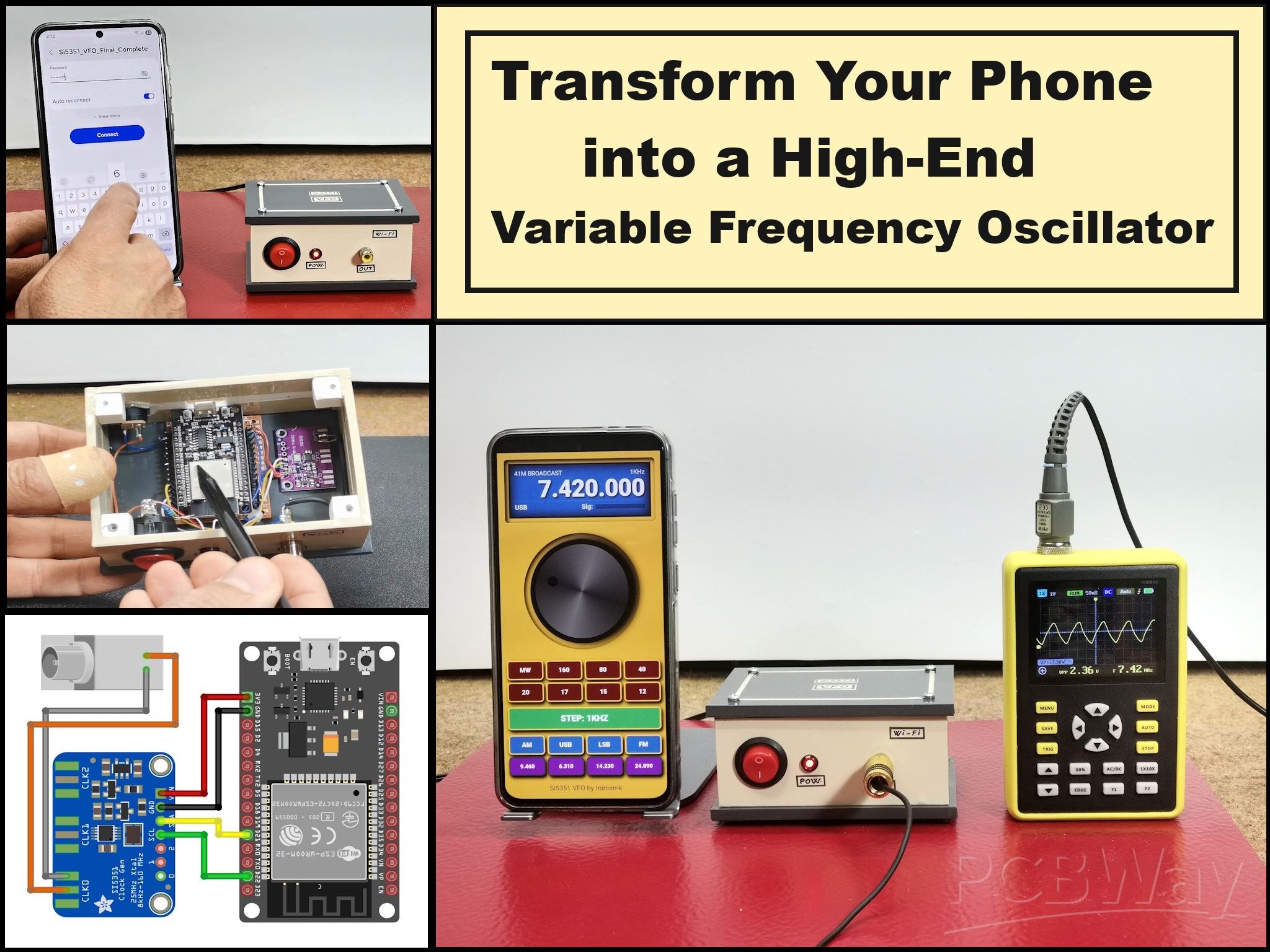
However, its manufacture is much simpler and cheaper, because we do not use a display, or even a rotary encoder, which is a basic part of every VFO. All this is achieved thanks to the use of a smartphone in the function of controlling and displaying the generated frequencies. Now the device is extremely simple and consists of only two inexpensive components: an ESP32 microcontroller board, and a Si5351 clock generator modulе which is connected to the ESP32 with only 4 wires.
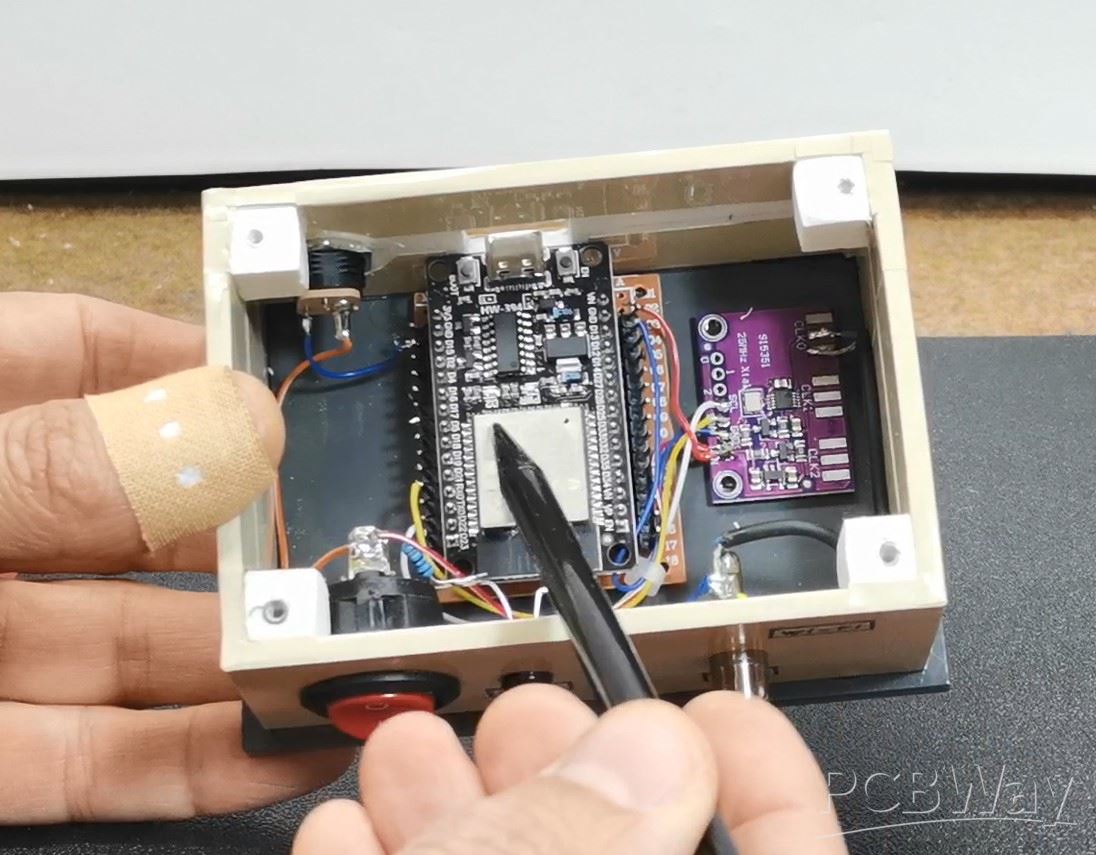
The frequency is generated directly on the CLK0 output of the signal generator. Using a smartphone as a user interface (UI) instead of a classic LCD is a great way to get a graphically rich display without spending money on expensive touchscreens. The ESP32 is perfect for this because it has built-in Wi-Fi and enough muscle to simultaneously run a web server and communicate with the Si5351 via the I2C protocol.
This project is sponsored by PCBWay . From concept to production, PCBWay provide cutting-edge electronic design solutions for global innovators, Including hardware design, software development, mechanical design, product testing and certification. PCBWay engineering team consists of experienced engineers in electronics, embedded systems, and product development. They successfully delivered hundreds of projects across industries such as medical devices, industrial automation, consumer electronics, smart home, and IoT.
At first, the challenge was to achieve that "smooth" rotation effect without lag, so I started with the ESPAsyncWebServer library, which allows control via WebSocket, but several bugs appeared, so I continued with the built-in WiFi.h and WebServer.h libraries, which are quite sufficient for optimal control and operation of the device. Then I gradually created a visually beautiful graphical interface with an LCD display, a central rotary knob, and more functional small buttons with different functions.
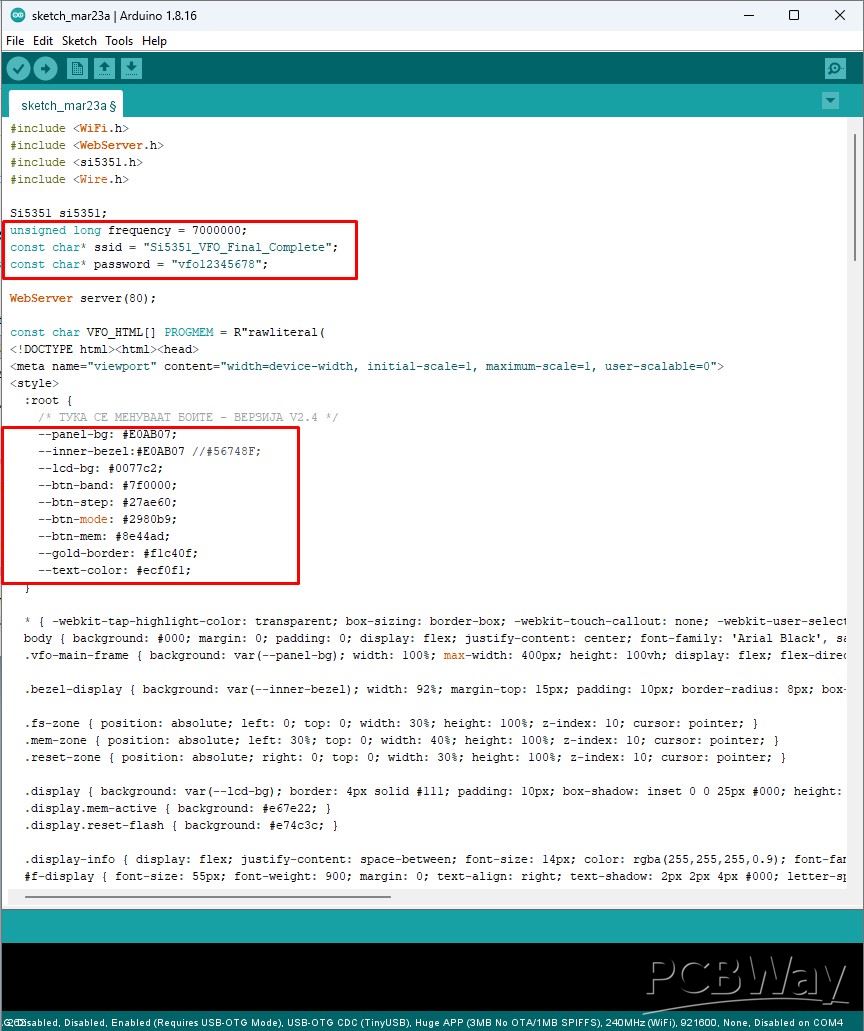
The code is designed in a way that you can easily change multiple parameters, from bandwidth and frequencies, to changing all the colors in one place.
First, let me explain to you the method of starting and all the functions of this hybrid VFO. We turn on the hardware part and on the Smartphone we search for a Wi-Fi network (access point) with the name SI5351_VFO_Final_Complete.
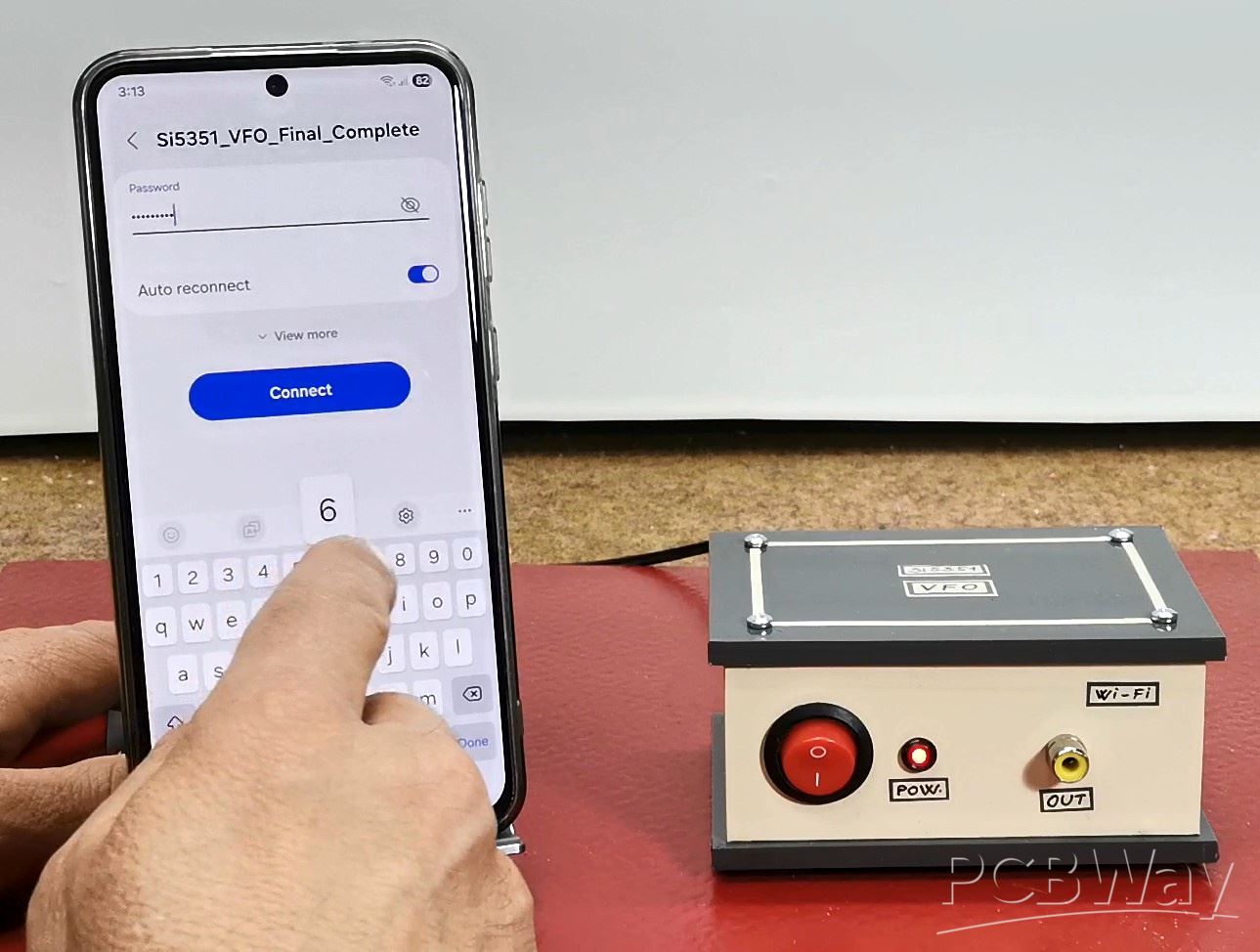
Then we connect to that network with the password "vfo12345678". Now in the Web Browser we enter the address 192.168.4.1. By pressing enter, a mask of a professionally made instrument appears on the display. This image actually represents a web interface through which we will control the hardware. A great advantage is the fact that we do not install any application on the smartphone at all, but only open a web page.
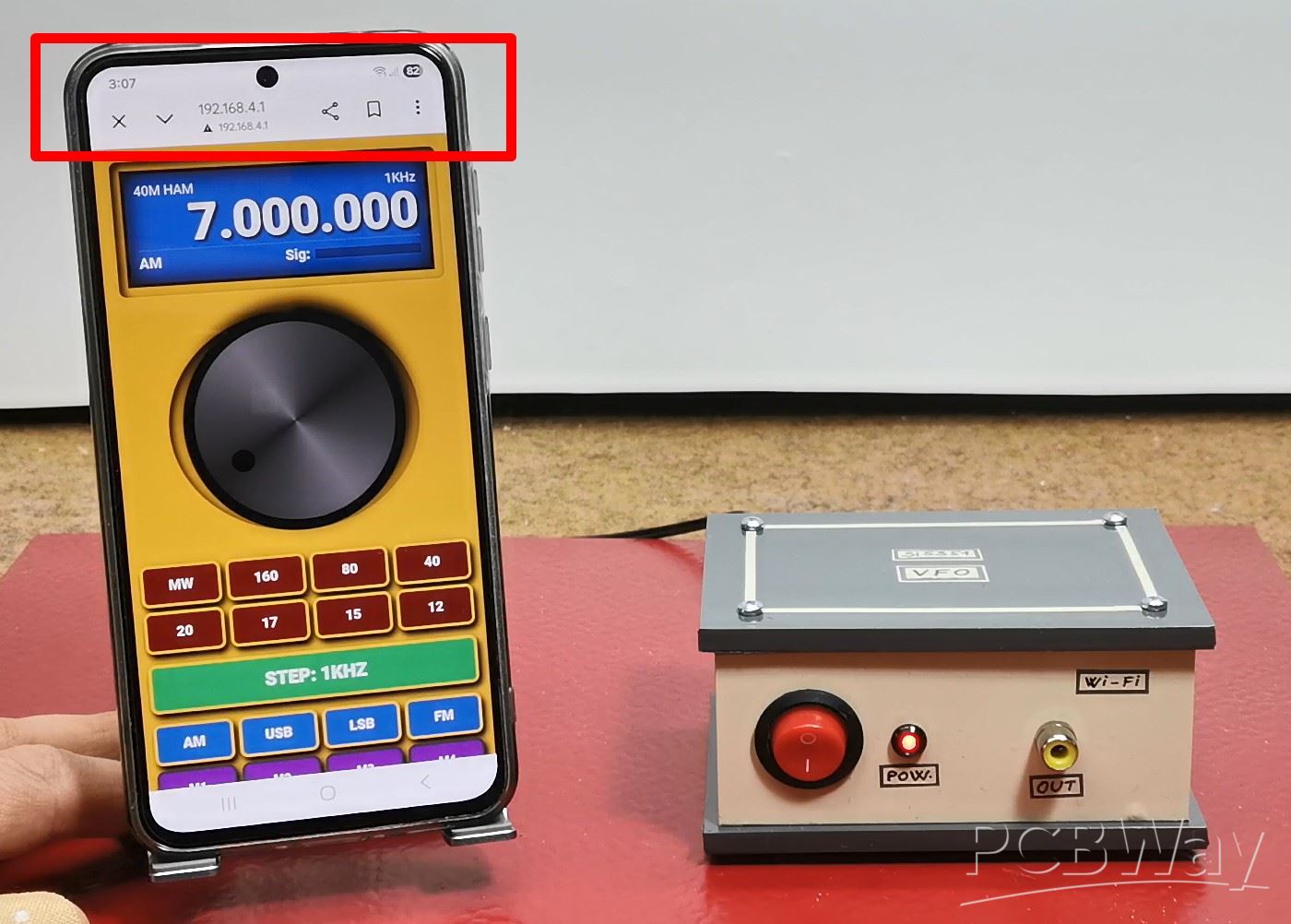
Thus, there is no danger of introducing malicious software, and the compatibility with different smartphone models is unlimited, taking into account that the only requirement is to activate a web browser. By pressing the bottom of the display, fullscreen mode is activated and now the instrument is ready for operation. The LCD display shows the starting frequency, which is defined in the code. The upper left part of the screen shows the modulation type and the Band, and the lower left shows the step with which the frequency changes. At the very right bottom is the Signal Bar, which in a real receiver or transmitter would display the signal strength. This Bar is connected to GPIO34 and by applying a voltage signal to this input, the display is activated. Below the display is a large round knob centrally placed with which we set the desired frequency.As I said earlier, the knob moves very smoothly and the data is transmitted almost instantly to the device. In reality, during operation, there is no noticeable delay at all. Several small functional buttons follow,.
- First, the Amateur band areas are defined,
- below them is the STEP button, which is very often used and therefore larger
- below STEP are the MODE buttons AM, SSB, USB, FM
- and at the bottom are the memory buttons.
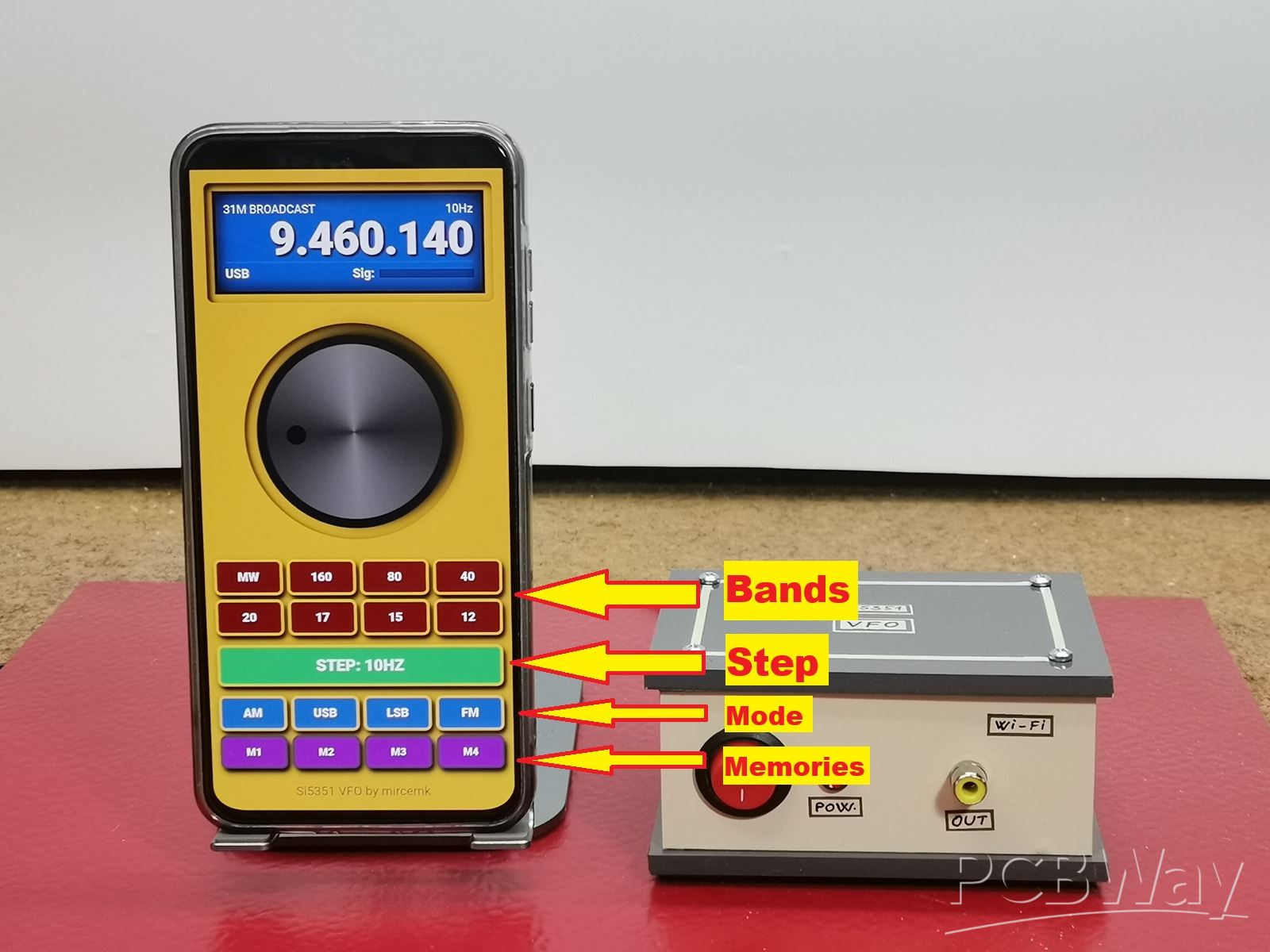
If we want to memorize a frequency, we first press the number at the top of the display, during which the memory buttons start flashing and by pressing one of them, the frequency is memorized. In case we want to delete all previously memorized frequencies, press the button in the middle of the LCD display.
Now let's see how this device works in real conditions.
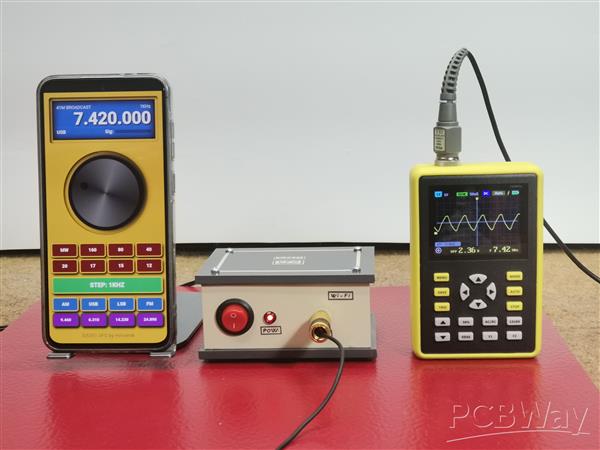
To do this, we will connect a small oscilloscope to the output of the hardware part, on which we will observe the change in frequency and signal shape.
And finally a short conclusion. This project proves you don't need expensive touchscreens to have a beautiful, professional-grade interface for your radio projects. By combining an ESP32 and an Si5351 with your smartphone, you can build a highly functional, retro-styled VFO that fits right in your pocket.
// by mircemk May, 2026

#include <WiFi.h>
#include <WebServer.h>
#include <si5351.h>
#include <Wire.h>

Si5351 si5351;
unsigned long frequency = 7000000;
const char* ssid = "Si5351_VFO_Final_Complete";
const char* password = "vfo12345678";

WebServer server(80);

const char VFO_HTML[] PROGMEM = R"rawliteral(
<!DOCTYPE html><html><head>
<meta name="viewport" content="width=device-width, initial-scale=1, maximum-scale=1, user-scalable=0">
<style>
  :root {
    /* ТУКА СЕ МЕНУВААТ БОИТЕ - ВЕРЗИЈА V2.4 */
    --panel-bg: #E0AB07;
    --inner-bezel:#E0AB07 //#56748F;
    --lcd-bg: #0077c2;
    --btn-band: #7f0000;
    --btn-step: #27ae60;
    --btn-mode: #2980b9;
    --btn-mem: #8e44ad;
    --gold-border: #f1c40f;
    --text-color: #ecf0f1;
  }

  * { -webkit-tap-highlight-color: transparent; box-sizing: border-box; -webkit-touch-callout: none; -webkit-user-select: none; user-select: none; }
  body { background: #000; margin: 0; padding: 0; display: flex; justify-content: center; font-family: 'Arial Black', sans-serif; color: var(--text-color); overflow: hidden; }
  .vfo-main-frame { background: var(--panel-bg); width: 100%; max-width: 400px; height: 100vh; display: flex; flex-direction: column; align-items: center; border-left: 2px solid #444; border-right: 2px solid #111; }

  .bezel-display { background: var(--inner-bezel); width: 92%; margin-top: 15px; padding: 10px; border-radius: 8px; box-shadow: inset 4px 4px 10px #000, 2px 2px 5px rgba(255,255,255,0.1); position: relative; }

  .fs-zone { position: absolute; left: 0; top: 0; width: 30%; height: 100%; z-index: 10; cursor: pointer; }
  .mem-zone { position: absolute; left: 30%; top: 0; width: 40%; height: 100%; z-index: 10; cursor: pointer; }
  .reset-zone { position: absolute; right: 0; top: 0; width: 30%; height: 100%; z-index: 10; cursor: pointer; }

  .display { background: var(--lcd-bg); border: 4px solid #111; padding: 10px; box-shadow: inset 0 0 25px #000; height: 125px; display: flex; flex-direction: column; justify-content: space-between; position: relative; transition: background 0.2s; }
  .display.mem-active { background: #e67e22; }
  .display.reset-flash { background: #e74c3c; }

  .display-info { display: flex; justify-content: space-between; font-size: 14px; color: rgba(255,255,255,0.9); font-family: Arial, sans-serif; }
  #f-display { font-size: 55px; font-weight: 900; margin: 0; text-align: right; text-shadow: 2px 2px 4px #000; letter-spacing: -1px; line-height: 1; }

  .display-footer { display: flex; align-items: center; border-top: 1px solid rgba(255,255,255,0.2); padding-top: 5px; margin-bottom: 4px; }
  #mode-label, .sig-text { font-size: 15px; font-weight: bold; }

  .s-meter-container { display: flex; align-items: center; gap: 6px; flex-grow: 1; justify-content: flex-end; margin-left: 25px; }
  .s-grid { display: flex; gap: 1px; height: 10px; width: 115px; background: rgba(0,0,0,0.3); border: 1px solid #111; }
  .s-seg { flex: 1; background: #222; }
  .s-on { background: #ffffff; box-shadow: 0 0 6px #ffffff; }

  .bezel-knob { background: var(--inner-bezel); width: 270px; height: 270px; margin: 25px 0; border-radius: 50%; box-shadow: inset 3px 3px 10px #000, 2px 2px 5px rgba(255,255,255,0.05); display: flex; justify-content: center; align-items: center; }
  #knob { width: 240px; height: 240px; background: conic-gradient(from 0deg, #333, #777 25%, #333 50%, #777 75%, #333); border-radius: 50%; border: 12px solid #1a1a1a; position: relative; will-change: transform; cursor: pointer; box-shadow: 5px 10px 20px #000; }
  #knob::after { content: ''; position: absolute; top: 25px; left: 50%; transform: translateX(-50%); width: 24px; height: 24px; background: #111; border-radius: 50%; box-shadow: inset 2px 2px 5px #000; }

  .controls-container { width: 94%; display: flex; flex-direction: column; }
  .grid { display: grid; gap: 6px; width: 100%; grid-template-columns: repeat(4, 1fr); }
  .group-margin { margin-bottom: 12px; }

  .btn { border: 3px solid var(--gold-border); border-radius: 8px; color: #fff; font-weight: 900; font-size: 15px; padding: 11px 0; text-align: center; cursor: pointer; box-shadow: 3px 5px 8px #000; text-transform: uppercase; transition: transform 0.05s; }
  .btn:active { transform: translateY(2px); box-shadow: 1px 2px 4px #000; }

  .b-band { background: var(--btn-band); }
  .b-step { background: var(--btn-step); font-size: 20px; padding: 12px; grid-column: span 4; }
  .b-mode { background: var(--btn-mode); }
  .b-mem { background: var(--btn-mem); border-color: #555; font-size: 13px; }

  .signature { color: #555; font-size: 16px; margin-top: 20px; text-align: center; width: 100%; padding-bottom: 15px; font-weight: normal; }
</style>
</head><body>
  <div class="vfo-main-frame">
    <div class="bezel-display">
      <div class="fs-zone" onclick="toggleFS()"></div>
      <div class="mem-zone" onclick="startMem()"></div>
      <div class="reset-zone" onclick="clearAllMem()"></div>

      <div class="display" id="main-display">
        <div class="display-info"><span id="band-label">40M HAM</span><span id="step-label">100Hz</span></div>
        <h1 id="f-display">07.000.000</h1>
        <div class="display-footer">
          <span id="mode-label">USB</span>
          <div class="s-meter-container">
            <span class="sig-text">Sig:</span>
            <div class="s-grid" id="s-grid"></div>
          </div>
        </div>
      </div>
    </div>
    <div class="bezel-knob"><div id="knob"></div></div>
    <div class="controls-container">
      <div class="grid group-margin">
        <div class="btn b-band" onclick="setBand(531000, 'MW')">MW</div>
        <div class="btn b-band" onclick="setBand(1810000, '160M')">160</div>
        <div class="btn b-band" onclick="setBand(3500000, '80M')">80</div>
        <div class="btn b-band" onclick="setBand(7000000, '40M')">40</div>
        <div class="btn b-band" onclick="setBand(14000000, '20M')">20</div>
        <div class="btn b-band" onclick="setBand(18068000, '17M')">17</div>
        <div class="btn b-band" onclick="setBand(21000000, '15M')">15</div>
        <div class="btn b-band" onclick="setBand(24890000, '12M')">12</div>
      </div>
      <div class="grid group-margin">
        <div class="btn b-step" id="step-btn" onclick="nextStep()">STEP: 100Hz</div>
      </div>
      <div class="grid">
        <div class="btn b-mode" onclick="setMode('AM')">AM</div>
        <div class="btn b-mode" onclick="setMode('USB')">USB</div>
        <div class="btn b-mode" onclick="setMode('LSB')">LSB</div>
        <div class="btn b-mode" onclick="setMode('FM')">FM</div>
        <div class="btn b-mem" id="m1" onclick="handleMem(1)">M1</div>
        <div class="btn b-mem" id="m2" onclick="handleMem(2)">M2</div>
        <div class="btn b-mem" id="m3" onclick="handleMem(3)">M3</div>
        <div class="btn b-mem" id="m4" onclick="handleMem(4)">M4</div>
      </div>
    </div>
    <div class="signature">Si5351 VFO by mircemk</div>
  </div>

  <script>
    var freq = 7000000;
    var curMode = "USB"; var lastAngle = 0; var curRot = 0; var isDrag = false; var lastSent = 0;
    var steps = [10, 100, 1000, 5000, 10000, 100000];
    var stepLabels = ["10Hz", "100Hz", "1KHz", "5KHz", "10KHz", "100KHz"];
    var stepIdx = 1;
    var isMemMode = false;

    function loadSavedMem() {
      for(let i=1; i<=4; i++){
        let saved = localStorage.getItem('vfo_m'+i);
        if(saved) document.getElementById('m'+i).innerText = (saved/1000000).toFixed(3);
        else document.getElementById('m'+i).innerText = "M"+i;
      }
    }

    function clearAllMem() {
      for(let i=1; i<=4; i++) localStorage.removeItem('vfo_m'+i);
      loadSavedMem();
      let d = document.getElementById('main-display');
      d.classList.add('reset-flash');
      setTimeout(() => d.classList.remove('reset-flash'), 300);
    }

    function startMem() {
      isMemMode = true;
      document.getElementById('main-display').classList.add('mem-active');
      document.querySelectorAll('.b-mem').forEach(b => b.classList.add('save-ready'));
    }

    function handleMem(id) {
      if(isMemMode) {
        localStorage.setItem('vfo_m'+id, freq);
        document.getElementById('m'+id).innerText = (freq/1000000).toFixed(3);
        isMemMode = false;
        document.getElementById('main-display').classList.remove('mem-active');
        document.querySelectorAll('.b-mem').forEach(b => b.classList.remove('save-ready'));
      } else {
        let saved = localStorage.getItem('vfo_m'+id);
        if(saved) { freq = parseInt(saved); updateUI(); sendFreq(); }
      }
    }

    function toggleFS() {
      var d = document.documentElement;
      if(!document.fullscreenElement) d.requestFullscreen().catch(e=>{});
      else document.exitFullscreen();
    }

    function updateBandLabel() {
      let b = document.getElementById('band-label');
      // ПРЕЗЕМЕНИ ОПСЕЗИ ОД V1.9
      if (freq >= 1810000 && freq <= 2000000) b.innerText = "160M HAM";
      else if (freq >= 3500000 && freq <= 3800000) b.innerText = "80M HAM";
      else if (freq >= 7000000 && freq <= 7200000) b.innerText = "40M HAM";
      else if (freq >= 14000000 && freq <= 14350000) b.innerText = "20M HAM";
      else if (freq >= 18068000 && freq <= 18168000) b.innerText = "17M HAM";
      else if (freq >= 21000000 && freq <= 21450000) b.innerText = "15M HAM";
      else if (freq >= 24890000 && freq <= 24990000) b.innerText = "12M HAM";
      else if (freq >= 28000000 && freq <= 29700000) b.innerText = "10M HAM";
      else if (freq >= 531000 && freq <= 1602000) b.innerText = "MW BROADCAST";
      else if (freq >= 5900000 && freq <= 6200000) b.innerText = "49M BROADCAST";
      else if (freq >= 7200001 && freq <= 7450000) b.innerText = "41M BROADCAST";
      else if (freq >= 9400000 && freq <= 9900000) b.innerText = "31M BROADCAST";
      else if (freq >= 11600000 && freq <= 12100000) b.innerText = "25M BROADCAST";
      else if (freq >= 15100000 && freq <= 15830000) b.innerText = "19M BROADCAST";
      else b.innerText = "GEN";
    }

    function updateUI() {
      document.getElementById('f-display').innerText = Number(freq).toLocaleString('de-DE').replace(/,/g, '.');
      document.getElementById('mode-label').innerText = curMode;
      updateBandLabel();
    }

    function setBand(f, n) { freq = f; updateUI(); sendFreq(); }
    function setMode(m) { curMode = m; updateUI(); }
    function nextStep() {
      stepIdx = (stepIdx + 1) % steps.length;
      document.getElementById('step-btn').innerText = "STEP: " + stepLabels[stepIdx];
      document.getElementById('step-label').innerText = stepLabels[stepIdx];
    }
    function sendFreq() {
      let now = Date.now();
      if (now - lastSent > 50) { fetch('/set?f=' + freq); lastSent = now; }
    }
    function getAngle(x, y) {
      let r = document.getElementById('knob').getBoundingClientRect();
      return Math.atan2(y - (r.top + r.height/2), x - (r.left + r.width/2)) * 180 / Math.PI;
    }
    function move(e) {
      if (!isDrag) return;
      let ev = e.touches ? e.touches[0] : e;
      let ang = getAngle(ev.clientX, ev.clientY);
      let d = ang - lastAngle;
      if (d > 180) d -= 360; if (d < -180) d += 360;
      curRot += d;
      freq += Math.round(d) * (steps[stepIdx] / 10);
      if (freq < 100000) freq = 100000;
      updateUI();
      document.getElementById('knob').style.transform = 'rotate(' + curRot + 'deg)';
      sendFreq();
      lastAngle = ang;
    }
    let knob = document.getElementById('knob');
    knob.addEventListener('mousedown', function(e) { isDrag = true; lastAngle = getAngle(e.clientX, e.clientY); });
    knob.addEventListener('touchstart', function(e) { isDrag = true; lastAngle = getAngle(e.touches[0].clientX, e.touches[0].clientY); e.preventDefault(); }, {passive: false});
    window.addEventListener('mouseup', () => isDrag = false);
    window.addEventListener('touchend', () => isDrag = false);
    window.addEventListener('mousemove', move);
    window.addEventListener('touchmove', move, {passive: false});

    setInterval(() => {
      fetch('/getS').then(r => r.text()).then(v => {
        let segs = document.querySelectorAll('.s-seg');
        let act = Math.floor((v/100)*20);
        segs.forEach((s,i) => { if(i<act) s.classList.add('s-on'); else s.classList.remove('s-on'); });
      });
    }, 250);

    loadSavedMem();
    updateUI();
  </script>
</body></html>
)rawliteral";

void updateFrequency(unsigned long f) { si5351.set_freq(f * 100ULL, SI5351_CLK0); }

void setup() {
  Serial.begin(115200); Wire.begin(21, 22);
  pinMode(32, INPUT);
  analogReadResolution(12);
  analogSetAttenuation(ADC_6db);
  WiFi.mode(WIFI_AP); WiFi.softAP(ssid, password);
  si5351.init(SI5351_CRYSTAL_LOAD_8PF, 0, 0);
  updateFrequency(frequency);
  server.on("/", []() { server.send(200, "text/html", VFO_HTML); });
  server.on("/set", []() { if (server.hasArg("f")) { frequency = server.arg("f").toInt(); si5351.set_freq(frequency * 100ULL, SI5351_CLK0); server.send(200, "text/plain", "OK"); } });
  server.on("/getS", []() { int val = analogRead(32); int percent = map(val, 0, 1200, 0, 100); if(percent > 100) percent = 100; server.send(200, "text/plain", String(percent)); });
  server.begin();
}
void loop() { server.handleClient(); }
The Ultimate Smartphone VFO ESP32 & Si5351 Wireless Control









Raspberry Pi 5 7 Inch Touch Screen IPS 1024x600 HD LCD HDMI-compatible Display for RPI 4B 3B+ OPI 5 AIDA64 PC Secondary Screen(Without Speaker)
BUY NOW


- Comments(3)
- Likes(2)
More by Mirko Pavleski
-
 Arduino 3D Printed self Balancing Cube
Self-balancing devices are electronic devices that use sensors and motors to keep themselves balanc...
Arduino 3D Printed self Balancing Cube
Self-balancing devices are electronic devices that use sensors and motors to keep themselves balanc...
-
 Building a Mini Fostex Horn Speaker with a 2-Inch Full-Range Driver
A back-loaded horn speaker is a loudspeaker design that channels the rear sound wave of a driver th...
Building a Mini Fostex Horn Speaker with a 2-Inch Full-Range Driver
A back-loaded horn speaker is a loudspeaker design that channels the rear sound wave of a driver th...
-
 ESP32 Moon Lamp That Shows the Real Moon Phase on Crowpanel Round Dispaly
Recently on the Hackaday portal I came across a very interesting project called Moon Display by aut...
ESP32 Moon Lamp That Shows the Real Moon Phase on Crowpanel Round Dispaly
Recently on the Hackaday portal I came across a very interesting project called Moon Display by aut...
-
 40-Year-Old DIY Power Amplifiers – Do They Still Work - 500W MOSFET & Transistor Amps
This time I want to describe my two DIY super powerful audio amplifiers that I made about 40 years ...
40-Year-Old DIY Power Amplifiers – Do They Still Work - 500W MOSFET & Transistor Amps
This time I want to describe my two DIY super powerful audio amplifiers that I made about 40 years ...
-
 Wi-Fi HaLow Explained! Long-Range Camera Test up to 300m (ESP32 + ThinkNode G4 from ELECROW)
I recently needed to install a security camera at a relatively large distance from my home, more pre...
Wi-Fi HaLow Explained! Long-Range Camera Test up to 300m (ESP32 + ThinkNode G4 from ELECROW)
I recently needed to install a security camera at a relatively large distance from my home, more pre...
-
 Simple Object Recognition with the UNIHIKER K10 – No TensorFlow, No Internet, No Cloud AI
Object recognition has become one of the most popular applications of artificial intelligence and em...
Simple Object Recognition with the UNIHIKER K10 – No TensorFlow, No Internet, No Cloud AI
Object recognition has become one of the most popular applications of artificial intelligence and em...
-
 DIY PCL82 Tube Amplifier, Single-Ended Amp with Amazing Sound
The idea for this project came from a local electronics magazine called EMITER, issue 12/13 from 20...
DIY PCL82 Tube Amplifier, Single-Ended Amp with Amazing Sound
The idea for this project came from a local electronics magazine called EMITER, issue 12/13 from 20...
-
 Simple MCP2036 SDR Radio - The Most Unusual Software Defined Radio
SDR (Software Defined Radio) is a radio communication system where many of the key electronic compo...
Simple MCP2036 SDR Radio - The Most Unusual Software Defined Radio
SDR (Software Defined Radio) is a radio communication system where many of the key electronic compo...
-
 Elecrow All-in-One Arduino Starter Kit Review - 20 Projects & 16 Modules
This time I will describe a simple and practical way to enter the world of microcontrollers, specif...
Elecrow All-in-One Arduino Starter Kit Review - 20 Projects & 16 Modules
This time I will describe a simple and practical way to enter the world of microcontrollers, specif...
-
 ESP32-C3 Color Detector with TCS34725, Real-Time RGB Detection & Web Interface
Color detection is a fundamental task in many embedded systems – from industrial sorting machines t...
ESP32-C3 Color Detector with TCS34725, Real-Time RGB Detection & Web Interface
Color detection is a fundamental task in many embedded systems – from industrial sorting machines t...
-
 DIY ESP32 Telegram Flood Protection System - Smart Home Automation
Recently I had an unpleasant experience in my home, specifically my ground floor was flooded as a r...
DIY ESP32 Telegram Flood Protection System - Smart Home Automation
Recently I had an unpleasant experience in my home, specifically my ground floor was flooded as a r...
-
 Real-Time Air Traffic Radar using ESP32 + ADS-B Data
ADS-B, which stands for Automatic Dependent Surveillance-Broadcast, is the modern standard for trac...
Real-Time Air Traffic Radar using ESP32 + ADS-B Data
ADS-B, which stands for Automatic Dependent Surveillance-Broadcast, is the modern standard for trac...
-
 DIY Green Laser Night Sky Object Finder - Find Stars & Galaxies Instantly with great accuracy
As an amateur astronomer, especially at the beginning, the most difficult part of observing the nig...
DIY Green Laser Night Sky Object Finder - Find Stars & Galaxies Instantly with great accuracy
As an amateur astronomer, especially at the beginning, the most difficult part of observing the nig...
-
 DIY Avionics Simulator with ESP32 - Artificial Horizon, Compass & Altimeter
The inspiration for this project comes from classical aircraft cockpit instruments used for navigat...
DIY Avionics Simulator with ESP32 - Artificial Horizon, Compass & Altimeter
The inspiration for this project comes from classical aircraft cockpit instruments used for navigat...
-
 DIY Miniature X-Ray Machine using a TV Vacuum Tube DY86
An X-ray machine (or radiograph) is a quick, painless medical test that produces images of the struc...
DIY Miniature X-Ray Machine using a TV Vacuum Tube DY86
An X-ray machine (or radiograph) is a quick, painless medical test that produces images of the struc...
-
 Simple SDR Receiver Using 2x NE612 - Dual Conversion, Superheterodyne (0.1–30 MHz)
SDR (Software Defined Radio) is a radio system in which most of the functions of a classic radio (f...
Simple SDR Receiver Using 2x NE612 - Dual Conversion, Superheterodyne (0.1–30 MHz)
SDR (Software Defined Radio) is a radio system in which most of the functions of a classic radio (f...
-
 DIY Vintage TV VU Meter with peak indicators
Some time ago in one of my projects I presented you a way to turn a black and white old mini TV int...
DIY Vintage TV VU Meter with peak indicators
Some time ago in one of my projects I presented you a way to turn a black and white old mini TV int...
-
 DIY Tesla Coil based Plasma Rife Machine
In several of my previous videos, I presented you with different ways to make a Rife Machine, from ...
DIY Tesla Coil based Plasma Rife Machine
In several of my previous videos, I presented you with different ways to make a Rife Machine, from ...
-
Programmable Mist Maker - XIAO / QT PY Extension
2335 2 2 -
RadioHAT - Raspberry Pi radio development platform
2022 0 4 -
-
-
-
ARPS-2 – Arduino-Compatible Robot Project Shield for Arduino UNO
4181 0 6 -
A Compact Charging Breakout Board For Waveshare ESP32-C3
4946 3 8 -
AI-driven LoRa & LLM-enabled Kiosk & Food Delivery System
5723 2 2 -





















