


|
|
2.8 inch TFT touch Dispaly ILI9341 chip |
x 1 | |
|
|
ESP32 IOT Microcontroller |
x 1 | |

|
PB-09N23P-03QMallory Sonalert Products Inc.
|
x 1 |

|
arduino IDEArduino
|
|

|
Soldering Iron Kit |
DIY Connect 4 Game on 2.8 inch TFT touch Display
Connect Four is a two-player connection rack game, in which the players choose a color and then take turns dropping colored tokens into a seven-column, six-row vertically suspended grid. The pieces fall straight down, occupying the lowest available space within the column. The objective of the game is to be the first to form a horizontal, vertical, or diagonal line of four of one's own tokens.
This time I will present you an ESP32 microcontroller version of this game, which is played on a color TFT touch display. You can find the original project on Joern Weise GitHub (https://github.com/M3taKn1ght/Blog-Repo/tree/master/4_Gewinnt), and I slightly modified the code by adding some sounds that made the game even more interesting and realistic.
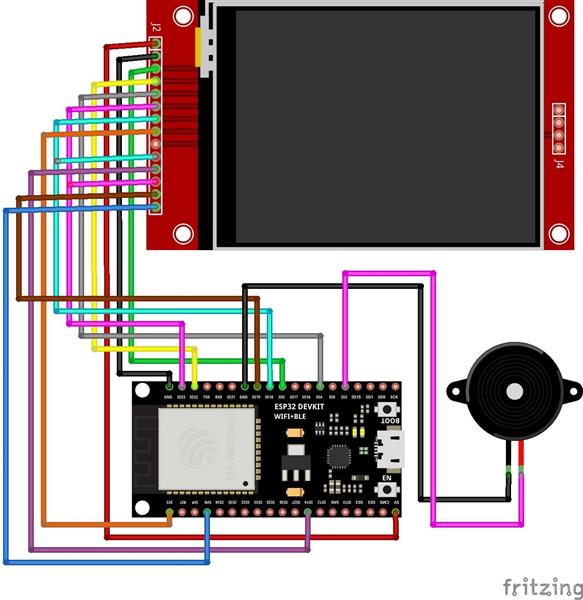
The device is extremely simple to build and contains only a three components:
- ESP32 dev kit microcontroller board
- 2.8 inch TFT touch Dispaly
- and a Buzzer

You can find many great tutorials on the internet on how to install the ESP32 board on the Arduino, as well as upload the code, so we won't explain that part now.

Note that if you use the schematic given in this project, for the device to work properly, we need to install the modified version of the tft-espi library that is provided.
Now let's see how the device works in reality. First, when turning on, the message for calibrating the touch screen appears.

We need to touch the indicated corners to calibrate. After calibration we need to press the Start bitton to start the game.
The first player plays with red tokens and the second with yellow ones.

When the game is over, the winner's color is shown on the display. Now, by pressing the Start button again starts a new game.

The device is built in a suitable box made of PVC board with a thickness of 5mm and covered with a self-adhesive label
//-----------------------------------------------------
// 4Gewinnt for Az-Touch Mod 2.4"-Display
// Autor:   Joern Weise
// License: GNU GPl 3.0
// Created: 04. Jun 2021
// Update:  07. Jun 2021
// Modified by mircemk: 07 Apr 2023
//-----------------------------------------------------
#include <SPI.h>
#include <TFT_eSPI.h>
TFT_eSPI tft = TFT_eSPI();

// Defines for playing field and dot
#define NUMROW 7        //Number of Rows (Spalten)
#define NUMCOLUMN 6     //Number of Columns (Reihen)
#define LINEWIDTH 3     //Wide of lines from playing field
#define XDOTBASIC 37    //Position 0 in x for dot
#define YDOTBASIC 210   //Position 0 in y for dot
#define BOXSHIFT 32     //Shift to next position in x and/or y for dot

// Defines for button
#define BUTTON_W 150
#define BUTTON_H 40
#define STARTBUTTON_X 90
#define STARTBUTTON_Y 180

uint16_t pixel_x, pixel_y;

byte bMatrix[NUMROW][NUMCOLUMN];
int iWinner = 0;          //"0": Draw, "1": Player1, "2": Player2
byte bPlayerMove = 0;     //"0": Nobody, "1": Player1, "2": Player2
int iMoves = 0;           //Internal counter to know when we got a draw
int iEnableButtons = 1;   //(De-)activte "Start"-Button

/*
* =================================================================
* Function:     setup
* Returns:      void
* Description:  Setup display and sensors
* =================================================================
*/
void setup()
{

  uint16_t calibrationData[5];
  pinMode(15, OUTPUT);
  digitalWrite(15, LOW);
  Serial.begin(115200);
  Serial.println("4 Gewinnt AZ-Delivery by Joern Weise");
  Serial.println("For Az-Touch Mod 2.4-Display");
  randomSeed(analogRead(34));
  tft.init();

  tft.setRotation(1);
  tft.fillScreen((0xFFFF));
  tft.setCursor(40, 20, 2);
  tft.setTextColor(TFT_RED, TFT_WHITE);
  tft.setTextSize(2);
  tft.println("Calibration of");
  tft.setCursor(40, 60, 2);
  tft.println("Display");
  tft.setTextColor(TFT_BLACK, TFT_WHITE);
  tft.setCursor(40, 100, 2);
  tft.println("Touch");
  tft.setCursor(40, 140, 2);
  tft.println("the indicated corners");
  tft.setCursor(40, 180, 2);
  tft.println("to calibrate");
  tft.calibrateTouch(calibrationData, TFT_GREEN, TFT_RED, 15);
  tft.fillScreen(TFT_BLACK);

  //Draw red frame
  drawFrame(5, TFT_RED);
  //Set first text
  tft.setCursor(70, 40);
  tft.setTextColor(TFT_BLUE);
  tft.setTextSize(3);
  tft.print("Co");
  tft.setTextColor(TFT_GREEN);
  tft.print("nn");
  tft.setTextColor(TFT_WHITE);
  tft.print("ec");
  tft.setTextColor(TFT_GOLD);
  tft.print("t 4");
  //Set second text
  tft.setCursor(110, 90);
  tft.setTextColor(TFT_RED);
  tft.setTextSize(2);
  tft.print("mircemk");
  //Set last line
  tft.setTextColor(TFT_WHITE);
  tft.setCursor(60, 130);
  tft.print("(c)Joern Weise");
  drawStartBtn();
  iEnableButtons = 1;

}

/*
* =================================================================
* Function:     loop
* Returns:      void
* Description:  Main loop to let program work
* =================================================================
*/
void loop()
{
  static uint16_t color;
  if (tft.getTouch(&pixel_x, &pixel_y) && iEnableButtons)
  {
    if ((pixel_x > STARTBUTTON_X) && (pixel_x < (STARTBUTTON_X + BUTTON_W)))
    {
      if ((pixel_y > STARTBUTTON_Y) && (pixel_y <= (STARTBUTTON_Y + BUTTON_H)))
      {
        Serial.println("---- Start new game ----");
        tone(2,400, 500);
        noTone(2);
        tone(2, 500, 500);
        noTone(2);
        tone(2, 600, 500);
        noTone(2);
        ResetGame();
        playGame();
      }
    }
  }
}

/*
* =================================================================
* Function:     playGame
* Returns:      void
* Description:  Start a loop to play game
* =================================================================
*/
void playGame()
{
  bool bWinner = false;
  do
  {
    if(!tft.getTouch(&pixel_x, &pixel_y))
    {
      if(bPlayerMove) //Turn player one
      {
        movePlayer();

      }
      else  //Turn player two

      {
        movePlayer();

      }
      bWinner = checkForWinner();
      iWinner = bPlayerMove;
      if(!bWinner)
      {
        bPlayerMove++;
        if(bPlayerMove >= 3)
        bPlayerMove = 1;
        drawNextPlayer();
        iMoves++;
        Serial.println("Number of moves: " + String(iMoves));
      }
    }
  }while(iMoves < (int(NUMROW) * int(NUMCOLUMN)) && !bWinner);
  drawGameEndScreen();
}

/*
* =================================================================
* Function:     movePlayer
* Returns:      void
* Description:  Get input from player and check if move is possible
* =================================================================
*/
void movePlayer()
{
  bool bValidMove = false;
  do
  {
    if(tft.getTouch(&pixel_x, &pixel_y))
    {
      Serial.println("X: " + String(pixel_x) + " Y: "  + String(pixel_y));
      int iRow = (int(pixel_x -int(XDOTBASIC /2)) + 1) / BOXSHIFT;
      Serial.println("Errechnete Spalte: " + String(iRow));
      if(iRow > 6)
        bValidMove = false;
      else
        bValidMove = checkMove(iRow);
      Serial.println("Valid move: " + String(bValidMove));
      if(bValidMove)
        showMatrix();
      tone(2, 1000, 200);
    }
  }while(!bValidMove);
}

/*
* =================================================================
* Function:     checkMove
* INPUT iRow:   Calculated row for matrix to check
* Returns:      true for possible position else false
* Description:  Get input from player and check if move is possible
* =================================================================
*/
bool checkMove(int iRow)
{
  bool bValidation = false;
  int iColumnCount = 0;
  do
  {
    if(bMatrix[iRow][iColumnCount] == 0)
    {
      bMatrix[iRow][iColumnCount] = bPlayerMove;
      drawPlayerMove(iRow, iColumnCount);
      bValidation = true;
    }
    iColumnCount++;
  }while(!bValidation && iColumnCount < int(NUMCOLUMN));
  return bValidation;
}

/*
* =================================================================
* Function:       drawPlayerMove
* INPUT iRow:     Row for player dot
* INPUT iColumn:  Column for player dot
* Returns:        void
* Description:    Draw new player dot
* =================================================================
*/
void drawPlayerMove(int iRow, int iColumn)
{
  if(bPlayerMove == 1)
    tft.fillCircle(int(XDOTBASIC)+(iRow*int(BOXSHIFT)),int (YDOTBASIC)-(iColumn*int(BOXSHIFT)),14,TFT_RED);
  else
    tft.fillCircle(int(XDOTBASIC)+(iRow*int(BOXSHIFT)),int (YDOTBASIC)-(iColumn*int(BOXSHIFT)),14,TFT_YELLOW);
}

/*
* =================================================================
* Function:     resetMatrix
* Returns:      void
* Description:  Reset the matrix
* =================================================================
*/
void resetMatrix()
{
  Serial.println("----- Reset Matrix -----");
  for(int iColumn = 0; iColumn < int(NUMCOLUMN); iColumn++)
    for(int iRow = 0; iRow < int(NUMROW); iRow++)
      bMatrix[iRow][iColumn] = 0;
  showMatrix();
  Serial.println("------------------------");
}

/*
* =================================================================
* Function:     showMatrix
* Returns:      void
* Description:  Show the matrix
* =================================================================
*/
void showMatrix()
{
  for(int iColumn = int(NUMCOLUMN)-1; iColumn != -1; iColumn--)
  {
    Serial.print(String(iColumn) + ": ");
    for(int iRow = 0; iRow < int(NUMROW); iRow++)
      Serial.print(String(bMatrix[iRow][iColumn]) + " ");
    Serial.println("");
  }
}

/*
* =================================================================
* Function:     drawFrame
* Returns:      void
* INPUT iSize:  Size of the frame
* INPUT color:  Color of the frame
* Description:  Draw frame with given size and color
* =================================================================
*/
void drawFrame(int iSize, uint16_t color)
{
  int iCnt;
  for (iCnt = 0; iCnt <= iSize; iCnt++)
    tft.drawRect(0 + iCnt, 0 + iCnt, 320 - (iCnt * 2), 240 - (iCnt * 2), color);
}


/*
* =================================================================
* Function:     drawVerticalLine
* Returns:      void
* INPUT x:      Posititon in x-coordinate
* INPUT color:  Color of the frame
* Description:  Draw vertical line with given color
* =================================================================
*/
void drawVerticalLine(int x, uint16_t color)
{
  int iCnt = 0;
  for(iCnt = 0; iCnt  < int(LINEWIDTH); iCnt ++)
    tft.drawLine(x+iCnt, 34, x+iCnt, 225, color);
}

/*
* =================================================================
* Function:     drawHorizontalLine
* Returns:      void
* INPUT x:      Posititon in y-coordinate
* INPUT color:  Color of the frame
* Description:  Draw horizontal line with given color
* =================================================================
*/
void drawHorizontalLine(int y, uint16_t color)
{
  int iCnt = 0;
  for(iCnt = 0; iCnt < int(LINEWIDTH); iCnt++)
    tft.drawLine(20, y+iCnt, 246, y+iCnt, color);
}

/*
* =================================================================
* Function:     drawStartBtn
* Returns:      void
* Description:  Draw start button
* =================================================================
*/
void drawStartBtn()
{
  tft.fillRect(STARTBUTTON_X, STARTBUTTON_Y, BUTTON_W, BUTTON_H, TFT_RED);
  tft.setTextColor(TFT_YELLOW);
  tft.setTextSize(2);
  tft.setTextDatum(MC_DATUM);
  tft.drawString("Start", STARTBUTTON_X + (BUTTON_W / 2) + 1, STARTBUTTON_Y + (BUTTON_H / 2));
}

/*
* =================================================================
* Function:     drawStartBtn
* Returns:      void
* Description:  Draw start button
* =================================================================
*/
void drawNextPlayer()
{
  if(bPlayerMove == 1)
    tft.fillCircle(320-35,210,20,TFT_RED);
  else
   tft.fillCircle(320-35,210,20,TFT_YELLOW);
}

/*
* =================================================================
* Function:     checkForWinner
* Returns:      true if there is a winner else false
* Description:  Check if there is a winner
* =================================================================
*/
bool checkForWinner()
{
  bool bWinner = false;
  int iNumItems = 1;
  //First check verical
  int iRow = 0;
  int iColumn = 0;
  //Check a vertical win from current player
  do
  {
    iColumn = 0;
    while((bMatrix[iRow][0] != 0) && iColumn < int(NUMCOLUMN) && !bWinner)
    {
      if(bMatrix[iRow][iColumn] != 0)
        bWinner = checkVertical(iRow, iColumn);
      iColumn++;
    }
    iRow++;
  }while(iRow < int(NUMROW) && !bWinner);

  //Check a horizontal win from current player
  //This loops only starts, if there is no winner found yet
  iColumn = 0;
  while(iColumn < int(NUMCOLUMN) && !bWinner)
  {
    iRow = 0;
    while(iRow < int(NUMROW) && !bWinner)
    {
      if(bMatrix[iRow][iColumn] != 0)
        bWinner = checkHorizontal(iRow, iColumn);
      iRow++;
    }
    iColumn++;
  }

  //Check a diagonal win from current player
  //Goes one up and one to the right
  //This loops only starts, if there is no winner found yet
  iColumn = 0;
  while(iColumn < int(NUMCOLUMN) && !bWinner)
  {
    iRow = 0;
    while(iRow < int(NUMROW) && !bWinner)
    {
      if(bMatrix[iRow][iColumn] != 0)
        bWinner = checkDiagonal(iRow, iColumn, true);
      iRow++;
    }
    iColumn++;
  }

  //Check a diagonal win from current player
  //Goes one up and one to the left
  //This loops only starts, if there is no winner found yet
  iColumn = 0;
  while(iColumn < int(NUMCOLUMN) && !bWinner)
  {
    iRow = 0;
    while(iRow < int(NUMROW) && !bWinner)
    {
      if(bMatrix[iRow][iColumn] != 0)
        bWinner = checkDiagonal(iRow, iColumn, false);
      iRow++;
    }
    iColumn++;
  }

  return bWinner;
}

/*
* =================================================================
* Function:       checkVertical
* Returns:        true if there is a winner else false
* INPUT iRow:     Current row
* INPUT iColumn:  Current column
* Description:    Start of checking a vertical win
* =================================================================
*/
bool checkVertical(int iRow, int iColumn)
{
  if(bMatrix[iRow][iColumn] != bPlayerMove)
    return false;
  else
  {
    int iSum = 1;
    return checkVertical(iRow, iColumn+1, iSum);
  }
}

/*
* =================================================================
* Function:       checkVertical
* Returns:        true if there is a winner else false
* INPUT iRow:     Current row
* INPUT iColumn:  Current column
* REF iSum:       Sum of current equal positions
* Description:    Recursive function to check vertical win
* =================================================================
*/
bool checkVertical(int iRow, int iColumn, int &iSum)
{
  if(bMatrix[iRow][iColumn] != bPlayerMove || bMatrix[iRow][iColumn] == 0)
    return false;
  else
  {
    iSum++;
    if(iSum == 4)
      return true;
    else
      return checkVertical(iRow, iColumn+1, iSum);
  }
}

/*
* =================================================================
* Function:       checkHorizontal
* Returns:        true if there is a winner else false
* INPUT iRow:     Current row
* INPUT iColumn:  Current column
* Description:    Start of checking a horizontal win
* =================================================================
*/
bool checkHorizontal(int iRow, int iColumn)
{
  if(bMatrix[iRow][iColumn] != bPlayerMove)
    return false;
  else
  {
    int iSum = 1;
    return checkHorizontal(iRow+1, iColumn, iSum);
  }
}

/*
* =================================================================
* Function:       checkHorizontal
* Returns:        true if there is a winner else false
* INPUT iRow:     Current row
* INPUT iColumn:  Current column
* REF iSum:       Sum of current equal positions
* Description:    Recursive function to check horizonal win
* =================================================================
*/
bool checkHorizontal(int iRow, int iColumn, int &iSum)
{
  if(bMatrix[iRow][iColumn] != bPlayerMove || bMatrix[iRow][iColumn] == 0)
    return false;
  else
  {
    iSum++;
    if(iSum == 4)
      return true;
    else
      return checkHorizontal(iRow+1, iColumn, iSum);
  }
}

/*
* =================================================================
* Function:       checkDiagonal
* Returns:        true if there is a winner else false
* INPUT iRow:     Current row
* INPUT iColumn:  Current column
* INPUT bRight:   If true check diagonal right, else left
* Description:    Start of checking a horizontal win
* =================================================================
*/
bool checkDiagonal(int iRow, int iColumn, bool bRight)
{
  if(bMatrix[iRow][iColumn] != bPlayerMove)
    return false;
  else
  {
    int iSum = 1;
    if(bRight)
      return checkDiagonal(iRow+1, iColumn+1, bRight, iSum);
    else
      return checkDiagonal(iRow-1, iColumn+1, bRight, iSum);
  }
}

/*
* =================================================================
* Function:       checkHorizontal
* Returns:        true if there is a winner else false
* INPUT iRow:     Current row
* INPUT iColumn:  Current column
* REF iSum:       Sum of current equal positions
* Description:    Recursive function to check horizonal win
* =================================================================
*/
bool checkDiagonal(int iRow, int iColumn, bool bRight,int &iSum)
{
  if(bMatrix[iRow][iColumn] != bPlayerMove || bMatrix[iRow][iColumn] == 0 || iRow >= int(NUMROW) || iColumn >= int(NUMCOLUMN) || iRow < 0 || iColumn < 0)
    return false;
  else
  {
    iSum++;
    if(iSum == 4)
      return true;
    else
    {
      if(bRight)
        return checkDiagonal(iRow+1, iColumn+1, bRight, iSum);
      else
        return checkDiagonal(iRow-1, iColumn+1, bRight, iSum);
    }
  }
}

/*
* =================================================================
* Function:     ResetGame
* Returns:      void
* Description:  Generate play-screen and reset all vars
* Hint:         Check out TFT_eSPI.h Section 6 for more colors
* =================================================================
*/
void ResetGame()
{
  resetMatrix();
  iEnableButtons = 0;

  int iCnt = 0;
  bPlayerMove = 1;
  iWinner = 0; //Nobody wins so far :)
  iMoves = 0;
  tft.fillScreen(TFT_BLACK);
  //Draw frame
  drawFrame(2, TFT_RED);

  for(int iHorizont = 0; iHorizont < int(NUMROW)+1; iHorizont++)
    drawHorizontalLine(65+(iHorizont*int(BOXSHIFT)), TFT_WHITE);

  for(int iVertical = 0; iVertical < int(NUMROW)+1; iVertical++)
    drawVerticalLine(20+(iVertical*int(BOXSHIFT)), TFT_WHITE);

  //Marker at the top of the box
  for(int i=0; i < 7; i++)
  {
    tft.fillCircle(37+(i*int(BOXSHIFT)),20,9,TFT_RED);
    tft.fillCircle(37+(i*int(BOXSHIFT)),20,1,TFT_WHITE);
    tft.drawCircle(37+(i*int(BOXSHIFT)),20,4,TFT_WHITE);
    tft.drawCircle(37+(i*int(BOXSHIFT)),20,7,TFT_WHITE);
  }

  tft.setCursor(270, 20);
  tft.setTextColor(TFT_BLUE);
  tft.setTextSize(3);
  tft.print("M");
  tft.setCursor(273, 60);
  tft.setTextColor(TFT_BLUE);
  tft.setTextSize(3);
  tft.print("O");
  tft.setCursor(273, 100);
  tft.setTextColor(TFT_BLUE);
  tft.setTextSize(3);
  tft.print("V");
  tft.setCursor(273, 140);
  tft.setTextColor(TFT_BLUE);
  tft.setTextSize(3);
  tft.print("E");
  drawNextPlayer();
  //tft.fillCircle(320-35,210,20,TFT_YELLOW);
}

/*
* =================================================================
* Function:     drawGameEndScreen
* Returns:      void
* Description:  Draw end screen and show winner
* =================================================================
*/
void drawGameEndScreen()
{
  tft.fillScreen(TFT_BLACK);
  drawFrame(10,TFT_RED);
  tft.setCursor(18,30);
  tft.setTextColor(TFT_WHITE);
  tft.setTextSize(4);
  tft.print("GAME ENDS");
  if(iWinner == 0)
  {
    //Print "DRAW!" text
    tft.setCursor(100,100);
    tft.setTextColor(TFT_YELLOW);
    tft.setTextSize(4);
    tft.print("DRAW");
  }
  if(iWinner == 1)
  {
    //Print "CPU WINS!" text
    tft.setCursor(75,100);
    tft.setTextColor(TFT_RED);
    tft.setTextSize(3);
    tft.print("RED WINS");
    tone(2, 100, 2000);
  }

  if(iWinner == 2)
  {
    //Print "HUMAN WINS!" text
    tft.setCursor(25,100);
    tft.setTextColor(TFT_YELLOW);
    tft.setTextSize(3);
    tft.print("YELLOW WINS");
    tone(2, 100, 2000);
  }
  //Draw and enable buttons again
  drawStartBtn();
  iEnableButtons = 1;
}
DIY Connect 4 Game on 2.8 inch TFT touch Display









Raspberry Pi 5 7 Inch Touch Screen IPS 1024x600 HD LCD HDMI-compatible Display for RPI 4B 3B+ OPI 5 AIDA64 PC Secondary Screen(Without Speaker)
BUY NOW


- Comments(0)
- Likes(1)
More by Mirko Pavleski
-
 Arduino 3D Printed self Balancing Cube
Self-balancing devices are electronic devices that use sensors and motors to keep themselves balanc...
Arduino 3D Printed self Balancing Cube
Self-balancing devices are electronic devices that use sensors and motors to keep themselves balanc...
-
 Building a Mini Fostex Horn Speaker with a 2-Inch Full-Range Driver
A back-loaded horn speaker is a loudspeaker design that channels the rear sound wave of a driver th...
Building a Mini Fostex Horn Speaker with a 2-Inch Full-Range Driver
A back-loaded horn speaker is a loudspeaker design that channels the rear sound wave of a driver th...
-
 ESP32 Moon Lamp That Shows the Real Moon Phase on Crowpanel Round Dispaly
Recently on the Hackaday portal I came across a very interesting project called Moon Display by aut...
ESP32 Moon Lamp That Shows the Real Moon Phase on Crowpanel Round Dispaly
Recently on the Hackaday portal I came across a very interesting project called Moon Display by aut...
-
 40-Year-Old DIY Power Amplifiers – Do They Still Work - 500W MOSFET & Transistor Amps
This time I want to describe my two DIY super powerful audio amplifiers that I made about 40 years ...
40-Year-Old DIY Power Amplifiers – Do They Still Work - 500W MOSFET & Transistor Amps
This time I want to describe my two DIY super powerful audio amplifiers that I made about 40 years ...
-
 Wi-Fi HaLow Explained! Long-Range Camera Test up to 300m (ESP32 + ThinkNode G4 from ELECROW)
I recently needed to install a security camera at a relatively large distance from my home, more pre...
Wi-Fi HaLow Explained! Long-Range Camera Test up to 300m (ESP32 + ThinkNode G4 from ELECROW)
I recently needed to install a security camera at a relatively large distance from my home, more pre...
-
 Simple Object Recognition with the UNIHIKER K10 – No TensorFlow, No Internet, No Cloud AI
Object recognition has become one of the most popular applications of artificial intelligence and em...
Simple Object Recognition with the UNIHIKER K10 – No TensorFlow, No Internet, No Cloud AI
Object recognition has become one of the most popular applications of artificial intelligence and em...
-
 DIY PCL82 Tube Amplifier, Single-Ended Amp with Amazing Sound
The idea for this project came from a local electronics magazine called EMITER, issue 12/13 from 20...
DIY PCL82 Tube Amplifier, Single-Ended Amp with Amazing Sound
The idea for this project came from a local electronics magazine called EMITER, issue 12/13 from 20...
-
 Simple MCP2036 SDR Radio - The Most Unusual Software Defined Radio
SDR (Software Defined Radio) is a radio communication system where many of the key electronic compo...
Simple MCP2036 SDR Radio - The Most Unusual Software Defined Radio
SDR (Software Defined Radio) is a radio communication system where many of the key electronic compo...
-
 Elecrow All-in-One Arduino Starter Kit Review - 20 Projects & 16 Modules
This time I will describe a simple and practical way to enter the world of microcontrollers, specif...
Elecrow All-in-One Arduino Starter Kit Review - 20 Projects & 16 Modules
This time I will describe a simple and practical way to enter the world of microcontrollers, specif...
-
 ESP32-C3 Color Detector with TCS34725, Real-Time RGB Detection & Web Interface
Color detection is a fundamental task in many embedded systems – from industrial sorting machines t...
ESP32-C3 Color Detector with TCS34725, Real-Time RGB Detection & Web Interface
Color detection is a fundamental task in many embedded systems – from industrial sorting machines t...
-
 DIY ESP32 Telegram Flood Protection System - Smart Home Automation
Recently I had an unpleasant experience in my home, specifically my ground floor was flooded as a r...
DIY ESP32 Telegram Flood Protection System - Smart Home Automation
Recently I had an unpleasant experience in my home, specifically my ground floor was flooded as a r...
-
 Real-Time Air Traffic Radar using ESP32 + ADS-B Data
ADS-B, which stands for Automatic Dependent Surveillance-Broadcast, is the modern standard for trac...
Real-Time Air Traffic Radar using ESP32 + ADS-B Data
ADS-B, which stands for Automatic Dependent Surveillance-Broadcast, is the modern standard for trac...
-
 DIY Green Laser Night Sky Object Finder - Find Stars & Galaxies Instantly with great accuracy
As an amateur astronomer, especially at the beginning, the most difficult part of observing the nig...
DIY Green Laser Night Sky Object Finder - Find Stars & Galaxies Instantly with great accuracy
As an amateur astronomer, especially at the beginning, the most difficult part of observing the nig...
-
 DIY Avionics Simulator with ESP32 - Artificial Horizon, Compass & Altimeter
The inspiration for this project comes from classical aircraft cockpit instruments used for navigat...
DIY Avionics Simulator with ESP32 - Artificial Horizon, Compass & Altimeter
The inspiration for this project comes from classical aircraft cockpit instruments used for navigat...
-
 DIY Miniature X-Ray Machine using a TV Vacuum Tube DY86
An X-ray machine (or radiograph) is a quick, painless medical test that produces images of the struc...
DIY Miniature X-Ray Machine using a TV Vacuum Tube DY86
An X-ray machine (or radiograph) is a quick, painless medical test that produces images of the struc...
-
 Simple SDR Receiver Using 2x NE612 - Dual Conversion, Superheterodyne (0.1–30 MHz)
SDR (Software Defined Radio) is a radio system in which most of the functions of a classic radio (f...
Simple SDR Receiver Using 2x NE612 - Dual Conversion, Superheterodyne (0.1–30 MHz)
SDR (Software Defined Radio) is a radio system in which most of the functions of a classic radio (f...
-
 DIY Vintage TV VU Meter with peak indicators
Some time ago in one of my projects I presented you a way to turn a black and white old mini TV int...
DIY Vintage TV VU Meter with peak indicators
Some time ago in one of my projects I presented you a way to turn a black and white old mini TV int...
-
 DIY Tesla Coil based Plasma Rife Machine
In several of my previous videos, I presented you with different ways to make a Rife Machine, from ...
DIY Tesla Coil based Plasma Rife Machine
In several of my previous videos, I presented you with different ways to make a Rife Machine, from ...
-
Programmable Mist Maker - XIAO / QT PY Extension
2239 2 2 -
RadioHAT - Raspberry Pi radio development platform
1928 0 4 -
-
-
-
ARPS-2 – Arduino-Compatible Robot Project Shield for Arduino UNO
4104 0 6 -
A Compact Charging Breakout Board For Waveshare ESP32-C3
4868 3 8 -
AI-driven LoRa & LLM-enabled Kiosk & Food Delivery System
5655 2 2 -





















