





|
NodeMCU-32S Lua WiFi IoT Development Board |
x 5 |
Crypto Mining using NodeMCU
Crypto Mining using microcontrollers, wait what!!! Are you serious? How?
Believe it or not, the rig you see onscreen actually mines a crypto currency called DUINO-Coin (?) or DUCO.
The total cost of this rig is only $35.
Now, if you believe me! then, grab yourself a cup of coffee, sit back and watch this video and start your journey into cryptocurrency with DUINO-Coin!
What is DUINO-Coin?

DUINO-Coin (?) was founded in 2019 and is a for-fun project. This project was developed by a team of young developers that focuses on energy efficient mining. It's mostly, but not only, dedicated to people who are just starting out in the crypto world and it doesn't require any expensive hardware.
DUCO is a transparent, open-source, centralized, eco-friendly coin that focuses on mining with low-powered devices like Arduino. DUCO tries to achieve a reward system using "Kolka" a name derived from Coca Cola making the low-powered devices like Arduino earn almost the same or even "more" than a powerful device like CPUs or GPUs. It also prevents people from building huge mining farms. It causes each additional miner to earn a bit less from the previous one.
DUCO is "centralized" and has an "infinite supply" and hence you can mine this coin forever.
You can Mine DUCO using:
Android smartphone
Computer's CPU
Arduino (or compatible AVR)
Raspberry Pi, Orange Pi or Banana Pi
ESP8266/ESP32 (or compatible boards)
Internet browser on PC or smart-TVs
Arduinos using ESP8266 as a host
Arduinos using Raspberry Pi as a host
Centralization: Making Arduino and other low powered devices not only profitable, but just possible would be impossible to maintain if the coin was decentralized. Hence, DuCo is a centralized coin with it's own chain. It is however possible to wrap (convert) DUCOs to wDUCO, bscDUCO, celoDUCO or maticDUCO to store them in decentralized form on another coin's chain.
To start your journey, have a look at the getting started with Duino-Coin webpage. Then, create a wallet to store your coins. Next, download the miner binaries for the device you are going to mine the coin.
If you are super tech savvy, then have a look at the coins whitepapers. The link is in the description below.
In my setup, I am mining DUCO using NodeMCU.
Schema
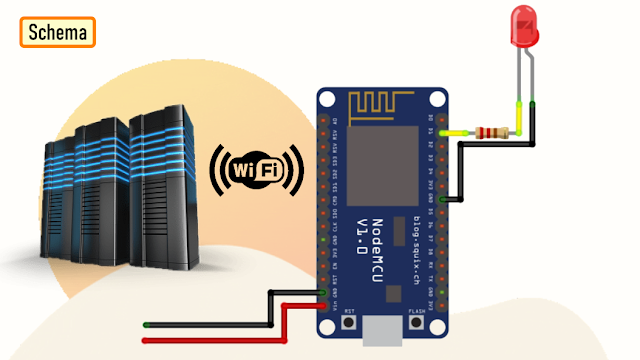
The setup is very simple. In my setup I have added an extra LED to give my board a bit of Si-Fi look.
Mining with ESP boards allows you to mine headlessly - you don't need to have them connected to a computer as they have their own Wi-Fi capabilities to connect to the server.
The Board

Now, lets have a look at my board. You can hookup, 5 x NodeMCUs to this board. Each NodeMCU has its own flashing LED. The board can be powered using just 5v using a USB cable.
So, this is how the NodeMCU DUCO Miner blade looks like in 3D.
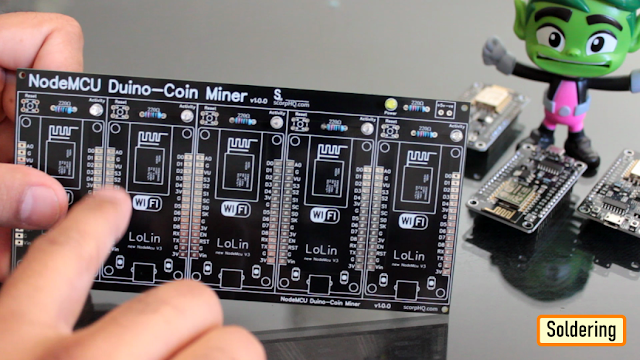
Soldering
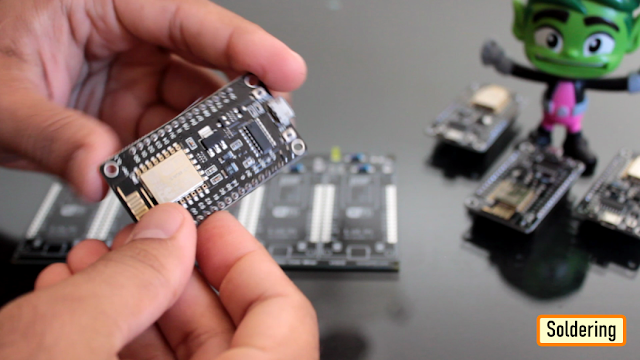
Lets start by soldering all the small components to the board.
I first soldered all the LEDs and the resistances to the board.
Since I care a lot about my Sensors and Microcontrollers, I am not going to solder them directly to the board. Instead I am soldering 'female pin headers' to the board which will house the NodeMCUs in them.
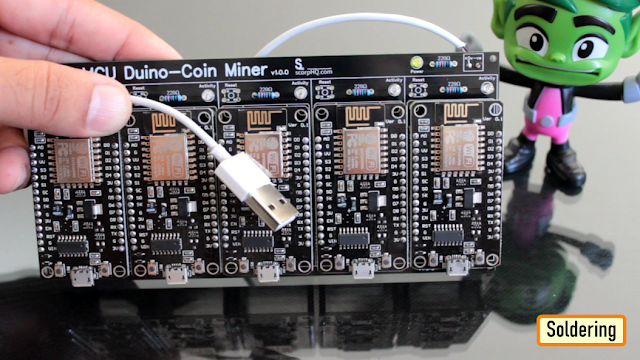
Finally, I soldered a USB cable to power the blade. I extracted this cable from a broken iPhone's charger.
Code
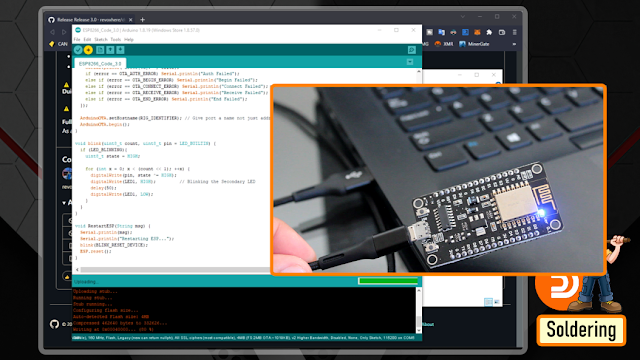
I downloaded the code from the DUINO-coins website. The current version is 3.0. I downloaded the windows version and then added my code block to make the blue LED flash on my blade.
In the code, you just need to edit few line in the top section to add your Wi-Fi details and the name of the NodeMCU.
If you're using an ESP8266 board, you can set the clock speed (Tools > CPU frequency) to 160 MHz to achieve better hash-rates.
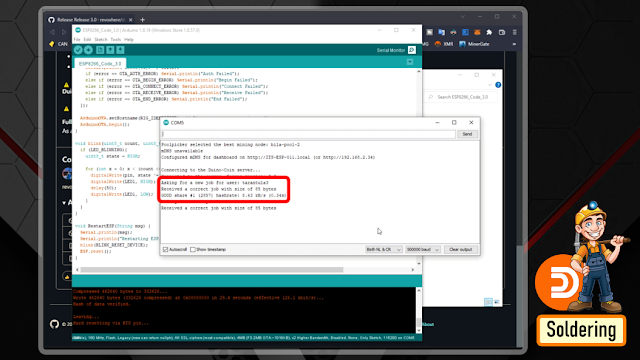
Then, just go ahead and upload the code one by one to all your NodeMCU's. Before adding the NodeMCU to your rig, it is a good idea to check it using the Arduino Serial Monitor (Tools > Serial Monitor), set the baud rate to 500000 baud and see how's the ESP is doing. If everything is correct, you should see messages saying that a share was accepted.
If it all works fine, your ESP will mine as long as it has power and internet connection.
Demo

So, this is how my final setup looks like.
To be very frank, the setup actually looks like having a small Christmas tree on your table, ha ha.
Hash-Rate

Mining DUCO at this stage is not very profitable. However, I just wanted to share the hash-rate table with you guys.
Remember, Kolka will play an essential role, as you keep on adding devices to your rig.
So, the hash-rate you will get may not be same as what you see on-screen.
Claiming Via Faucets

You can also claim DUCO via web-faucets.
I have scene many faucets coming in and completely disappearing, so the links provided in the video may not be valid when you try to access them.
The first one in list is the "faucet.duinocoin.com". You can claim 1 DUCO from this website by solving a captcha to start your journey. Remember you can only claim once from this website.
The next one is the "furim.xyz". Again, you just need to solve a captcha to earn some DUCO.
The 3rd one in list is "duco-faucet.pcgeek.pl" same as the other two, you can claim some DUCO every 15 minutes by solving a captcha on this website.
Exchanging DUCO
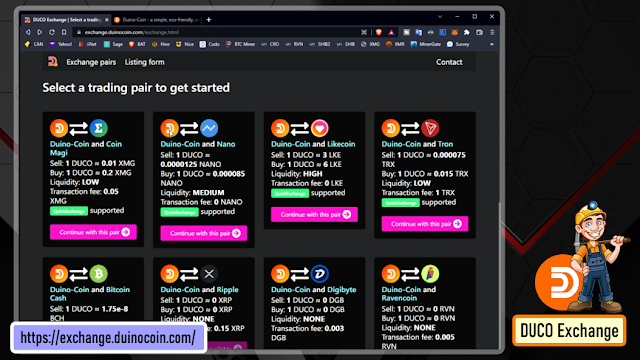
After mining some DUINO-Coins, you may want to exchange them to some other currency.
To exchange your coins, simply visit the website and select the currency you want to exchange. At the moment of writing this tutorial, DUCO Exchange supports XMG, BCH, TRX, BYND and LKE coins.
After deciding which coin you want exchanged, simply fill in the exchange form and wait for the exchange to happen (it may take up to 72 hours). You'll shortly receive an e-mail confirming the process and describing any further steps if needed.
Other exchanges:
Other exchanges supporting DUINO-Coin are Node-S, PancakeSwap, SunSwap, and SushiSwap.
Thanks
Thanks again for checking my post. I hope it helps you.
If you want to support me subscribe to my YouTube Channel: https://www.youtube.com/user/tarantula3
Blog Posts: https://diy-projects4u.blogspot.com/2022/05/DUCOMner.html
Video references: https://youtu.be/EhhSaQm-QK0
Code
Release 3.0 Original: https://github.com/revoxhere/duino-coin/releases/tag/3.0
Release 3.0 Modified: https://drive.google.com/file/d/1VhXl81TYWWwfeJQcksMMMdQ9oFS56tf7/view?usp=sharing
Resource Pages
Getting started: https://duinocoin.com/getting-started
Create Wallet: https://wallet.duinocoin.com/register
App list: https://duinocoin.com/apps
Exchange: https://exchange.duinocoin.com/
White Paper: https://github.com/revoxhere/duino-coin/blob/gh-pages/assets/whitepaper.pdf
Dashboards
Dashboard-1: https://wallet.duinocoin.com/
Dashboard-2: https://duco.sytes.net/index.php
Dashboard-3: https://duco.pcgeek.pl/
Facets List
Faucet-1: https://faucet.duinocoin.com/
Faucet-2: https://furim.xyz/faucet.html
Faucet-3: https://duco-faucet.pcgeek.pl/
Discussion
Discord: https://discord.gg/kvBkccy
Reddit : https://www.reddit.com/r/Duinocoin/
Support My Work:
BTC: 1M1PdxVxSTPLoMK91XnvEPksVuAa4J4dDp
LTC: MQFkVkWimYngMwp5SMuSbMP4ADStjysstm
DOGE: DDe7Fws24zf7acZevoT8uERnmisiHwR5st
ETH: 0x939aa4e13ecb4b46663c8017986abc0d204cde60
BAT: 0x939aa4e13ecb4b46663c8017986abc0d204cde60
LBC: bZ8ANEJFsd2MNFfpoxBhtFNPboh7PmD7M2
Thanks, ca again in my next tutorial.
Crypto Mining using NodeMCU
Project images are for reference only. Actual production is based on the manufacturing files on the project page.
Please review the designer's notes (e.g., PCB thickness) and select the appropriate options.
PCBWay is not responsible
for issues caused by unsuitable parameter selections.
For more important ordering information, please refer to
Read More









Raspberry Pi 5 7 Inch Touch Screen IPS 1024x600 HD LCD HDMI-compatible Display for RPI 4B 3B+ OPI 5 AIDA64 PC Secondary Screen(Without Speaker)
BUY NOW


- Comments(2)
- Likes(12)

- 1 USER VOTES
- YOUR VOTE 0.00 0.00

-
10design
-
10usability
-
10creativity
-
10content
More by Ashish Adhikari
-
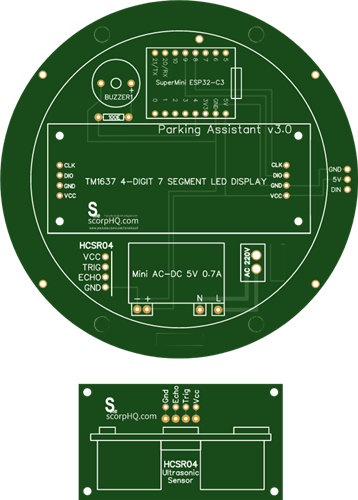 Arduino Parking Assistant V3
The ESP32-C3 Based Parking Assistant is an advanced parking sensor system that utilizes the ESP32-C3...
Arduino Parking Assistant V3
The ESP32-C3 Based Parking Assistant is an advanced parking sensor system that utilizes the ESP32-C3...
-
 100 LED Chaser Circuit Using IC555 and CD4017
A Chaser Circuit consists of a clocked IC or other electronic unit like an Arduino that drives an ar...
100 LED Chaser Circuit Using IC555 and CD4017
A Chaser Circuit consists of a clocked IC or other electronic unit like an Arduino that drives an ar...
-
 Cute Medusa 3D Printed Humidifier
Humidifiers add moisture to the air. They can help people with dry skin, allergies, and respiratory ...
Cute Medusa 3D Printed Humidifier
Humidifiers add moisture to the air. They can help people with dry skin, allergies, and respiratory ...
-
 4x4x4 PCB LED CUBE
Note from PCBWay: This project includes two PCBs, if both need to be produced, please inform your sa...
4x4x4 PCB LED CUBE
Note from PCBWay: This project includes two PCBs, if both need to be produced, please inform your sa...
-
 Getting Started With Raspberry Pi Pico
Couple of months ago, I bought a "Raspberry Pi Pico" to get some hands-on experience of it and to cr...
Getting Started With Raspberry Pi Pico
Couple of months ago, I bought a "Raspberry Pi Pico" to get some hands-on experience of it and to cr...
-
 DIY LED Roulette Wheel | ESP32 C3 Project
Hi everyone, today I am going to show you how I made a "Digital Roulette Wheel" by combining ESP32-C...
DIY LED Roulette Wheel | ESP32 C3 Project
Hi everyone, today I am going to show you how I made a "Digital Roulette Wheel" by combining ESP32-C...
-
 ESP32 C3 Super Mini WiFi Fix - 3 Methods That Work
Hi everyone! I’ve recently started working with a tiny, super affordable microcontroller board calle...
ESP32 C3 Super Mini WiFi Fix - 3 Methods That Work
Hi everyone! I’ve recently started working with a tiny, super affordable microcontroller board calle...
-
 Programmable RGB Thermometer
Summer has been relentless this year. My passion for Bitcoin mining took a major hit due to the imme...
Programmable RGB Thermometer
Summer has been relentless this year. My passion for Bitcoin mining took a major hit due to the imme...
-
 All About PC817 Optocoupler
An Optocoupler also known as Photocoupler or Optical Isolator is a component that transfers electric...
All About PC817 Optocoupler
An Optocoupler also known as Photocoupler or Optical Isolator is a component that transfers electric...
-
 Make Your Own 3D Printed Diwali Diyas at Home
Diyas are the heart of major Indian festivals, most notably Diwali, the "Festival of Lights." Lighti...
Make Your Own 3D Printed Diwali Diyas at Home
Diyas are the heart of major Indian festivals, most notably Diwali, the "Festival of Lights." Lighti...
-
 Arduino Based 3D Printed Color Adjustable Minecraft Lantern
For this Halloween, I'm fusing the creative blocky world of Minecraft with the spooky glow of the co...
Arduino Based 3D Printed Color Adjustable Minecraft Lantern
For this Halloween, I'm fusing the creative blocky world of Minecraft with the spooky glow of the co...
-
 3D Printed Breathing IC555 LED Trophy
This project features a custom 3D-printed 'Mortal Kombat' trophy shell paired with a basic NE555 tim...
3D Printed Breathing IC555 LED Trophy
This project features a custom 3D-printed 'Mortal Kombat' trophy shell paired with a basic NE555 tim...
-
 Destiny Internet Ghost - Internet Notifier
The Internet has changed the way we live our lives. From communication, education, banking, entertai...
Destiny Internet Ghost - Internet Notifier
The Internet has changed the way we live our lives. From communication, education, banking, entertai...
-
 Liquid level indicator Using ULN2003
A water level indicator detects and indicates the level of water in an overhead tank and relays the ...
Liquid level indicator Using ULN2003
A water level indicator detects and indicates the level of water in an overhead tank and relays the ...
-
 All About IC UNL2003
The UNL2003 IC contains 7 High Voltage, High Current NPN Darlington Transistor Arrays each rated at ...
All About IC UNL2003
The UNL2003 IC contains 7 High Voltage, High Current NPN Darlington Transistor Arrays each rated at ...
-
 NodeMCU Based: 3D Printed Indoor Gauge Thermometer
Had some time this weekend and a desire to create something new and interesting, so went ahead and c...
NodeMCU Based: 3D Printed Indoor Gauge Thermometer
Had some time this weekend and a desire to create something new and interesting, so went ahead and c...
-
 Rechargeable Gothic Lantern
A Gothic Lantern is a captivating piece of lighting that brings the allure of the Victorian Era into...
Rechargeable Gothic Lantern
A Gothic Lantern is a captivating piece of lighting that brings the allure of the Victorian Era into...
-
 555 Adjustable Delay On Off Timer Circuit
The 555 timer IC is an integrated circuit (IC) that is used in a variety of timer, delay, pulse gene...
555 Adjustable Delay On Off Timer Circuit
The 555 timer IC is an integrated circuit (IC) that is used in a variety of timer, delay, pulse gene...
-
Programmable Mist Maker - XIAO / QT PY Extension
2056 2 2 -
RadioHAT - Raspberry Pi radio development platform
1752 0 4 -
-
-
-
ARPS-2 – Arduino-Compatible Robot Project Shield for Arduino UNO
3980 0 6 -
A Compact Charging Breakout Board For Waveshare ESP32-C3
4714 3 8 -
AI-driven LoRa & LLM-enabled Kiosk & Food Delivery System
5520 2 2 -





















