|
|
ESP8266 NodeMCU |
x 1 | |
|
|
LCD Display (i2C) |
x 1 | |
|
|
Push Button |
x 1 | |
|
|
Buzzer |
x 1 |

|
KiCADKicad
|
|

|
arduino IDEArduino
|
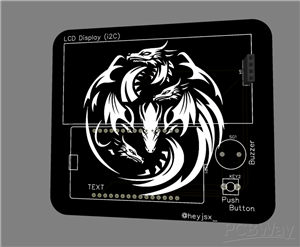
Desk Buddy
# Desk Buddy v2.0.0 - Complete Documentation
---
1. PROJECT OVERVIEW
Desk Buddy v2.0.0 is a smart desk companion built using the ESP8266 microcontroller. It combines multiple useful features into one compact device, making your desk smarter and more productive.
What It Does:
- Displays real-time date and time in 12-hour format
- Shows live weather updates for your city
- Monitors internet speed (ping)
- Tracks device uptime
- Displays Quote of the Day (one quote per day with smooth scrolling)
- Manages reminders with a web interface (auto-scrolling)
- Tracks water intake with a 45-minute reminder alarm (PWM controlled soft beep)
- Web-based management interface for all features
Why Desk Buddy:
- Productivity: Stay on top of tasks with reminders
- Health: Track water intake with gentle reminders
- Information: Quick access to time, weather, and internet status
- Motivation: Daily quotes to keep you inspired
- Convenience: Manage everything from your browser
---
2. FEATURES
2.1 Display Features:
- Date & Time: 12-hour format with AM/PM, shows day/month/year
- Weather: Real-time temperature with city name
- Internet Speed: Ping monitoring to Google
- Uptime Monitor: Shows device running time (days/hours/minutes)
- Quote of the Day: One unique quote per day with auto-scrolling
- Reminder System: Add/delete reminders via web interface with scrolling display
- Water Tracker: 45-minute reminder with soft PWM buzzer alarm
- Device Info: Shows version and IP address
2.2 Web Interface Features:
- Add Reminder: Add reminders with text and deadline
- View Reminders: See all active reminders with deadlines
- Delete Reminder: Delete individual reminders
- Clear All: Delete all reminders at once
- Log Water: Add 1 glass of water
- Pause/Resume: Toggle water reminder on/off
- Auto-Refresh: Updates every 10 seconds
2.3 Hardware Features:
- PWM Buzzer: Soft, non-irritating beep patterns
- Push Button: Page navigation and alarm stop
- Data Persistence: Saves reminders and water count to EEPROM
- LCD Display: 16x2 with I2C interface
- WiFi Management: Auto-connect with AP fallback
2.4 Technical Features:
- Auto-Update: Weather updates every 5 minutes
- NTP Sync: Accurate time from internet
- Quote of the Day: New quote every day at midnight
- Smart Scrolling: Smooth scrolling for long text
- Error Handling: Graceful failure handling
- Debug Mode: Serial monitor output for troubleshooting
---
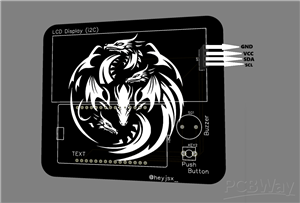
4. PIN CONNECTIONS
4.1 Quick Reference:
LCD Display (I2C):
- LCD VCC -> 3.3V or VIN (Red wire)
- LCD GND -> GND (Black wire)
- LCD SDA -> D2 (GPIO4) (Blue wire)
- LCD SCL -> D1 (GPIO5) (Green wire)
Push Button:
- Button Signal -> D5 (GPIO14) (Yellow wire)
- Button Ground -> GND (Black wire)
Buzzer:
- Buzzer Positive (+) -> D4 (GPIO2) (Orange wire)
- Buzzer Negative (-) -> GND (Black wire)
Wiring Summary:
ESP8266 NodeMCU -> Components
3V3/VIN -> LCD VCC (Red)
GND -> LCD GND (Black)
GND -> Button GND (Black)
GND -> Buzzer GND (Black)
D1 (GPIO5) -> LCD SCL (Green)
D2 (GPIO4) -> LCD SDA (Blue)
D5 (GPIO14) -> Button Signal (Yellow)
D4 (GPIO2) -> Buzzer Positive (+) (Orange)
---
6. SOFTWARE SETUP
6.1 Arduino IDE Installation:
1. Download from arduino.cc
2. Install for your operating system (Windows/Mac/Linux)
6.2 Add ESP8266 Board Package:
1. Open Arduino IDE
2. Go to File -> Preferences
3. Add this URL to "Additional Boards Manager URLs":
https://arduino.esp8266.com/stable/package_esp8266com_index.json
4. Click OK
5. Go to Tools -> Board -> Boards Manager
6. Search "esp8266"
7. Install "esp8266 by ESP8266 Community" (version 3.0.2 or later)
6.3 Required Libraries:
Install via Sketch -> Include Library -> Manage Libraries:
LiquidCrystal I2C by Frank de Brabander - LCD control
WiFiManager by tzapu - WiFi configuration with AP fallback
TimeLib by Michael Margolis - Time management
NTPClient by Fabrice Weinberg - Time synchronization
ArduinoJson by Benoit Blanchon - JSON parsing for APIs
EEPROM - Built-in (ESP8266) - Data storage
---
7. API CONFIGURATION
OpenWeatherMap API Setup:
Step 1: Create Account
1. Go to OpenWeatherMap
2. Click "Sign Up" (top right)
3. Fill registration form
4. Verify your email
Step 2: Get API Key
1. Login to your account
2. Go to "API Keys" section
3. Find your default API key (or create new)
4. Copy the API key
Step 3: Update Code
In your code, update this line:
const char* weatherAPI = "http://api.openweathermap.org/data/2.5/weather?q=YOUR_CITY&appid=YOUR_API_KEY&units=metric";
Step 4: Change City Name and API Key(MUST)
Replace "YOUR_CITY" with your city name and "YOUR_API_KEY" with your API Key
---
8. INSTALLATION GUIDE
8.1 Hardware Assembly:
Step 1: Connect Components
1. LCD Display:
- VCC -> 3.3V/VIN
- GND -> GND
- SDA -> D2 (GPIO4)
- SCL -> D1 (GPIO5)
2. Push Button:
- Pin 1 -> D5 (GPIO14)
- Pin 2 -> GND
3. Buzzer:
- Positive (+) -> D4 (GPIO2)
- Negative (-) -> GND
8.2 Software Installation:
Step 1: Download the Code
Copy the complete Desk Buddy code into Arduino IDE.
Step 2: Configure Settings
WiFi Credentials:
const char* ssid = "Your_SSID"; // Your WiFi name
const char* password = "Your_password"; // Your WiFi password
Weather API:
const char* weatherAPI = "http://api.openweathermap.org/data/2.5/weather?q=YOUR_CITY&appid=YOUR_API_KEY&units=metric";
Step 3: Upload Code
1. Select board: Tools -> Board -> NodeMCU 1.0 (ESP-12E Module)
2. Select port: Tools -> Port -> COMx
3. Click Verify (✓) to compile
4. Click Upload (→) to upload
5. Wait for "Done uploading" message
8.3 First Boot Sequence:
LCD Startup Sequence:
1. "Desk Buddy" appears
2. Version number shows (v2.0.0)
3. "Connecting to [WiFi]"
4. "WiFi Connected!" with IP address
5. "Press Button to change page"
Serial Monitor Output:
========================================
Desk Buddy v2.0.0 Starting...
========================================
✓ Button initialized on D5 (GPIO14)
✓ Buzzer initialized on D4 (GPIO2) with PWM
✓ WiFi Connected!
IP: 192.168.1.100
✓ Web server started
✓ Visit: http://192.168.1.100
✓ Weather data updated
✓ Ping: 45ms
✓ Loaded 0 reminders from EEPROM
========================================
System Ready!
========================================
8.4 WiFi Fallback Mode (AP Mode):
If WiFi credentials fail:
1. ESP8266 creates AP: "DeskBuddy"
2. AP IP: 192.168.4.1
3. Connect to "DeskBuddy" from your device
4. Configure WiFi via captive portal
---
9. WEB INTERFACE GUIDE
9.1 Accessing the Web Interface:
1. Find IP Address:
- Check Page 8 (Device Info) on LCD
- Or check Serial Monitor output
2. Open Browser:
http://[YOUR_IP_ADDRESS]
Example: http://192.168.1.100
9.2 Web Interface Features:
Add Reminder:
1. Type your reminder in the text box
2. Select a deadline date (YYYY-MM-DD)
3. Click "Add Reminder" button
4. Reminder appears in the list and on LCD
View Reminders:
- All active reminders displayed
- Shows text and deadline
- Count badge shows total reminders
- Auto-refreshes every 10 seconds
Delete Reminder:
1. Click ✕ button next to a reminder
2. Confirm deletion
3. Reminder disappears from list and LCD
Clear All:
1. Click "Clear All" button
2. Confirm deletion
3. All reminders removed
Water Tracker Controls:
- Log Water: Adds 1 glass, resets 45-min timer
- Pause/Resume: Toggle reminders on/off
- Status: Shows Active/Paused state
- Count: Shows total glasses today
Pages Overview:
Press the button to cycle through 8 pages:
Page 1: Date & Time
Line 1: 15 Dec 2024
Line 2: 02:30:45 PM
Page 2: Weather
Line 1: Weather
Line 2: Chennai 32.5°C
Page 3: Internet Speed
Line 1: Internet Speed
Line 2: Ping: 45ms
Page 4: Uptime
Line 1: Uptime
Line 2: 2d 14h 32m
Page 5: Quote
Line 1: Quote
Line 2: The only way to do... (scrolling)
Page 6: Reminder
Line 1: Reminder 1/3
Line 2: Submit report [2024-12-20] (scrolling)
Page 7: Water Tracker
Line 1: Water Tracker
Line 2: Next: 32min
Page 8: Device Info
Line 1: Desk Buddy v2.0.0
Line 2: IP: 192.168.1.100
---
CONCLUSION
Summary:
Desk Buddy v2.0.0 is a feature-rich smart desk companion that successfully combines multiple useful functionalities into a single, compact device. It leverages the power of the ESP8266 microcontroller to provide:
- Real-time Information: Date, time, weather, and internet speed at a glance
- Smart Reminders: Web-based management with auto-scrolling display
- Health Tracking: Water intake reminder with gentle PWM buzzer
- Daily Motivation: One unique quote per day with smooth scrolling
- User-Friendly Interface: Easy-to-use web interface for management
- Data Persistence: Reminders and water count saved to EEPROM
- WiFi Fallback: AP mode for easy configuration
- Software Buzzer: PWM controlled soft, non-irritating beep patterns
Key Achievements:
- 8 Display Pages: Comprehensive information display
- Web Interface: Full management from any browser
- Scrolling Features: Smooth text scrolling for long content
- Quote of the Day: Daily inspiration without repetition
- Water Tracker: Health reminder with soft alarm
- Button Feedback: Short beep on button press
- Error Handling: Graceful failure handling
Future Enhancements:
- Mobile App: Dedicated mobile app for management
- Push Notifications: Send reminders to phone
- Custom Themes: Change color schemes
- Statistics: Daily/weekly reminder and water stats
- Night Mode: Dim display for night use
- Voice Control: Voice commands via Alexa/Google
---
Desk Buddy v2.0.0 is a complete, functional, and user-friendly smart desk companion that enhances productivity and brings convenience to your workspace. With its combination of practical features, easy-to-use interface, and reliable performance, it's the perfect addition to any desk setup.
---
Documentation Version: 1.0
Firmware Version: v2.0.0
Last Updated: 2026
Thank you for choosing Desk Buddy!
Desk Buddy
Project images are for reference only. Actual production is based on the manufacturing files on the project page.
Please review the designer's notes (e.g., PCB thickness) and select the appropriate options.
PCBWay is not responsible
for issues caused by unsuitable parameter selections.
For more important ordering information, please refer to
Read More


Raspberry Pi 5 7 Inch Touch Screen IPS 1024x600 HD LCD HDMI-compatible Display for RPI 4B 3B+ OPI 5 AIDA64 PC Secondary Screen(Without Speaker)
BUY NOW


- Comments(0)
- Likes(0)
More by Heymant Visaakan J
-
 Automatic Barrier Controller
The Automatic Barrier Controller is a compact, single-PCB automated gate entry system designed for m...
Automatic Barrier Controller
The Automatic Barrier Controller is a compact, single-PCB automated gate entry system designed for m...
-
 Distance Measuring Tool
# ESP8266 Distance Measurer - Complete Documentation---## 1. Project OverviewThis is an ESP8266-base...
Distance Measuring Tool
# ESP8266 Distance Measurer - Complete Documentation---## 1. Project OverviewThis is an ESP8266-base...
-
 Radar System
# ESP8266 Radar System - Complete Documentation---## 1. Project OverviewThis is an ESP8266-based Rad...
Radar System
# ESP8266 Radar System - Complete Documentation---## 1. Project OverviewThis is an ESP8266-based Rad...
-
 Desk Buddy
# Desk Buddy v2.0.0 - Complete Documentation---1. PROJECT OVERVIEWDesk Buddy v2.0.0 is a smart desk ...
Desk Buddy
# Desk Buddy v2.0.0 - Complete Documentation---1. PROJECT OVERVIEWDesk Buddy v2.0.0 is a smart desk ...
-
 Chess Clock
Project Overview:System Architecture & Control Logic:The ESP8266 acts as the central processor f...
Chess Clock
Project Overview:System Architecture & Control Logic:The ESP8266 acts as the central processor f...
-
 ESP32 Air Mouse
Project Overview:The ESP32 Air Mouse is an innovative, gesture-controlled mouse that lets you naviga...
ESP32 Air Mouse
Project Overview:The ESP32 Air Mouse is an innovative, gesture-controlled mouse that lets you naviga...
-
 Smart Clock
 PCB – Product DescriptionThe Smart Clock PCB is a custom-designed, 2-layer FR-4 printed ...
Smart Clock
Smart Clock PCB – Product DescriptionThe Smart Clock PCB is a custom-designed, 2-layer FR-4 printed ...
-
 Smart ThermoStat
Smart Thermostat using ESP8266 & Blynk IoT:This project is a Wi-Fi enabled smart thermostat buil...
Smart ThermoStat
Smart Thermostat using ESP8266 & Blynk IoT:This project is a Wi-Fi enabled smart thermostat buil...
-
Émetteur Récepteur Optique Expérimental (communication UART ATtiny + fibre optique)
37 0 1 -
SmallOLED - Live PC Stats, Animated Clocks & Audio Visualizer
868 0 3 -
"Talking Multimeter": Arduino-Based Speech Add-on for Multimeters with SCPI Protocol
509 0 1 -
Programmable Mist Maker - XIAO / QT PY Extension
2976 2 3 -
RadioHAT - Raspberry Pi radio development platform
2524 0 4 -
-
-