In modern high-speed digital circuit design, DDR2 memory remains a widely used high-speed storage device. Due to its high operating frequency, the quality of the DDR2 PCB layout directly determines whether the hardware system can function reliably and how fast it can operate. Poor routing may lead to signal integrity degradation, timing violations, or even complete system failure.
This article discusses the key considerations for DDR2 PCB routing, including impedance control, termination design, routing sequence, and topology comparison with DDR3.
The single-ended impedance should be controlled at 50Ω (±10%), while the differential impedance should be 100Ω (±10%), ensuring proper signal integrity and minimizing reflections.
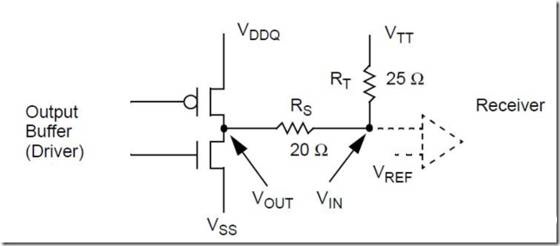
Series termination is mainly suitable for cases with lighter loads or strong driver capability. For unidirectional signals such as address and control lines, the series resistor should be placed close to the signal driver, which helps suppress reflections and improve signal quality.
When the load is heavy, the routing is long, or simulation indicates the need for additional matching, parallel termination can be used. The termination resistor is typically connected to the termination voltage VTT, with a common resistance range of 36Ω–56Ω, and 47Ω is often selected as a typical engineering value.
Differential clock signals (CK/CK#) require 100Ω differential termination, which can be implemented using internal ODT (On-Die Termination) or external resistors.
In a proper DDR2 PCB layout, the recommended routing order is:
Prioritizing critical high-speed signals helps ensure timing margin and signal integrity across the entire system.
Each Data Group (DQ[7:0] + DQS + DM) should satisfy:
Since DDR2 data and DQS operate in a source-synchronous manner, DQS serves as the length-matching reference within each group.
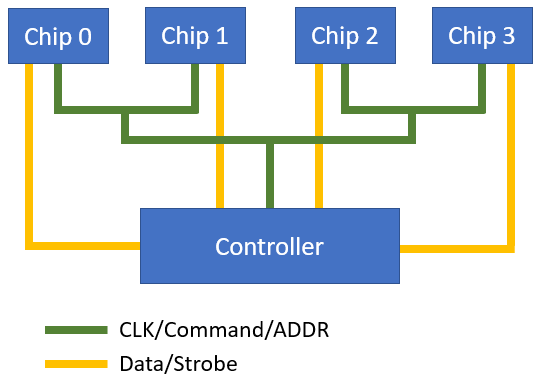
In a DDR2 T-branch topology:
When the DDR2 load is heavy or multiple memory devices are used, the design should include:
These measures reduce reflections and improve signal integrity.
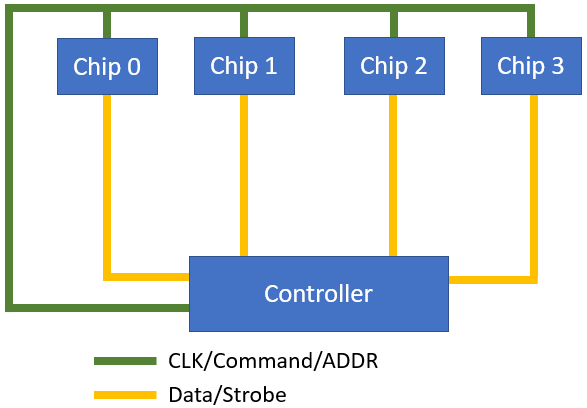
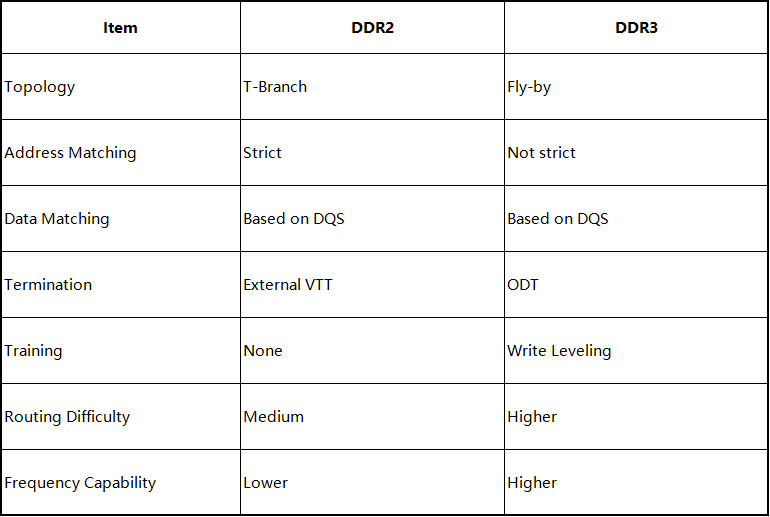
In a previous article, we introduced DDR3 Routing Guide. The differences between DDR2 and DDR3 layouts are primarily caused by topology changes (T-branch → Fly-by). Before reviewing the comparison table, the following topology diagrams help illustrate the concept.
Characteristics:
Characteristics:
If you need assistance with PCB design or PCB layout, feel free to contact the PCBWay Design Team!



