

Vasko USB security key
What is your project about?
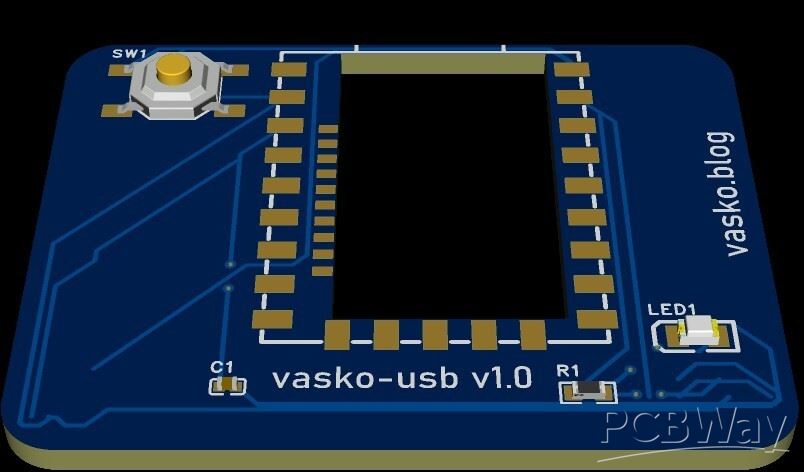
This project is a compact, custom-designed USB security key and hardware token built around the RP2040-Zero microcontroller module. It features a tactile button for physical user interaction and an indicator LED for visual status feedback. Designed with simplicity and ease of assembly in mind, it serves as a reliable hardware device for security tasks, password management, or automated USB HID typing shortcuts.
Why did you decide to make it?
As someone who loves working with microcontrollers and custom electronics, I wanted to build a practical, everyday-carry hardware tool that is both simple to assemble and fully customizable. Commercial security keys can be restrictive and expensive, so I set out to design my own open-source alternative using the powerful RP2040 ecosystem—making it easy to program in CircuitPython or C/C++.
How does it work?
The heart of the device is the RP2040-Zero module, which plugs directly into the custom PCB via castellated pads and connects to host devices through its onboard USB-C port.
User Input: Pressing the tactile button (SW1) pulls a designated GPIO pin (GP0) low, triggering an action in the firmware.
Visual Feedback: The microcontroller can light up the indicator LED (LED1) through a current-limiting resistor (R1) to show operational status.
Power Stability: A 100nF decoupling capacitor (C1) ensures clean and stable power delivery across the board.
When plugged into a computer, the device runs custom firmware that can act as a secure USB HID keyboard, executing predefined tasks or authentication sequences only when you physically press the button.
🛠️ Bill of Materials (BOM)
U2: RP2040-Zero Microcontroller Module (Waveshare)
SW1: Tactile SMD Push Button (TS-1187A-C-D-B)
R1: SMD Resistor (330Ω, 0603 package)
LED1: SMD LED (0805 package)
C1: 100nF Decoupling Capacitor (0603 package)
PCB: Custom 2-layer printed circuit board manufactured by PCBWay
📝 Project Description & Build Instructions
Schematic Design: Created using Net Labels (3V3, GND, BTN, LED) in EasyEDA to keep the wiring clean and logically structured without messy overlapping lines.
PCB Layout: Designed as a compact, single-sided surface-mount layout optimized for quick assembly and low component count.
Assembly: The RP2040-Zero module sits cleanly on the castellated pads, accompanied by the passive components, button, and LED.
Firmware: Programmed via USB-C using standard RP2040 toolchains (Arduino IDE / CircuitPython) to handle the button interrupt and LED indicator logic.
Apply for sponsorship >>- Comments(0)
- Likes(0)