|
|
Ultimate Pico RP2040 128Mbit 16MBPurple
|
x 1 | |
|
|
1n4148 Small Signal Diode - DO35 |
x 1 | |
|
|
6x6x12 Micro Tactile Switch Momentary Push Button |
x 1 |
PiCOLECO - Raspberry Pi Pico ColecoVision Flash Multicart
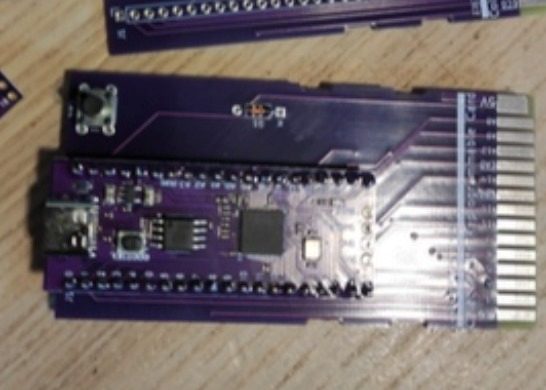
PiCOLECO is a clever, low-cost open-source flash multicart for the ColecoVision, built around the inexpensive purple Raspberry Pi Pico-compatible board.
Instead of swapping physical cartridges, PiCOLECO lets you store multiple ColecoVision ROM images on the Pico's onboard flash memory. When the ColecoVision starts, a menu appears on the console allowing you to choose which game to load.
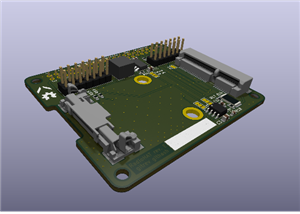
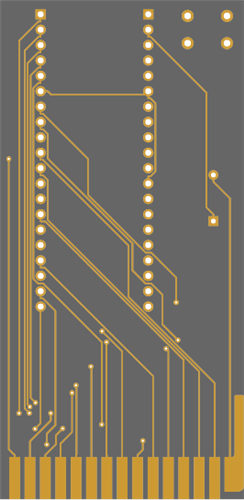
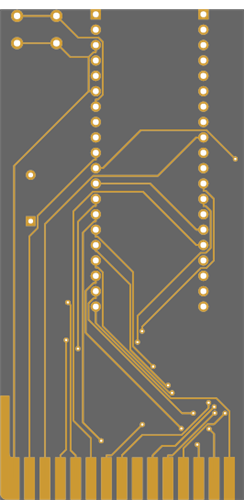
The hardware is refreshingly simple too. The PCB connects the Pico clone directly to the ColecoVision cartridge port and needs only a handful of additional components.
This PCBWay project page is intended to make the hardware side of the build as straightforward as possible, while keeping the original open-source project and its authors properly credited.
What You Need
To build the cartridge you will need:
* 1 × PiCOLECO PCB
* 1 × compatible purple Raspberry Pi Pico clone
* 2 × 1×20 2.54 mm male pin headers
* 1 × 1N4148 through-hole diode
* 1 × 6 × 6 mm momentary tactile push button
* Soldering equipment
* A USB cable for programming the Pico and copying ROM files
The push button is used to reset/restart the cartridge when required.
Important: PiCOLECO was designed specifically around the common purple Pico clone. The original project warns that this board does not use the same pinout as an original green Raspberry Pi Pico. Do not substitute a standard Pico without checking the hardware design first.
How PiCOLECO Works
The Raspberry Pi Pico clone acts as the cartridge ROM hardware.
Once the PiCOLECO firmware has been installed, the Pico can be connected to a computer by USB and ColecoVision `.BIN` files copied directly onto its flash storage.
There is no special ROM-writing hardware required. Updating the collection is essentially a USB drag-and-drop job.
When inserted into the ColecoVision, PiCOLECO provides a file-selection menu from which the stored games can be selected and launched.
Standard ROMs up to 32 KB are supported, and later firmware versions introduced partial support for MegaCart bank-switched ROMs up to 128 KB.
ROM Filename Warning
The filesystem implementation used by PiCOLECO has a **32-byte filename limit, including the file extension**.
If a game fails to launch, check the filename first and shorten it if necessary.
Programming the Pico
The firmware is supplied as a `.UF2` file.
To install it:
1. Connect the Pico clone to your computer while holding its onboard boot button.
2. The Pico should appear as a USB storage device.
3. Copy the appropriate PiCOLECO `.UF2` firmware file onto it.
4. Allow the Pico to restart.
5. Reconnect it normally and copy your ColecoVision `.BIN` ROM files onto its storage.
After the firmware has been installed, changing the games normally only requires connecting the Pico by USB and copying files.
Build, Program and Use PiCOLECO - Video Guide
VIDEO COMING SOON
I am producing a full PiCOLECO build video for my Mark Fixes Stuff YouTube channel.
The video will cover the complete process, including:
* Ordering the PCB
* Identifying the correct Pico clone
* Choosing the components
* Soldering and assembly
* Installing the PiCOLECO firmware
* Loading ColecoVision ROM files
* Using the on-console game-selection menu
* Testing the finished cartridge on real ColecoVision hardware
* Any problems or quirks I encounter during the build
Once the video is published, I will update this project page with the direct video link.
A Note About USB Power
The original project includes a diode to provide protection around the cartridge power arrangement.
However, the project author specifically warns:
Do not connect the Pico by USB while PiCOLECO is inserted into a powered-on ColecoVision.
The safest approach is simple: remove the cartridge from the console before connecting it to your computer.
Open-Source Project and Credits
PiCOLECO is not my original hardware or firmware design.
This PCBWay page has been created to make the open-source project easier to find, order and build, and to accompany my own build video and supporting article.
The original PiCOLECO project was created by **aotta**, who published the PCB design, KiCad files, Gerbers, source code and compiled firmware for the community.
Aotta also credits two other open-source projects and developers whose work forms part of PiCOLECO:
Robin Edwards - A8PicoCart
PiCOLECO uses a substantial amount of code derived from Robin Edwards' A8PicoCart project.
Aotta specifically credits the A8PicoCart's approach to managing the Pico's flash storage and USB file updates as the basis for this part of PiCOLECO.
Original project:
https://github.com/robinhedwards/A8PicoCart
Oscar Toledo - CVBasic
The ColecoVision menu and file selector were created using CVBasic, developed by Oscar Toledo.
CVBasic provides a BASIC compiler specifically designed for creating software for systems including the ColecoVision.
More information:
PiCOLECO by aotta
Original source code, firmware, PCB design and documentation:
https://github.com/aotta/PiCOLECO
There is also an extensive PiCOLECO discussion thread on the AtariAge forums where aotta and other builders have documented firmware versions, compatibility, builds and troubleshooting:
https://forums.atariage.com/topic/366660-picoleco-a-diy-multicart-for-colecovision/
A large thank you to aotta, Robin Edwards and Oscar Toledo for making their work available to the retro-computing and retro-gaming community.
Projects like this are precisely why keeping old hardware running remains so accessible.
Firmware Compatibility
The original project has received several firmware updates.
At the time this page was prepared, the GitHub repository documents:
* 1.0a - partial MegaCart bank-switching support for ROMs up to 128 KB
* 1.0c - fix for a sprite issue affecting Pac-Man Compilation
* 1.0d - both ColecoVision controllers can be used in the file-selection menu
Check the original GitHub repository before programming your cartridge, as development or compatibility information may have changed since this page was written.
Supporting Article
A detailed accompanying article will also be published on:
Mark Fixes Stuff
https://www.markfixesstuff.com/
The article will include additional photographs, component information, build notes, problems encountered during assembly, firmware setup and links back to the original open-source resources.
Licence and Attribution
Please respect the licensing and attribution requirements of the original PiCOLECO project and the projects upon which it is based.
This PCBWay listing is intended to help people build and discover the original open-source project. Credit for the PiCOLECO hardware and software belongs with its respective creators and contributors.
If you improve the design, discover compatibility information or develop a useful modification, please consider contributing it back to the original project and community.
PiCOLECO - Raspberry Pi Pico ColecoVision Flash Multicart
Project images are for reference only. Actual production is based on the manufacturing files on the project page.
Please review the designer's notes (e.g., PCB thickness) and select the appropriate options.
PCBWay is not responsible
for issues caused by unsuitable parameter selections.
For more important ordering information, please refer to
Read More


Raspberry Pi 5 7 Inch Touch Screen IPS 1024x600 HD LCD HDMI-compatible Display for RPI 4B 3B+ OPI 5 AIDA64 PC Secondary Screen(Without Speaker)
BUY NOW


- Comments(1)
- Likes(1)
More by Mark Fixes Stuff
-
 Mikro Gen Shadow of the Unicorn interface Modern re-creation for Sinclair Spectrum
Steven Smith of ProjectSpeccy.com reverse engineered this interface as a reaction to prices he saw o...
Mikro Gen Shadow of the Unicorn interface Modern re-creation for Sinclair Spectrum
Steven Smith of ProjectSpeccy.com reverse engineered this interface as a reaction to prices he saw o...
-
 Sinclair Spectrum Composite Mod PCB for Modulator Can Install (Build Video!)
This compact PCB simply replaces the existing RF modulator PCB in a Sinclair Spectrum 16k or 48k, ei...
Sinclair Spectrum Composite Mod PCB for Modulator Can Install (Build Video!)
This compact PCB simply replaces the existing RF modulator PCB in a Sinclair Spectrum 16k or 48k, ei...
-
 PiCOLECO - Raspberry Pi Pico ColecoVision Flash Multicart
PiCOLECO is a clever, low-cost open-source flash multicart for the ColecoVision, built around the in...
PiCOLECO - Raspberry Pi Pico ColecoVision Flash Multicart
PiCOLECO is a clever, low-cost open-source flash multicart for the ColecoVision, built around the in...
-
 Fixel 3DO FZ-1 ODE Mount
This project is a custom 3D printed mounting solution designed to securely install a Fixelsan ODE an...
Fixel 3DO FZ-1 ODE Mount
This project is a custom 3D printed mounting solution designed to securely install a Fixelsan ODE an...
-
 FDSKey PCB for Famicom Disk System and Sharp Twin Famicom
FDSKey is an open source hardware project created by Alexey Cluster (ClusterM) that provides a moder...
FDSKey PCB for Famicom Disk System and Sharp Twin Famicom
FDSKey is an open source hardware project created by Alexey Cluster (ClusterM) that provides a moder...
-
 Atari 8 bit A8 Picocart - An easy to build, cheap 400/800/XL/XE Flash Cart!
The A8 PicoCart by ElectroTrains A.K.A Robin Edwards. It allows you to use a Pi Pico clone as an Ata...
Atari 8 bit A8 Picocart - An easy to build, cheap 400/800/XL/XE Flash Cart!
The A8 PicoCart by ElectroTrains A.K.A Robin Edwards. It allows you to use a Pi Pico clone as an Ata...
-
 TZXDuino Shield V2 by Zaxon
This is the UPDATED V2 TZXDuino Shield by Zaxon. TZXDuino is a cassette player replacement for the S...
TZXDuino Shield V2 by Zaxon
This is the UPDATED V2 TZXDuino Shield by Zaxon. TZXDuino is a cassette player replacement for the S...
-
 Romantic Robot Multiface 128 Recreation for ZX Spectrum
Stephen Smith of projectspeccy.com sought to investigate how Multiface type interfaces work and see ...
Romantic Robot Multiface 128 Recreation for ZX Spectrum
Stephen Smith of projectspeccy.com sought to investigate how Multiface type interfaces work and see ...
-
SmallOLED - Live PC Stats, Animated Clocks & Audio Visualizer
706 0 3 -
"Talking Multimeter": Arduino-Based Speech Add-on for Multimeters with SCPI Protocol
398 0 1 -
Programmable Mist Maker - XIAO / QT PY Extension
2844 2 3 -
RadioHAT - Raspberry Pi radio development platform
2436 0 4 -
-
-
-
ARPS-2 – Arduino-Compatible Robot Project Shield for Arduino UNO
4519 0 6