How to turn on lights with telegram and esp32 from anywhere in the world
In this tutorial we will see how to make a system that allows us to turn on lights with telegram, from anywhere in the world, just by typing a command. To do this a dual channel relay module will turn on two 110V/220V bulbs, the esp32 will connect to our Wifi network and by means of commands, to control the on or off of lights. We will send messages through the telegram messaging service, where the bot will respond to us when the light is turned on or off and we will also be able to know the status of each of them.
Circuit

Electronic components
Cables dupont

An ESP32
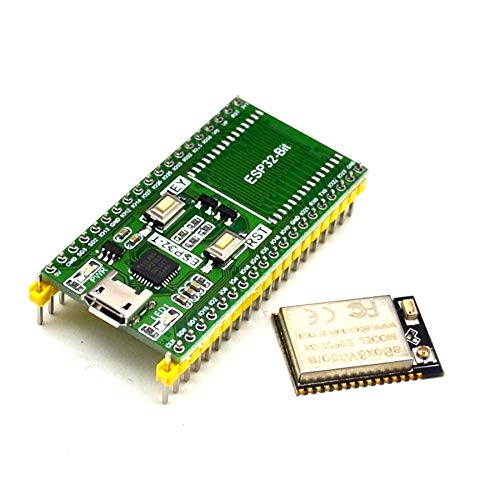
Features of the ESP32-T module

Connectivity
The ESP32 module has all the wiFi variants:
- 802.11 b/g/n/e/i/n
- Wi-Fi Direct (P2P), P2P Discovery, P2P Group Owner mode and P2P Power Management
This new version includes low-power Bluethoot connectivity
- Bluetooth v4.2 BR/EDR and BLE
- BLE Beacon
In addition, you can communicate using SPI, I2C, UART, MAC Ethernet, Host SD protocols
Microcontroller features
The CPU consists of a Tensilica LX6 Model SoC with the following features and memory
- Dual 32-bit core with 160MHz speed
- 448 kBytes ROM
- 520kByteS SRAM
Have 48 Pins
- 18 12-bit ADC
- 2 8-bit DAC
- 10 pin contact sensors
- 16 PWM
- 20 Digital inputs/outputs
Power and consumption modes
For proper operation of the ESP32 it is necessary to supply a voltage between 2.8V and 3.6V. The energy you consume depends on the mode of operation. It contains a mode, the Ultra Low Power Solution (ULP),in which basic tasks (ADC, PSTN…) continue to be performed in Sleep mode.
Two spotlights

A pcb

Gerber file
Pines macho

Dual-channel relay module

Features
- Card with 2-5V and 2-channel relays
- Tical current: 4mA
- Activation current: 2mA
- Working current: 65mA
- High Current Relay: AC250V 10A; DC30V 10A.
- Standard interface for microcontroller: Arduino, AVR, PIC, DSP, ARM, etc.
- PC817 on-board optocoupler with anti-jamming optical isolation capability
- Independent contact wiring, safe and reliable
- With screw holes for easy installation
- Size: 44.4×32.4mm
Pinout
Input Part:
- VCC: connect to positive power (depending on relay voltage range)
- GND: connect to negative power
- IN1: channel trigger pin 1 relay module (high level trigger)
- IN2: channel trigger pin 2 relay module (high level trigger)
Output Part:
- Normally open (NA): Normally open relay pin. NO pin is not connected to COM pin when relay is off. The pin does NOT connect to the COM pin when the relay is on.
- Pin común (COM): pin común del relé.
- Normally closed (NC): normally closed relay pin. The NC pin connects to the COM pin when the relay is off. The NC pin does not connect to the COM pin when the relay is on.
A plinth for the esp32

Source
#include <WiFi.h>
#include <WiFiClientSecure.h>
#include <UniversalTelegramBot.h>
// Reemplazar con los datos de tu red wifi
#define WIFI_SSID "Tu_red_wifi"
#define WIFI_PASSWORD "Tu_clave"
//Token de Telegram BOT se obtenienen desde Botfather en telegram
#define BOT_TOKEN "Tu_token"
const unsigned long tiempo = 1000; //tiempo medio entre mensajes de escaneo
WiFiClientSecure secured_client;
UniversalTelegramBot bot(BOT_TOKEN, secured_client);
unsigned long tiempoAnterior; //última vez que se realizó el análisis de mensajes
const int led12 = 12;
const int led14 = 14;
int estadoLed12 = 0;
int estadoLed14 = 0;
int inicio = 1;
String chat_id;
#define ID_Chat "tu_id_chat"//ID_Chat se obtiene de telegram
void mensajesNuevos(int numerosMensajes)
{
  for (int i = 0; i < numerosMensajes; i++)
  {
    String chat_id = bot.messages[i].chat_id;
    String text = bot.messages[i].text;
//////////Luz 1 en el pin 12//////
    if (text == "Luz1on")
    {
      digitalWrite(led12, LOW); //
      estadoLed12 = 1;
      bot.sendMessage(chat_id, "Luz 1 encendida", "");
    }


    if (text == "Luz1off")
    {
      estadoLed12 = 0;
      digitalWrite(led12, HIGH); //
      bot.sendMessage(chat_id, "Luz 1 apagada", "");
    }
//////////Luz 2 en el pin 14//////
    if (text == "Luz2on")
    {
      digitalWrite(led14, LOW);
      estadoLed14 = 1;
      bot.sendMessage(chat_id, "Luz 2 encendida", "");
    }


    if (text == "Luz2off")
    {
      estadoLed14 = 0;
      digitalWrite(led14, HIGH);
      bot.sendMessage(chat_id, "Luz 2 apagada", "");
    }


////////Estado de las luces  ///////


    if (text == "Estado")
    {
      ////Estado luz 1////
      if (estadoLed12)
      {
        bot.sendMessage(chat_id, "Luz 1 encendida", "");
      }
      else
      {
        bot.sendMessage(chat_id, "Luz 1 apagada", "");
      }
      ////Estado luz 2////
      if (estadoLed14)
      {
        bot.sendMessage(chat_id, "Luz 2 encendida", "");
      }
      else
      {
        bot.sendMessage(chat_id, "Luz 2 apagada", "");
      }
    }


    if (text == "Ayuda")
    {
      String ayuda = "Bienvenido al sistema de control luces con Esp32, " ".\n";
      ayuda += "Estas son tus opciones.\n\n";
      ayuda += "Luz1on: para encender la Luz 1 \n";
      ayuda += "Luz1off: para apagar la luz 1 \n";
      ayuda += "Luz2on: para encender la Luz 2 \n";
      ayuda += "Luz2off: para apagar la luz 2 \n";
      ayuda += "Estado : devuelve el estado actual de las luces\n";
      ayuda += "Ayuda: Imprime este menú \n";
      ayuda += "Recuerda el sistema distingue entre mayuculas y minusculas \n";
      bot.sendMessage(chat_id, ayuda, "");
    }

  }
}


void setup()
{
  Serial.begin(115200);
  pinMode(led12, OUTPUT); //inicializar  pin 12 digital como salida.
  pinMode(led14, OUTPUT); //inicializar pin 14 digital como salida.
  digitalWrite(led12, HIGH); //
  digitalWrite(led14, HIGH);
  // Intenta conectarse a la red wifi
  Serial.print("Conectando a la red ");
  Serial.print(WIFI_SSID);
  WiFi.begin(WIFI_SSID, WIFI_PASSWORD);
  secured_client.setCACert(TELEGRAM_CERTIFICATE_ROOT); //Agregar certificado raíz para api.telegram.org
  while (WiFi.status() != WL_CONNECTED)
  {
    Serial.print(".");
    delay(500);
  }
  Serial.print("\nConectado a la red wifi. Dirección IP: ");
  Serial.println(WiFi.localIP());
   if(inicio == 1){
    Serial.println("Sistema preparado");
    bot.sendMessage(ID_Chat, "Sistema preparado!!!, escribe Ayuda para ver las opciones", "");//Enviamos un mensaje a telegram para informar que el sistema está listo
    inicio = 0;
    }
}


void loop()
{
  //Verifica si hay datos nuevos en telegram cada 1 segundo
  if (millis() - tiempoAnterior > tiempo)
  {
    int numerosMensajes = bot.getUpdates(bot.last_message_received + 1);


    while (numerosMensajes)
    {
      Serial.println("Comando recibido");
      mensajesNuevos(numerosMensajes);
      numerosMensajes = bot.getUpdates(bot.last_message_received + 1);
    }


    tiempoAnterior = millis();
  }

}
Download Library –> Universal-Arduino-Telegram-Bot-master
Create Bot on Telegram

In telegram we look for BotFather

We write /start and something similar to this will appear to us

Write /newbot
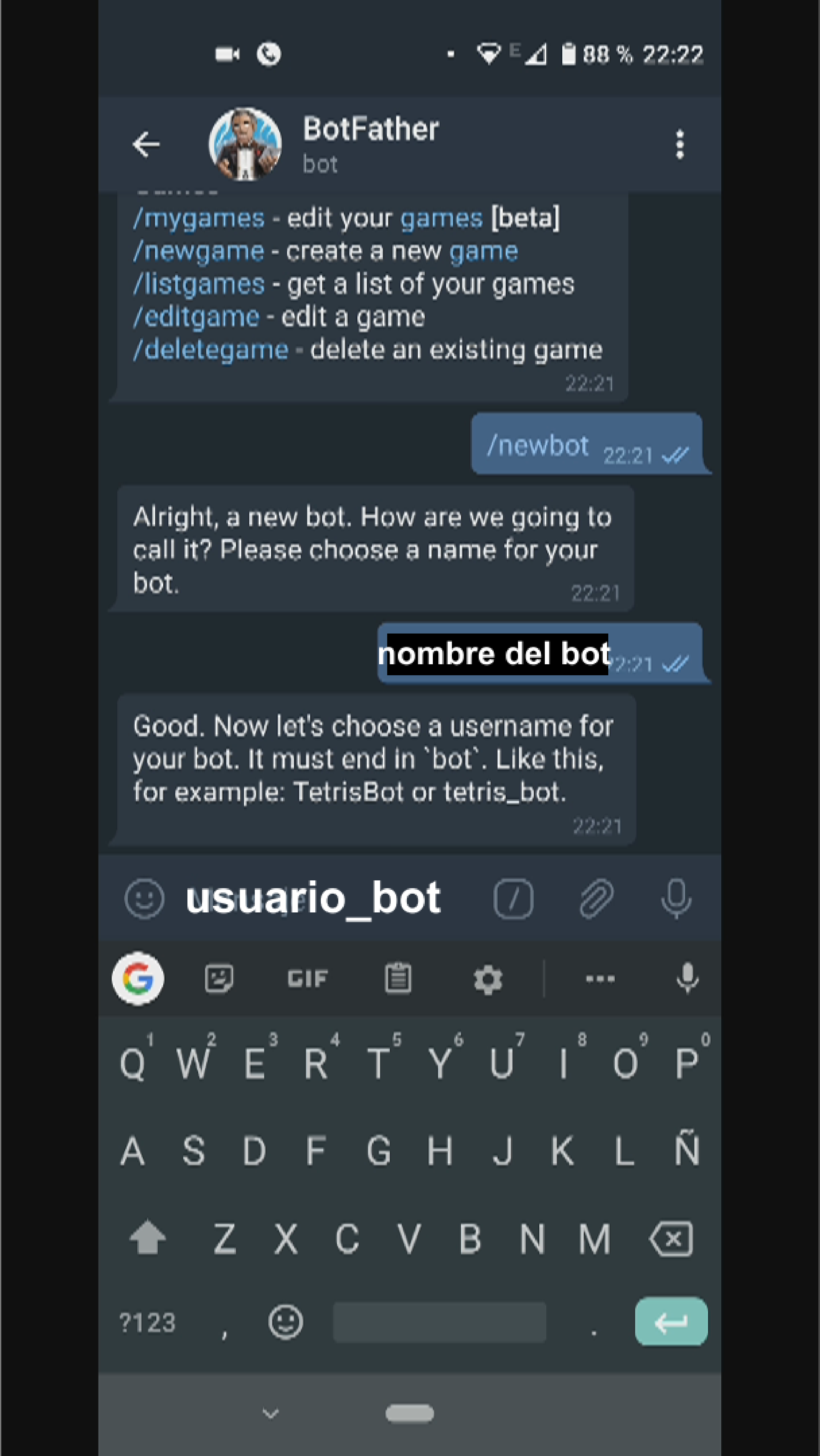
I will see the name of the bot, and we invent a name for our bot, it must be in the format ?usuario_bot?

We’ll get a token that we’re going to use in the source code

Now we’ll look for IDBot, and we’ll start it

We write /getid and it will give us user_id that we should place in the source code
How to turn on lights with telegram and esp32 from anywhere in the world
*PCBWay community is a sharing platform. We are not responsible for any design issues and parameter issues (board thickness, surface finish, etc.) you choose.








Raspberry Pi 5 7 Inch Touch Screen IPS 1024x600 HD LCD HDMI-compatible Display for RPI 4B 3B+ OPI 5 AIDA64 PC Secondary Screen(Without Speaker)
BUY NOW


- Comments(4)
- Likes(2)
- 1 USER VOTES
- YOUR VOTE 0.00 0.00

-
10design
-
10usability
-
10creativity
-
10content
More by CarlosVolt Tutoriales
-
 Infrared stepper motor control with speed control
More info and updates https://rogerbit.com/wprb/2024/09/motor-paso-a-paso-x-infrarrojo/In this proje...
Infrared stepper motor control with speed control
More info and updates https://rogerbit.com/wprb/2024/09/motor-paso-a-paso-x-infrarrojo/In this proje...
-
 Uploading BME280 Sensor Data to ThingSpeak Using ESP32
In this tutorial, we will show you how to connect a BME280 sensor to an ESP32 to read temperature, h...
Uploading BME280 Sensor Data to ThingSpeak Using ESP32
In this tutorial, we will show you how to connect a BME280 sensor to an ESP32 to read temperature, h...
-
 Water pump control for irrigation via telegram and esp32
Water Pump Control by Telegram and ESP32 is an automated system that allows you to remotely control ...
Water pump control for irrigation via telegram and esp32
Water Pump Control by Telegram and ESP32 is an automated system that allows you to remotely control ...
-
 Air conditioning on/off control via telegram and esp32
In this tutorial we will see how to control an air conditioner, with an esp32 and the telegram appli...
Air conditioning on/off control via telegram and esp32
In this tutorial we will see how to control an air conditioner, with an esp32 and the telegram appli...
-
 35 watt stereo amplifier
In this video we will see how to build an audio amplifier, with the TDA7377 integrated circuit, and ...
35 watt stereo amplifier
In this video we will see how to build an audio amplifier, with the TDA7377 integrated circuit, and ...
-
 Laser alarm with RFID module
More info and updates in https://rogerbit.com/wprb/2024/08/alarma-laser-rfid/In this project, we bui...
Laser alarm with RFID module
More info and updates in https://rogerbit.com/wprb/2024/08/alarma-laser-rfid/In this project, we bui...
-
 Control lights by voice commands and keys
In this tutorial we will see how to create a device to control lights by voice commands, with a modu...
Control lights by voice commands and keys
In this tutorial we will see how to create a device to control lights by voice commands, with a modu...
-
 Stepper motor control x bluetooth and app
In this tutorial we will see a circuit, which controls a stepper motor, with an application made in ...
Stepper motor control x bluetooth and app
In this tutorial we will see a circuit, which controls a stepper motor, with an application made in ...
-
 DFplayermini x bluetooth mp3 player control
More info and updates in https://rogerbit.com/wprb/2022/12/dfplayermini-x-bluetooth/In this tutorial...
DFplayermini x bluetooth mp3 player control
More info and updates in https://rogerbit.com/wprb/2022/12/dfplayermini-x-bluetooth/In this tutorial...
-
 Robot with WiFi control and servos driven by ESP32
More info and updates in https://rogerbit.com/wprb/2023/07/robot-wifi/A robot controlled by Wi-Fi, s...
Robot with WiFi control and servos driven by ESP32
More info and updates in https://rogerbit.com/wprb/2023/07/robot-wifi/A robot controlled by Wi-Fi, s...
-
 How to make a water level meter with uln2803
In this tutorial we will see how to make a water level meter circuit with the built-in uln2803.The p...
How to make a water level meter with uln2803
In this tutorial we will see how to make a water level meter circuit with the built-in uln2803.The p...
-
 Color Detector with Arduino and OLED display
In this tutorial we will show you how to build a color detector using the TCS3200 sensor and an SH11...
Color Detector with Arduino and OLED display
In this tutorial we will show you how to build a color detector using the TCS3200 sensor and an SH11...
-
 DTMF decoder for handy with arduino, control over several kilometers
In this tutorial we will see how to make a circuit to connect to our handy, in this case a Baofeng U...
DTMF decoder for handy with arduino, control over several kilometers
In this tutorial we will see how to make a circuit to connect to our handy, in this case a Baofeng U...
-
 Turn on light from thindspeak with esp32
In this tutorial, we will show you how to control lights over the Internet using an ESP32 and the Th...
Turn on light from thindspeak with esp32
In this tutorial, we will show you how to control lights over the Internet using an ESP32 and the Th...
-
 MP3 player control with webserver using ESP32 WIFI
In this tutorial, you will learn how to build a web server using the ESP32 to control the YX5300 mod...
MP3 player control with webserver using ESP32 WIFI
In this tutorial, you will learn how to build a web server using the ESP32 to control the YX5300 mod...
-
 Time clock with fingerprint IoT module, uploading data to thingspeak
More info in and updates in https://rogerbit.com/wprb/2022/07/reloj-de-control-fingerprint/In this t...
Time clock with fingerprint IoT module, uploading data to thingspeak
More info in and updates in https://rogerbit.com/wprb/2022/07/reloj-de-control-fingerprint/In this t...
-
 Make your own logic tip (includes printed circuit board)
In this video tutorial we will see how to make a logic tip, on a printed circuit, with the integrate...
Make your own logic tip (includes printed circuit board)
In this video tutorial we will see how to make a logic tip, on a printed circuit, with the integrate...
-
 Coil or inductor meter with Arduino and OLED display
More info and updates in https://rogerbit.com/wprb/2022/06/medidor-inductores/In this tutorial we wi...
Coil or inductor meter with Arduino and OLED display
More info and updates in https://rogerbit.com/wprb/2022/06/medidor-inductores/In this tutorial we wi...
-
-
ARPS-2 – Arduino-Compatible Robot Project Shield for Arduino UNO
1626 0 5 -
A Compact Charging Breakout Board For Waveshare ESP32-C3
2167 3 7 -
AI-driven LoRa & LLM-enabled Kiosk & Food Delivery System
2192 2 0 -
-
-
-
ESP32-C3 BLE Keyboard - Battery Powered with USB-C Charging
2341 0 1 -