



|
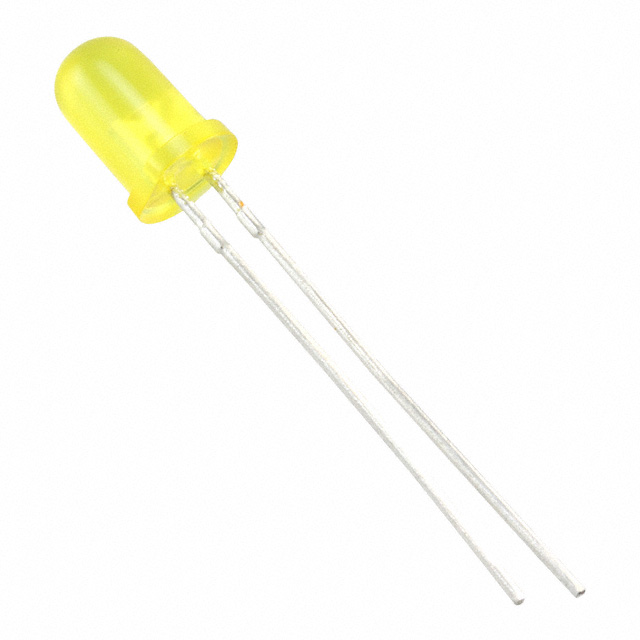
WP7113SYDKingbright
|
x 36 | |
|
|
4607X-101-331LFBourns Inc.
|
x 1 | |
|
|
PTV09A-4225U-B103Bourns Inc.
|
x 1 |

|
KiCad 9.0 |
|

|
arduino IDEArduino
|
Conways Game of Life Arduino Mega Extension
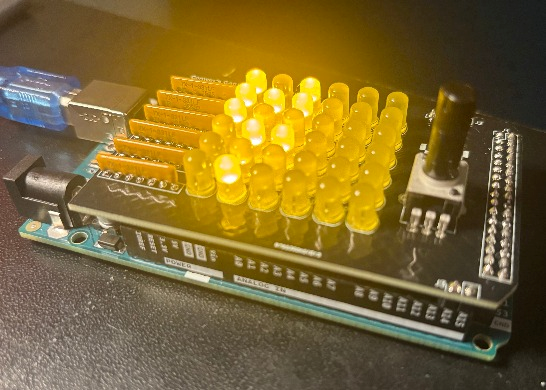
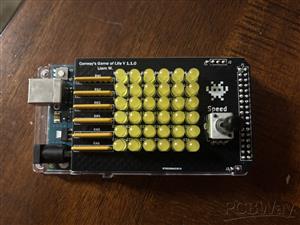
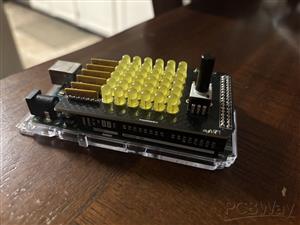
Ever find an old Arduino Mega in your drawers you're not sure what to do with? Well, now you have your answer! This project is a shield designed to fit onto the Arduino Mega development platform as a decorative conversation piece that plays Conways Game of Life! The shield contains 36 LEDs in a 6x6 grid, as well as a potentiometer input to adjust the speed at which the game is played. I originally got the idea after finding an old Arduino Mega in my dormitory closet for a previous class and trying to think of a use for it and I experimented with some of KiCAD's built in tools for this project, such as cross hatching and SVG decal import!
/*
 * Game of Life: SIZE x SIZE Serial & LED Desktop Companion
 * ULTIMATE VERSION: Adjustable constants and variations
 */

// --- ADJUSTABLE CONSTANTS ---
const int SIZE = 6;                     // The size of the grid of LEDs, make sure to adjust the array ledPins[]
const int MUTATION_CHANCE = 25;         // The % chance to revive any given dead cell on the mutation phase, triggered by stagnation
const int STAGNATION_THRESHOLD = 1;     // How many generations of the same grid before stagnation is triggered
const int FLIP_CHANCE = 50;            // The chance for ANY cell to randomly flip every generation, simulating a kind of "cosmic radiation" - in 0.01% chance intervals
const int GENERATION_INTERVAL = 500;    // The max time between generation updates (ms)
const bool DISPLAY_SERIAL = true;       // Whether or not to display the program output to the serial COM line for testing (true/false)
const bool STAGNATION_DETECTION = true; // Whether to detect stagnation, and mutate in turn
const int SERIAL_BAUD_RATE = 19200;     // The baud rate of the serial display, for testing (9600, 19200, 38400, 57600, are common rates - the higher the number, the faster data is transmitted)

// ----------------------------

const int ledPins[sq(SIZE)] =
{
  18, 19, 20, 21, 22, 23,
  24, 25, 26, 27, 28, 29,
  30, 31, 32, 33, 34, 35,
  36, 37, 38, 39, 40, 41,     // The grid to the left corresponds to the positioning of the pins on your display, adjust as needed
  42, 43, 44, 45, 46, 47,
  48, 49, 50, 51, 52, 53
};

bool grid[SIZE][SIZE];
bool nextGrid[SIZE][SIZE]; // Defines two 6x6 grids of empty data, to be calculated and compared by the program

bool history[3][SIZE][SIZE]; // An array of three past game states, which are used to detect repetition

int stagnationCounter = 0;
int potReading = 0;
unsigned long generation = 0; // The two counters responsible for counting the current state of the game

void setup()
{
  if(DISPLAY_SERIAL)
  {
  Serial.begin(SERIAL_BAUD_RATE); // Sets the serial baud rate for printing, if selected
  }

  for (int i = 0; i < sq(SIZE); i++) pinMode(ledPins[i], OUTPUT); // Initializes all pins to OUTPUT mode

  pinMode(A15, OUTPUT);
  digitalWrite(A15, HIGH); // Begins outputting 5V to the voltage divider potentiometer

  randomSeed(analogRead(A0)); // Seeds the pseudo-random function with analogRead()
  initGrid(); // Randomly initializes the grid
}

void loop()
{
  displayGrid(); // Displays the current grid

  if(STAGNATION_DETECTION)
  {
    if (isMatchingHistory() || isEmpty()) //If the current grid seems to match up with the grids previous history or is empty...
    {
     stagnationCounter++; // Counts the stagnation
    }
    else
    {
     stagnationCounter = 0; // Otherwise resets the counter
    }


    if (stagnationCounter > STAGNATION_THRESHOLD) // If the threshold has been breached...
    {
     if(DISPLAY_SERIAL)
     {
     Serial.println("--- Loop Detected: Mutating ---"); // Prints to the screen that stagnation has occurred...
     }

     delay(GENERATION_INTERVAL);

     mutate(); // Then mutates the board (revives a certain % of tiles)...

     stagnationCounter = 0; // And resets the counter
     return;
    }
  }

  saveToHistory(); // Saves the grid every turn

  computeNextGen(); // Computes the next state of the grid

  int potReading = analogRead(A14);
  int dynamicDelay = map(potReading, 0, 1023, 5, GENERATION_INTERVAL); // Map the reading to a  range (Min 10ms, Max GENERATION_INTERVALms)

  delay(dynamicDelay);

}

void initGrid()
{
  for (int y = 0; y < SIZE; y++)
  {
    for (int x = 0; x < SIZE; x++)
    {
      grid[y][x] = random(0, 2); // For each index in the grid, randomly sets it to 1 or 0
    }
  }

  clearHistory(); // Removes all history
}

void mutate()
{
  int revivedCount = 0; // A counter to display how many revived cells there are as a result of the function

  for (int y = 0; y < SIZE; y++)
  {
    for (int x = 0; x < SIZE; x++)
    {
      if (grid[y][x] == false) // For each cell in the array, checks if its dead...
      {
        if (random(0, 100) < MUTATION_CHANCE)
        {
          grid[y][x] = true; // If yes, it has a MUTATION_CHANCE % chance to revive itself

          if(DISPLAY_SERIAL)
          {
            revivedCount++; // Iterates counter if DISPLAY_SERIAL is selected
          }
        }
      }
    }
  }

  if(DISPLAY_SERIAL)
  {
  Serial.print("Mutation complete. Revived ");
  Serial.print(revivedCount); // Prints the amount of revived cells if DISPLAY_SERIAL is on
  Serial.println(" cells.");
  }

  clearHistory(); // Clears all prior array history
}

void saveToHistory()
{
  for (int i = 2; i > 0; i--)
  {
    memcpy(history[i], history[i-1], sizeof(grid)); // Shifts the saved arrays in the history arrays...
  }
  memcpy(history[0], grid, sizeof(grid)); // Then adds the current state of the grid to the history

}

void clearHistory()
{
  for(int i = 0; i < 3; i++)
  {
    for(int y  =0; y < SIZE; y++)
    {
      for(int x = 0; x < SIZE; x++) history[i][y][x] = false; // Sets each array in the saved history to null values
    }
  }
}

bool isMatchingHistory()
{
  for (int i = 0; i < 3; i++)
  {
    bool match = true; // A boolean representing whether the arrays match...

    for (int y = 0; y < SIZE; y++)
    {
      for (int x = 0; x < SIZE; x++)
      {
        if (grid[y][x] != history[i][y][x]) // Checks to see if they're matching, if not: returns false
        {
          match = false;
          break;
        }
      }
      if (!match) break; // Quits function if match was found to be false already
    }
    if (match) return true; // Returns true if they do match
  }
  return false; // Otherwise returns false
}

void computeNextGen()
{
  for (int y = 0; y < SIZE; y++)
  {
    for (int x = 0; x < SIZE; x++)
    {
      int neighbors = countNeighbors(x, y);

      bool newState;

      if (grid[y][x])
      {
        newState = (neighbors == 2 || neighbors == 3); // Using boolean logic...
      }
      else
      {
        newState = (neighbors == 3);                   // Program will determine what the new state of the cell should be...
      }

      if (random(0, 10000) < FLIP_CHANCE)
      {
        newState = !newState;                          // A built-in random chance function will have a FLIP_CHANCE % chance to flip the cell beforehand...
      }

      nextGrid[y][x] = newState;                       // And the program then sets each cell to its new state.
    }
  }
  memcpy(grid, nextGrid, sizeof(grid)); // Copies the next grid to the current grid
}

int countNeighbors(int x, int y)
{
  int count = 0;
  for (int i = -1; i <= 1; i++)
  {
    for (int j = -1; j <= 1; j++)
    {
      if (i == 0 && j == 0) continue;
      int col = (x + i + SIZE) % SIZE; // Counts the surrounding tiles of each cell, taking into account the size of the array
      int row = (y + j + SIZE) % SIZE;
      if (grid[row][col]) count++; // If there is a neighbour, iterates the neighbour count
    }
  }
  return count; //Returns its count
}

void displayGrid()
{
  if(DISPLAY_SERIAL)
  {
  Serial.print("\nGen: "); Serial.println(generation++);
  }

  for (int y = 0; y < SIZE; y++)
  {
    for (int x = 0; x < SIZE; x++)
    {
      digitalWrite(ledPins[y * SIZE + x], grid[y][x]); // Writes to each individual pin the elements of the current grid

      if(DISPLAY_SERIAL)
      {
      Serial.print(grid[y][x] ? "X " : ". "); // Displays a formatted serial table depending on whether the cell is on or off
      }
    }

    if(DISPLAY_SERIAL)
    {
    Serial.println(); // Line index for printing serial
    }
  }
}

bool isEmpty()
{
  for (int y = 0; y < SIZE; y++)
  {
    for (int x = 0; x < SIZE; x++) if (grid[y][x]) return false; // If any individual element is "alive" (1), returns false
  }
  return true; // Otherwise the array must be completely "dead," and returns as such
}
Conways Game of Life Arduino Mega Extension
Project images are for reference only. Actual production is based on the manufacturing files on the project page.
Please review the designer's notes (e.g., PCB thickness) and select the appropriate options.
PCBWay is not responsible
for issues caused by unsuitable parameter selections.
For more important ordering information, please refer to
Read More









Raspberry Pi 5 7 Inch Touch Screen IPS 1024x600 HD LCD HDMI-compatible Display for RPI 4B 3B+ OPI 5 AIDA64 PC Secondary Screen(Without Speaker)
BUY NOW


- Comments(0)
- Likes(3)
More by Liam Watson
-
SmallOLED - Live PC Stats, Animated Clocks & Audio Visualizer
771 0 3 -
"Talking Multimeter": Arduino-Based Speech Add-on for Multimeters with SCPI Protocol
437 0 1 -
Programmable Mist Maker - XIAO / QT PY Extension
2890 2 3 -
RadioHAT - Raspberry Pi radio development platform
2469 0 4 -
-
-
-
ARPS-2 – Arduino-Compatible Robot Project Shield for Arduino UNO
4552 0 6


















