High-performance board layout is not merely about transmitting signals faster—it is about ensuring they remain stable, continuous, and predictable throughout the entire channel. As edge rates push into the sub-nanosecond range, traces begin to act like transmission lines. Impedance discontinuities, fragmented reference planes, and extended loop paths can quickly lead to reflections, crosstalk, and unwanted electromagnetic interference (EMI).
To mitigate these signal integrity (SI) issues, engineers must take a systematic approach across three critical pillars: impedance matching, layer stackup architecture, and signal return management.
It is vital to distinguish general circuit impedance from transmission line characteristic impedance (Z0):
Lumped Circuit Impedance: Frequency-dependent (f), composed of resistance (R), inductive reactance (XL=2πfL), and capacitive reactance(XC=1/2πfC).
Characteristic Impedance (Z0): A distributed property determined by the trace geometry and dielectric parameters. For an ideal, lossless line: 
Where L0 and C0 represent distributed inductance and capacitance per unit length. In an ideal scenario, Z0 remains constant regardless of signal frequency.
When signal edges become extremely sharp (such as DDR4 clocks at 2400–3200 MHz), impedance mismatches trigger reflections. These reflections cause ringing, consume timing jitter budget, and can ultimately lead to bit errors. Most high-speed link failures—such as closed eye diagrams on USB 3.0, PCIe, or SerDes interfaces—stem from unmanaged impedance variations rather than schematic flaws.
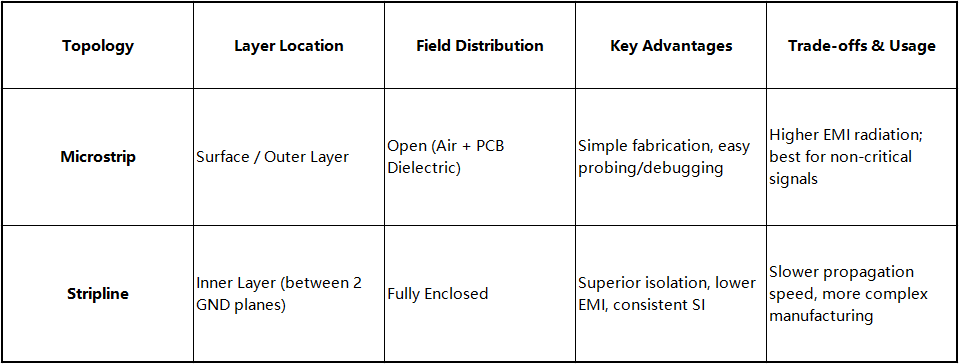
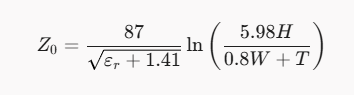
Single-ended impedance calculations provide clear design levers:
Microstrip:
Stripline:
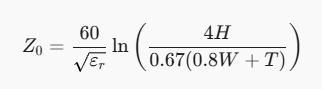
(Where Z0 = Target Impedance [e.g., 50Ω], $\varepsilon_r$ = Relative Permittivity, $H$ = Dielectric Height, $W$ = Trace Width, $T$ = Copper Thickness)
Physical Relationships:
Directly Proportional: Z₀ ∝ H (Greater height reduces parasitic capacitance, increasing impedance).
Inversely Proportional: Z₀ ∝ 1/W, 1/T, 1/εr (Wider traces, thicker copper, or higher εr boost capacitance, lowering impedance).
In practice, field solvers like Polar Si9000 are used to calculate precise trace geometry based on stackup specifications.
Standard fabrication typically guarantees a ±10% impedance tolerance (45Ω-55Ω for a nominal 50Ω line). While sufficient for lower data rates, ultra-high-speed SerDes operating at 10+ Gbps have very tight noise margins. In these critical channels, tightening tolerances to ±5% or ±3% helps prevent channel loss and reflection from closing the eye pattern.
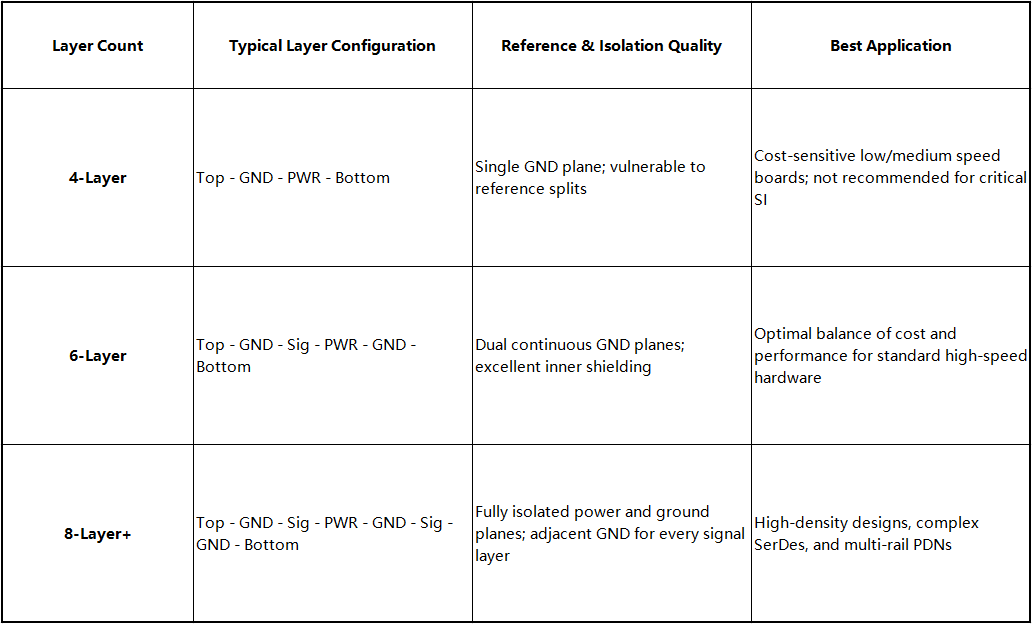
Layer stackup defines the physical foundation of the PCB. It assigns signal, power, and ground layers to establish clear signal reference paths, manage power delivery network (PDN) impedance, and ensure inter-layer isolation.
Every signal travels in a closed loop consisting of a forward path and a return path. While DC current follows the path of least resistance, high-frequency AC current strictly follows the path of least inductance. Consequently, return currents naturally flow on the reference plane directly beneath the signal trace.
Crossing a reference gap forces return current to detour around the obstacle, creating three distinct issues:



