




Otto Robot ESP32 based Xiaozhi AI Frameworks
YOU CAN BUY THIS KIT ON ALIEXPRESS
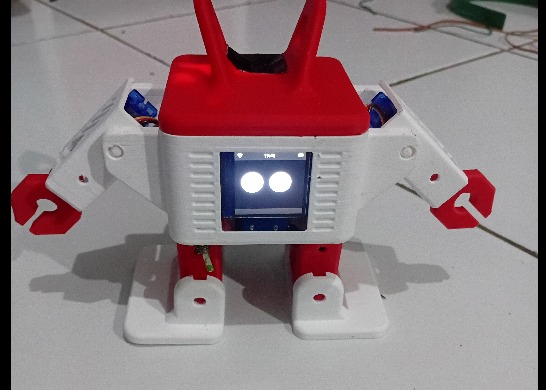
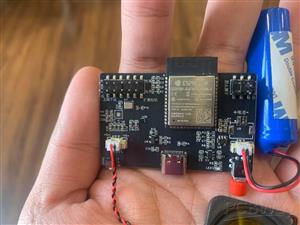
Otto is an open-source humanoid robot platform with various motion capabilities and interactive functions. This project implements the Otto robot's control system based on ESP32 and integrates Xiaozhi AI.
Otto robots have a wide range of movement capabilities, including walking, turning, jumping, swaying and other dance-like movements.
Recommended motion parameters
Low-speed operation : speed = 1200-1500 (suitable for precise control)
Medium speed : speed = 900-1200 (Recommended for daily use)
High-speed action : speed = 500-800 (performance and entertainment)
Small amplitude : amount = 10-30 (delicate movements)
Medium amplitude : amount = 30-60 (standard action)
Large range : amount = 60-120 (exaggerated performance)
action
All actions are invoked through a unified self.otto.actiontool, with actionthe action name specified via parameters.
MCP tool namedescribeParameter Descriptionself.otto.actionPerform robot actionsaction : Action name (required)
steps : Number of steps (1-100, default 3)
speed : Action speed (100-3000, lower value means faster, default 700)
direction : Direction parameter (1/-1/0, default 1, meaning varies depending on the action type)
amount : Amount of motion (0-170, default 30)
arm_swing : Arm swing amplitude (0-170, default 50)
Supported Action List
Basic movement actions :
walk- Walking (requires steps/speed/direction/arm_swing)
turn- Turn around (requires steps/speed/direction/arm_swing)
jump- Jump (requires steps/speed)
Special moves :
swing- Sway left and right (requires steps/speed/amount)
moonwalk- Moonwalk (requires steps/speed/direction/amount)
bend- Bending the body (requires steps/speed/direction)
shake_leg- Leg swing (requires steps/speed/direction)
updown- Up and down movement (requires steps/speed/amount)
whirlwind_leg- Whirlwind Kick (requires steps/speed/amount)
Fixed motion :
sit- Sit down (no parameters required)
showcase- Display actions (no parameters required, multiple actions can be executed in sequence)
home- Reset to initial position (no parameters required)
Hand movements (requires hand servo support, marked with *):
hands_up- Raise your hand (speed/direction required)*
hands_down- Let go (requires speed/direction)*
hand_wave- Wave (direction required)*
windmill- Windmill (requires steps/speed/amount)*
takeoff- Takeoff (requires steps/speed/amount)*
fitness- Fitness (requires steps/speed/amount)*
greeting- Greet someone (direction/steps required)*
shy- Shy (requires directions/steps)*
radio_calisthenics- Radio calisthenics (no parameters required)*
magic_circle- The Magic of Love Goes Round and Round (No Parameters Required)*
Note : Hand gestures marked with * are only available when a hand servo is configured.
System Tools
MCP tool namedescribeReturn value/descriptionself.otto.stopImmediately stop all actions and reset.Stop the current action and return to the initial position.self.otto.get_statusGet robot statusReturns to "moving" or "idle"self.otto.set_trimCalibrate individual servo positionservo_type : Servo type (left_leg/right_leg/left_foot/right_foot/left_hand/right_hand)
trim_value : Fine-tuning value (-50 to 50 degrees)self.otto.get_trimsGet the current servo fine-tuning settingsReturns all servo fine-tuning values in JSON format.self.otto.get_ipGet robot WiFi IP addressReturns the IP address and connection status in JSON format: {"ip":"192.168.x.x","connected":true}or{"ip":"","connected":false}self.battery.get_levelGet battery statusReturns battery percentage and charging status in JSON format.self.otto.servo_sequencesServo Sequence Self-ProgrammingIt supports segmented sequence transmission and both normal mover and oscillator modes. See the detailed explanation in the code comments.
Note : homeThe (reset) action self.otto.actionis invoked through the tool, with the following parameters {"action": "home"}.
Parameter Description
self.otto.actionTool parameter descriptions:
action (required): Action name. Supported actions are listed in the "List of Supported Actions" above.
steps : The number of steps/attempts for the action (1-100, default 3). A larger value means a longer action duration.
speed : Action execution speed/cycle (100-3000, default 700), the smaller the value, the faster.
Most actions: 500-1500 milliseconds
Special maneuvers may vary (e.g., whirlwind kick: 100-1000, takeoff: 200-600, etc.).
direction : Direction parameter (-1/0/1, default 1), the meaning varies depending on the action type:
Movement actions (walk/turn): 1 = forward/left turn, -1 = backward/right turn
Directional movements (bend/shake_leg/moonwalk): 1 = left, -1 = right
Hand gestures (hands_up/hands_down/hand_wave/greeting/shy): 1 = left hand, -1 = right hand, 0 = both hands (0 is supported only for hands_up/hands_down)
amount : Range of motion (0-170, default 30), the larger the value, the greater the range of motion.
arm_swing : Arm swing amplitude (0-170, default 50), used only for walk/turn actions, 0 indicates no swing.
motion control
After each action is completed, the robot will automatically return to its initial position (home) to prepare for the next action.
Exceptions : The sit(sit down) and showcase(display) actions will not automatically reset after execution.
All parameters have reasonable default values, and parameters that do not need to be customized can be omitted.
The action is executed in a background task and will not block the main program.
Supports action queues, allowing multiple actions to be executed consecutively.
Hand gestures require a hand servo to function; without a hand servo, the gestures will be skipped.
MCP工具调用示例
// 向前走3步(使用默认参数)
{"name": "self.otto.action", "arguments": {"action": "walk"}}
// 向前走5步,稍快一些
{"name": "self.otto.action", "arguments": {"action": "walk", "steps": 5, "speed": 800}}
// 左转2步,大幅度摆动手臂
{"name": "self.otto.action", "arguments": {"action": "turn", "steps": 2, "arm_swing": 100}}
// 摇摆舞蹈,中等幅度
{"name": "self.otto.action", "arguments": {"action": "swing", "steps": 5, "amount": 50}}
// 跳跃
{"name": "self.otto.action", "arguments": {"action": "jump", "steps": 1, "speed": 1000}}
// 太空步
{"name": "self.otto.action", "arguments": {"action": "moonwalk", "steps": 3, "speed": 800, "direction": 1, "amount": 30}}
// 挥左手打招呼
{"name": "self.otto.action", "arguments": {"action": "hand_wave", "direction": 1}}
// 展示动作(串联多个动作)
{"name": "self.otto.action", "arguments": {"action": "showcase"}}
// 坐下
{"name": "self.otto.action", "arguments": {"action": "sit"}}
// 大风车动作
{"name": "self.otto.action", "arguments": {"action": "windmill", "steps": 10, "speed": 500, "amount": 80}}
// 起飞动作
{"name": "self.otto.action", "arguments": {"action": "takeoff", "steps": 5, "speed": 300, "amount": 40}}
// 广播体操
{"name": "self.otto.action", "arguments": {"action": "radio_calisthenics"}}
// 复位到初始位置
{"name": "self.otto.action", "arguments": {"action": "home"}}
// 立即停止所有动作并复位
{"name": "self.otto.stop", "arguments": {}}
// 获取机器人IP地址
{"name": "self.otto.get_ip", "arguments": {}}
Voice command examples
"Walk forward" / "Walk forward 5 steps" / "Move forward quickly"
"Turn left" / "Turn right" / "Turn around"
"Jump" / "Take a jump"
"Swing" / "Swing dance" / "Dancing"
"Moonwalk"
"Whirlwind Kick" / "Whirlwind Kick Move"
"Sit down" / "Sit down and rest"
"Demonstrate the action" / "Perform a scene"
"Wave" / "Wave to say hello"
"Raise your hand" / "Raise both hands" / "Let go"
"Big Windmill" / "Make a Big Windmill"
"Takeoff" / "Ready for takeoff"
"Fitness" / "Doing fitness exercises"
"Greeting" / "Greeting gestures"
"Shy" / "Shy Actions"
"Radio calisthenics" / "Doing radio calisthenics"
"The Magic of Love Goes Round and Round" / "Going Round and Round"
"Stop" / "Cease"
Note : Xiaozhi controls the robot's actions by creating new tasks in the background, and can still accept new voice commands during the execution of the action. Otto can be stopped immediately with the "Stop" voice command.
Otto Robot ESP32 based Xiaozhi AI Frameworks
Project images are for reference only. Actual production is based on the manufacturing files on the project page.
Please review the designer's notes (e.g., PCB thickness) and select the appropriate options.
PCBWay is not responsible
for issues caused by unsuitable parameter selections.
For more important ordering information, please refer to
Read More









Raspberry Pi 5 7 Inch Touch Screen IPS 1024x600 HD LCD HDMI-compatible Display for RPI 4B 3B+ OPI 5 AIDA64 PC Secondary Screen(Without Speaker)
BUY NOW


- Comments(1)
- Likes(2)
More by Gugun Gumilar
-
 ESP-HI: Integrating Xiaozhi AI into a Robot Dog
Project OverviewYOU CAN BUY THIS KIT ON ALI EXPRESSESP-Hi is an ultra-low-cost AI conversational rob...
ESP-HI: Integrating Xiaozhi AI into a Robot Dog
Project OverviewYOU CAN BUY THIS KIT ON ALI EXPRESSESP-Hi is an ultra-low-cost AI conversational rob...
-
 Otto Robot ESP32 based Xiaozhi AI Frameworks
YOU CAN BUY THIS KIT ON ALIEXPRESSOtto is an open-source humanoid robot platform with various motion...
Otto Robot ESP32 based Xiaozhi AI Frameworks
YOU CAN BUY THIS KIT ON ALIEXPRESSOtto is an open-source humanoid robot platform with various motion...
-
 Easy Flyback Music
This is my design for easy flyback from franzoli electronics website
Easy Flyback Music
This is my design for easy flyback from franzoli electronics website
-
 Suntik PWM
PWM Module for Modification ATX Power Supply to Variabe power supply
Suntik PWM
PWM Module for Modification ATX Power Supply to Variabe power supply
-
 PCB based Tesla Coil GaN edition
Tesla Coil with pcb as secondary coil, you can read the documentation at https://hackaday.io/project...
PCB based Tesla Coil GaN edition
Tesla Coil with pcb as secondary coil, you can read the documentation at https://hackaday.io/project...
-
 Musical Flyback Driver
https://belajarelektrons.blogspot.com/2015/01/musical-flyback.html
Musical Flyback Driver
https://belajarelektrons.blogspot.com/2015/01/musical-flyback.html
-
 Mini SSTC12V
This time I tried to make a 12 Volt Mini SSTC the reason is simple because it is safer than SSTC whi...
Mini SSTC12V
This time I tried to make a 12 Volt Mini SSTC the reason is simple because it is safer than SSTC whi...
-
SmallOLED - Live PC Stats, Animated Clocks & Audio Visualizer
706 0 3 -
"Talking Multimeter": Arduino-Based Speech Add-on for Multimeters with SCPI Protocol
398 0 1 -
Programmable Mist Maker - XIAO / QT PY Extension
2844 2 3 -
RadioHAT - Raspberry Pi radio development platform
2436 0 4 -
-
-
-
ARPS-2 – Arduino-Compatible Robot Project Shield for Arduino UNO
4519 0 6


















