



|
|
ESP32C3-XIAOSeeed Technology
|
x 1 | |
|
|
OLED Display 0.96 I2C 128x64 |
x 1 | |
|
|
Push ButtonSame Sky
|
x 2 |

|
arduino IDEArduino
|
Gemini on Xiao ESP32 C3
In this project,
I brought Google Gemini AI responses on a Mini 128*64OLED display using the Seeed Studio Xiao ESP32-C3. With just a few components, I created a pocket-sized AI terminal that fetches intelligent replies from Gemini and displays them very smoothy with text wrapping, and button-based navigation—no trouble and just direct & clear output.
I built this because I always wanted to build something very simple, intelligent, and embedded —A compact AI interface without relying much on a phone or PC screen. This project is inspired by chat-based AI like Gemini & ChatGPT. So, I decided to make a Pocket AI assistant that communicates only through text, entirely on a microcontroller with a small OLED.
I used simple Hardware which are-
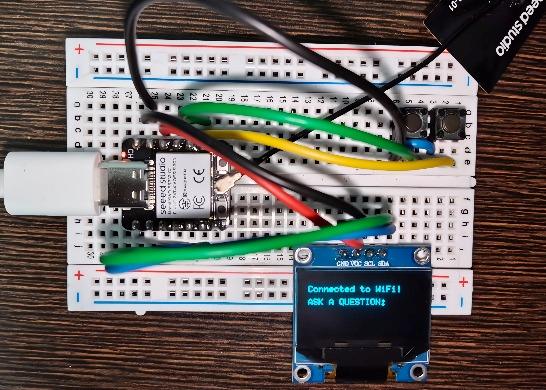
- Xiao ESP32-C3 (by Seeed Studio) – compact, Wi-Fi enabled board
- 0.96" I2C OLED Display – 128x64 resolution
- 2 Push Buttons – for scrolling up and down
- Breadboard & Jumpers
- USB-C Cable
How I Built It-
1. Display Setup & Fonts
I used the U8g2 library for controlling the OLED display. It allows clean fonts and buffer-based drawing, ideal for simple text displaying and animations.
2. Animations & UI
I added:
A “Developed By - IoT HUB” splash animation with slow seesaw movement
A blinking “Loading…” animation while fetching answers
Word-wrap that avoids breaking words mid-line
3. Wi-Fi & Gemini API
Using the ESP32-C3’s Wi-Fi capabilities, I connected my local network and used HTTPClient to query Gemini using its public API.
The responses are parsed using ArduinoJson, and displayed on the screen—3 lines at a time, with vertical scroll using two buttons.
4. User Interaction
1) Input questions via Serial Monitor
2) See responses on OLED with clean formatting
3) Scroll up and down using GPIO buttons
How You Can Build It -
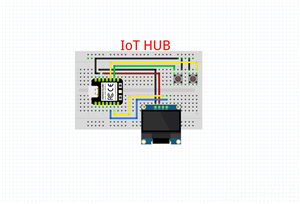
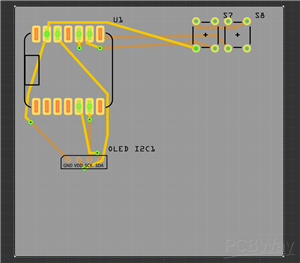
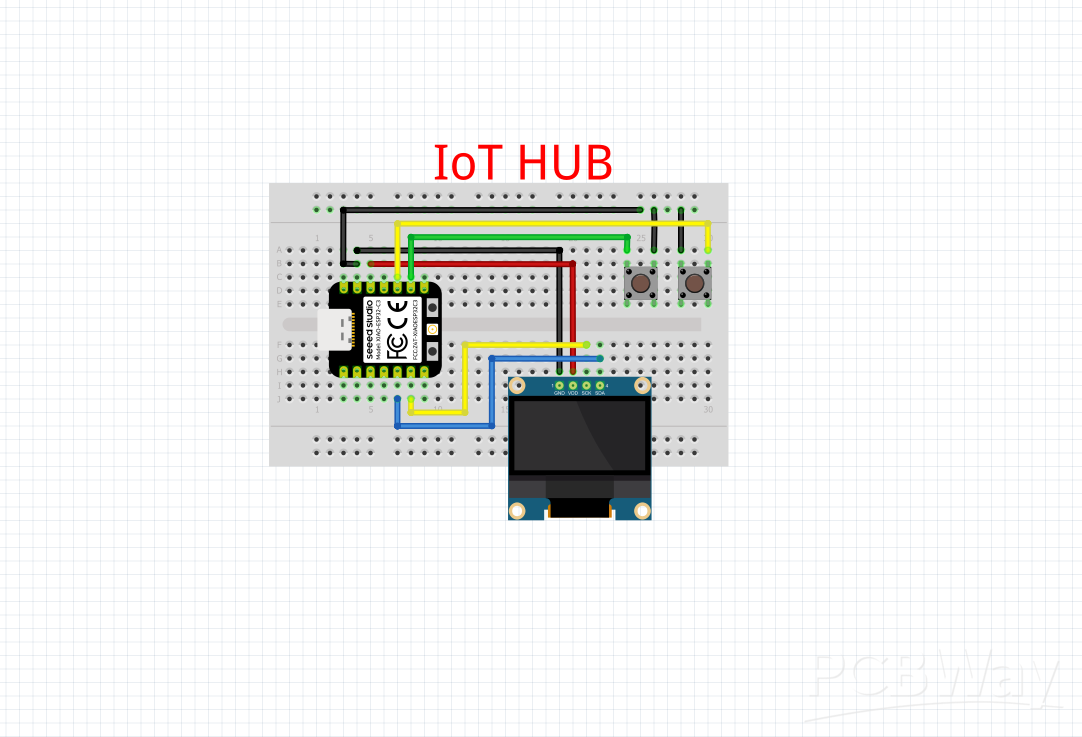
Wire the OLED to SDA = GPIO6, SCL = GPIO7 on Xiao ESP32-C3
Connect two push buttons to GPIO8 and GPIO9 (with internal pullups)
Flash the provided Arduino code with your API and WiFi SSID with Password
Enter a question in the Serial Monitor and get the AI response directly on your display
Use the buttons to scroll through longer answers
Libraries used
U8g2 for OLED
WiFi & HTTPClient for network communication
ArduinoJson for parsing Gemini’s JSON response
What you can integrate by yourself ?
You can -
Add voice-to-text input using a microphone module
Save answer history on SD card using SD card module
Add menu and other multitasking features
This is a must TRY PROJECT SO-
Try it, fork it, and feel free to improve it!
/*Basic code for using Gemini AI on mini display with the help of tiny powerful devlopment board- Xiao ESP32 C3 by Seeed Studio.
You can also make this by uploading this code to you Xiao ESP32 C3 board and by following the other steps on mentioned hackster.io*/

//Devloped exclusively by IoT HUB

#include <WiFi.h>
#include <HTTPClient.h>
#include <ArduinoJson.h>
#include <U8g2lib.h>
#include <vector>

#define SCROLL_DOWN_PIN 9
#define SCROLL_UP_PIN   8

const char *ssid = "YOUR WIFI SSID";
const char *password = "YOUR SSID PASSWORD";

const String apiKey = "Your Gemini API";
const String geminiUrl = "https://generativelanguage.googleapis.com/v1beta/models/gemini-1.5-flash-latest:generateContent?key=" + apiKey;

// OLED (SDA=6, SCL=7 for Xiao ESP32-C3)
U8G2_SSD1306_128X64_NONAME_F_HW_I2C u8g2(U8G2_R0, /* reset=*/U8X8_PIN_NONE, /* clock=*/7, /* data=*/6);

std::vector<String> wrappedAnswerLines;
std::vector<String> wrappedQuestionLines;
String displayedQuestion = "";
int currentPage = 0;
bool lastUpState = HIGH, lastDownState = HIGH;

// Clean intro animation with top and bottom line bouncing
void showStartupAnimation() {
  unsigned long startTime = millis();
  u8g2.setFont(u8g2_font_6x10_tr);

  while (millis() - startTime < 2000) {
    int offset = 10 * sin((millis() - startTime) / 300.0);
    u8g2.clearBuffer();
    u8g2.drawStr(25 + offset, 18, "Developed By -");
    u8g2.drawStr(35 - offset, 48, "IoT HUB");
    u8g2.sendBuffer();
    delay(50);
  }
}

// Loading animation: blinking dots
void showLoadingAnimationWhileWaiting() {
  int dotState = 0;
  unsigned long lastUpdate = 0;

  while (WiFi.status() == WL_CONNECTED && !Serial.available()) {
    if (millis() - lastUpdate > 300) {
      lastUpdate = millis();
      dotState = (dotState + 1) % 4;
      u8g2.clearBuffer();
      u8g2.setFont(u8g2_font_6x10_tr);
      String loadingText = "Loading";
      for (int i = 0; i < dotState; i++) loadingText += ".";
      u8g2.drawStr(40, 32, loadingText.c_str());
      u8g2.sendBuffer();
    }
    delay(10);
  }
}

void setup() {
  Serial.begin(115200);
  delay(1000);

  pinMode(SCROLL_DOWN_PIN, INPUT_PULLUP);
  pinMode(SCROLL_UP_PIN, INPUT_PULLUP);

  u8g2.begin();
  u8g2.setFont(u8g2_font_6x10_tr);

  showStartupAnimation();

  u8g2.clearBuffer();
  u8g2.drawStr(0, 15, "Connecting to WiFi...");
  u8g2.sendBuffer();

  WiFi.begin(ssid, password);
  while (WiFi.status() != WL_CONNECTED) {
    delay(500);
    Serial.print(".");
  }

  Serial.println("\nConnected to WiFi");
  u8g2.clearBuffer();
  u8g2.drawStr(0, 15, "Connected to WiFi!");
  u8g2.drawStr(0, 30, "ASK A QUESTION:");
  u8g2.sendBuffer();

  Serial.println("Ask a question:");
}

void loop() {
  bool downState = digitalRead(SCROLL_DOWN_PIN);
  bool upState = digitalRead(SCROLL_UP_PIN);

  if (downState == LOW && lastDownState == HIGH) {
    scrollAnswerDown(); delay(200);
  }
  if (upState == LOW && lastUpState == HIGH) {
    scrollAnswerUp(); delay(200);
  }
  lastDownState = downState;
  lastUpState = upState;

  if (Serial.available()) {
    String userInput = Serial.readStringUntil('\n');
    userInput.trim();

    if (userInput.length() > 0) {
      displayedQuestion = userInput;
      displayedQuestion.toUpperCase();  // Force ALL CAPS

      showLoadingAnimationWhileWaiting();

      String answer = askGemini(userInput);

      if (answer.length() > 0) {
        Serial.println("Answer: " + answer);
        prepareAnswerLines(answer);
        prepareQuestionLines(displayedQuestion);
      } else {
        Serial.println("Failed to get an answer.");
        prepareAnswerLines("Error: No answer.");
        prepareQuestionLines(displayedQuestion);
      }

      currentPage = 0;
      displayCurrentPage();
      Serial.println("\nAsk another question:");
    }
  }
}

void scrollAnswerDown() {
  if (wrappedAnswerLines.empty()) return;
  int totalPages = (wrappedAnswerLines.size() + 2) / 3;
  currentPage = (currentPage + 1) % totalPages;
  displayCurrentPage();
}

void scrollAnswerUp() {
  if (wrappedAnswerLines.empty()) return;
  int totalPages = (wrappedAnswerLines.size() + 2) / 3;
  currentPage = (currentPage - 1 + totalPages) % totalPages;
  displayCurrentPage();
}

void wrapTextToLines(String text, std::vector<String>& linesOut, int maxLen = 22) {
  linesOut.clear();
  String word, line;

  for (int i = 0; i < text.length(); i++) {
    char c = text[i];
    if (c == ' ' || c == '\n') {
      if (line.length() + word.length() > maxLen) {
        linesOut.push_back(line);
        line = word + " ";
      } else {
        line += word + " ";
      }
      word = "";
      if (c == '\n' && line.length() > 0) {
        linesOut.push_back(line);
        line = "";
      }
    } else {
      word += c;
    }
  }
  if (word.length()) {
    if (line.length() + word.length() > maxLen) {
      linesOut.push_back(line);
      line = word;
    } else {
      line += word;
    }
  }
  if (line.length()) linesOut.push_back(line);
}

void prepareAnswerLines(String text) {
  wrapTextToLines(text, wrappedAnswerLines, 22);
}

void prepareQuestionLines(String text) {
  wrapTextToLines(text, wrappedQuestionLines, 22);
}

void displayCurrentPage() {
  u8g2.clearBuffer();
  u8g2.setFont(u8g2_font_6x10_tr);

  // Show question (up to 2 lines)
  if (wrappedQuestionLines.size() > 0)
    u8g2.drawStr(0, 10, wrappedQuestionLines[0].c_str());
  if (wrappedQuestionLines.size() > 1)
    u8g2.drawStr(0, 20, wrappedQuestionLines[1].c_str());

  // Show answer (3 lines)
  int startLine = currentPage * 3;
  for (int i = 0; i < 3; i++) {
    int idx = startLine + i;
    if (idx < wrappedAnswerLines.size()) {
      u8g2.drawStr(0, 35 + i * 10, wrappedAnswerLines[idx].c_str());
    }
  }

  u8g2.sendBuffer();
}

String askGemini(String question) {
  HTTPClient http;
  http.begin(geminiUrl);
  http.addHeader("Content-Type", "application/json");

  String payload = "{\"contents\":[{\"parts\":[{\"text\":\"" + question + "\"}]}]}";
  int httpCode = http.POST(payload);
  String response = http.getString();
  String result = "";

  if (httpCode == 200) {
    DynamicJsonDocument doc(4096);
    if (!deserializeJson(doc, response)) {
      JsonArray candidates = doc["candidates"];
      if (candidates.size() > 0) {
        result = candidates[0]["content"]["parts"][0]["text"].as<String>();
      } else {
        result = "No response.";
      }
    } else {
      result = "JSON parse error.";
    }
  } else {
    Serial.print("Request error: ");
    Serial.println(httpCode);
  }

  http.end();
  return result;
}


//An original *IoT HUB* creation
Gemini on Xiao ESP32 C3









Raspberry Pi 5 7 Inch Touch Screen IPS 1024x600 HD LCD HDMI-compatible Display for RPI 4B 3B+ OPI 5 AIDA64 PC Secondary Screen(Without Speaker)
BUY NOW

- Comments(0)
- Likes(2)
More by Sarthak Mathur
-
Programmable Mist Maker - XIAO / QT PY Extension
2226 2 2 -
RadioHAT - Raspberry Pi radio development platform
1916 0 4 -
-
-
-
ARPS-2 – Arduino-Compatible Robot Project Shield for Arduino UNO
4093 0 6 -
A Compact Charging Breakout Board For Waveshare ESP32-C3
4858 3 8 -
AI-driven LoRa & LLM-enabled Kiosk & Food Delivery System
5645 2 2 -





















