



Easy Hannukah Menorah project
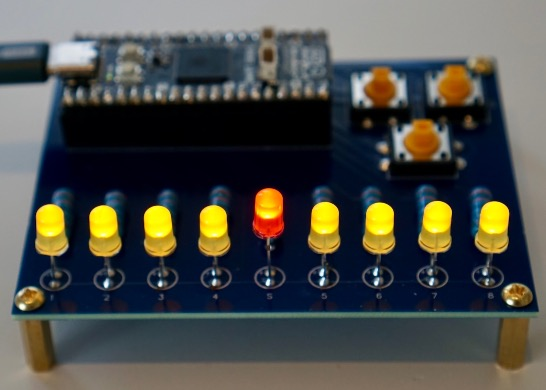
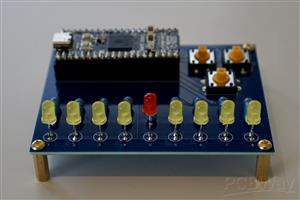
A really simple to solder project for Hannukah Menorah. I think anyone comfortable with basic soldering and can hack basic code in python will be OK with it.
I built a few of those with perfboards and they made for popular gifts, so I ended up creating a simple PCB to make it a much easier and more professional looking Menorah.
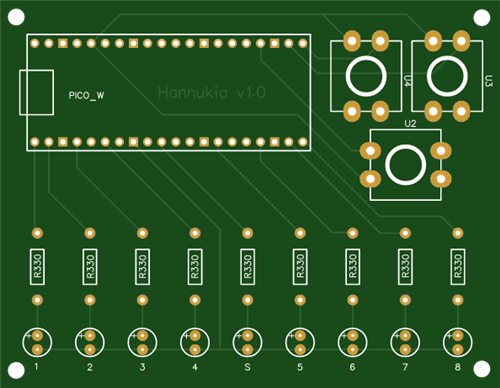
I used three buttons for manually moving the candles up and down, and the 2rd button below the first two to grab current date and compare to stored Hannukah dates and set the candles automatically.
It can be used with a basic Pi Pico which is how I initially used it.
I later used a Pimoroni Pico Plus 2 W for two reasons:
- USB-C is a lot more convenient than the micro-USB the Raspberry Pi Pico is still insisting on using
- Wifi - I added a 3rd button to connect to the wifi, grab the current date/time using NTP, and set the candle count automatically.
I like to use 1 watt resistors as they are nice and chunky and look cool on the board. Completely an overkill from a current perspective, but if you are reading this so far, necessity has nothing to do with this project :)
You will also need 5mm LEDs - cheap ones you find online in bulk work well, just get the colours you want. I used 220 ohm or 470 ohm resistors - I find LEDs are not fussy even 1k or 2k may work.
LEDs do have a positive and negative - see the board for where the + and - go. Long leg (plus) goes towards where the Pico sits.
You may want to get 20 pin stacking headers if you want to socket your Pi Pico or compatible and of course pins for your pico if your Pico needs them.
You will also need 12x12x7.3 switches which fit nicely in my opinion.
I attached the code I used with the Pimoroni Pico above. Without wifi and using a regular Raspberry Pi Pico, you can obviously dramatically simplify the code. There is also some weird button behaviour with the Pimoroni for recognising button presses which made my code worse. I am no developer as you can tell :)
Bottom line if you solder this thing correctly, just figure out the various output pins and button pins, follow the basic Raspberry Pi Pico examples for playing with a button and a LED - if you know basic programming you will make it work.
Also pasted the basic code which works with an original Pico with no wifi as a comment. All the indents get messed up with the copy/paste, but you will figure it out.
import time
from machine import Pin
import network
import requests
from secrets import WIFI_SSID, WIFI_PASSWORD
import ntptime
import utime

candle0=Pin(7,Pin.OUT, value=0)
candle1=Pin(0,Pin.OUT, value=0)
candle2=Pin(1,Pin.OUT, value=0)
candle3=Pin(2,Pin.OUT, value=0)
candle4=Pin(4,Pin.OUT, value=0)
candle5=Pin(10,Pin.OUT, value=0)
candle6=Pin(13,Pin.OUT, value=0)
candle7=Pin(14,Pin.OUT, value=0)
candle8=Pin(15,Pin.OUT, value=0)

def days_between(d1, d2):
    d1 += (1, 0, 0, 0, 0)  # ensure a time past midnight
    d2 += (1, 0, 0, 0, 0)
    return utime.mktime(d1) // (24*3600) - utime.mktime(d2) // (24*3600)

def toggle_candle(candle_number, status):
    if candle_number==0:
        candle0.value(status)
    if candle_number==1:
        candle1.value(status)
    if candle_number==2:
        candle2.value(status)
    if candle_number==3:
        candle3.value(status)
    if candle_number==4:
        candle4.value(status)
    if candle_number==5:
        candle5.value(status)
    if candle_number==6:
        candle6.value(status)
    if candle_number==7:
        candle7.value(status)
    if candle_number==8:
        candle8.value(status)

def wifi_connect():
    # connect to wifi
    print("trying to cnnect to wifi")
    wifi_blink = False
    wlan = network.WLAN(network.STA_IF)
    wlan.active(True)
    #wlan.disconnect()
    wlan.connect(WIFI_SSID, WIFI_PASSWORD)
    connection_count=0
    attempt=1
    while (wlan.isconnected() is False) and (connection_count<12):
        print('Waiting for connection...')
        toggle_candle(0,wifi_blink)
        wifi_blink = not wifi_blink
        time.sleep(1)
        connection_count = connection_count + 1
        if connection_count==12 and attempt<3:
            print("could not connect first time, let's try once more")
            wlan.disconnect()
            time.sleep(0.5)
            wlan.active(False)
            time.sleep(0.5)
            wlan = network.WLAN(network.STA_IF)
            time.sleep(0.5)
            wlan.active(True)
            time.sleep(0.5)
            wlan.connect(WIFI_SSID, WIFI_PASSWORD)
            connection_count=0
            attempt=attempt+1
    if connection_count==12:
        print("probably not connected")
    else:
        print("should be connected")
        print(wlan.ipconfig("addr4"))

def get_ntp_time():
    # NTP servers "uk.pool.ntp.org", "1.europe.pool.ntp.org"
    ntptime.host = "1.europe.pool.ntp.org"
    try:
      print("Local time before synchronization:%s" %str(time.localtime()))
      #make sure to have internet connection
      ntptime.settime()
      print("Local time after synchronization:%s" %str(time.localtime()))
    except:
      print("Error syncing time")

def light_candles(candles):
    for candle in range (0, 9):
        toggle_candle(candle,False)
    for candle in range (0, candles+1):
        toggle_candle(candle,True)
        time.sleep(0.2)

def auto_set():
    year = 2025
    candles = 9
    while (candles > 8 and year < 2031):
        print(time.localtime())
        candles = days_between(date_today, hannukah_dates[year-2025])+1
        print("year")
        print(year)
        year=year+1
    if year < 2031:
        if candles < 0:
            candles = 0
            print("candles negative")
        print("valid candles")
        print(candles)
        light_candles(candles)
        return candles
    else:
        print("could not find next valid Hannukah date")

print("initial light display")
for x in range (1,5):
    toggle_candle(x,True)
    toggle_candle(9-x,True)
    time.sleep(0.3)
toggle_candle(0,True)
time.sleep(0.3)
for x in range (1,5):
    toggle_candle(x,False)
    toggle_candle(9-x,False)
    time.sleep(0.3)
print("ready")

candles=0

hannukah_dates = [(2025, 12, 14), (2026, 12, 4), (2027, 12, 24), (2028, 12, 12), (2029, 12, 1), (2030, 12, 20)]


while True:
    button_up=Pin(17,Pin.IN, Pin.PULL_DOWN)
    button_down=Pin(16,Pin.IN, Pin.PULL_DOWN)
    button_auto=Pin(18,Pin.IN, Pin.PULL_DOWN)
    if button_up.value():
        print("up")
        button_up=Pin(17,Pin.OUT)
        if candles < 8:
            candles = candles + 1
            print(candles)
            toggle_candle(candles,True)
        time.sleep(0.2)
    if button_down.value():
        print("down")
        button_up=Pin(16,Pin.OUT)
        if candles >= 0:
            toggle_candle(candles,False)
            candles -= 1
            print(candles)
        time.sleep(0.2)
    if button_auto.value():
        print("auto")
        button_up=Pin(18,Pin.OUT)
        wifi_connect()
        get_ntp_time()
        date_today = (time.localtime()[0], time.localtime()[1], time.localtime()[2])
        candles = auto_set()
Easy Hannukah Menorah project
Project images are for reference only. Actual production is based on the manufacturing files on the project page.
Please review the designer's notes (e.g., PCB thickness) and select the appropriate options.
PCBWay is not responsible
for issues caused by unsuitable parameter selections.
For more important ordering information, please refer to
Read More









Raspberry Pi 5 7 Inch Touch Screen IPS 1024x600 HD LCD HDMI-compatible Display for RPI 4B 3B+ OPI 5 AIDA64 PC Secondary Screen(Without Speaker)
BUY NOW


- Comments(2)
- Likes(0)
 More by Engineer
-
SmallOLED - Live PC Stats, Animated Clocks & Audio Visualizer
836 0 3 -
"Talking Multimeter": Arduino-Based Speech Add-on for Multimeters with SCPI Protocol
477 0 1 -
Programmable Mist Maker - XIAO / QT PY Extension
2952 2 3 -
RadioHAT - Raspberry Pi radio development platform
2498 0 4 -
-
-
-
ARPS-2 – Arduino-Compatible Robot Project Shield for Arduino UNO
4580 0 6


















