



|
ONSHAPE |
|

|
Visual Studio CodeMicrosofe
|
|

|
ESP-PROGEspressif
|
A custom 3D-printed Bus Map Tracker
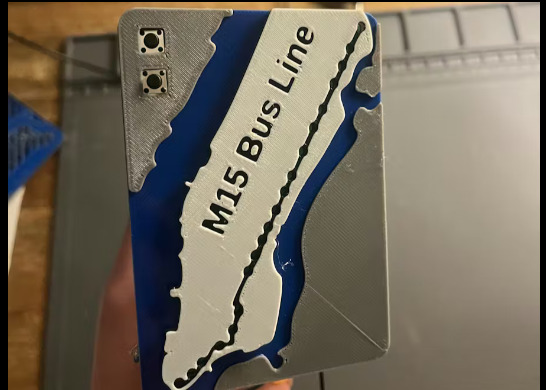
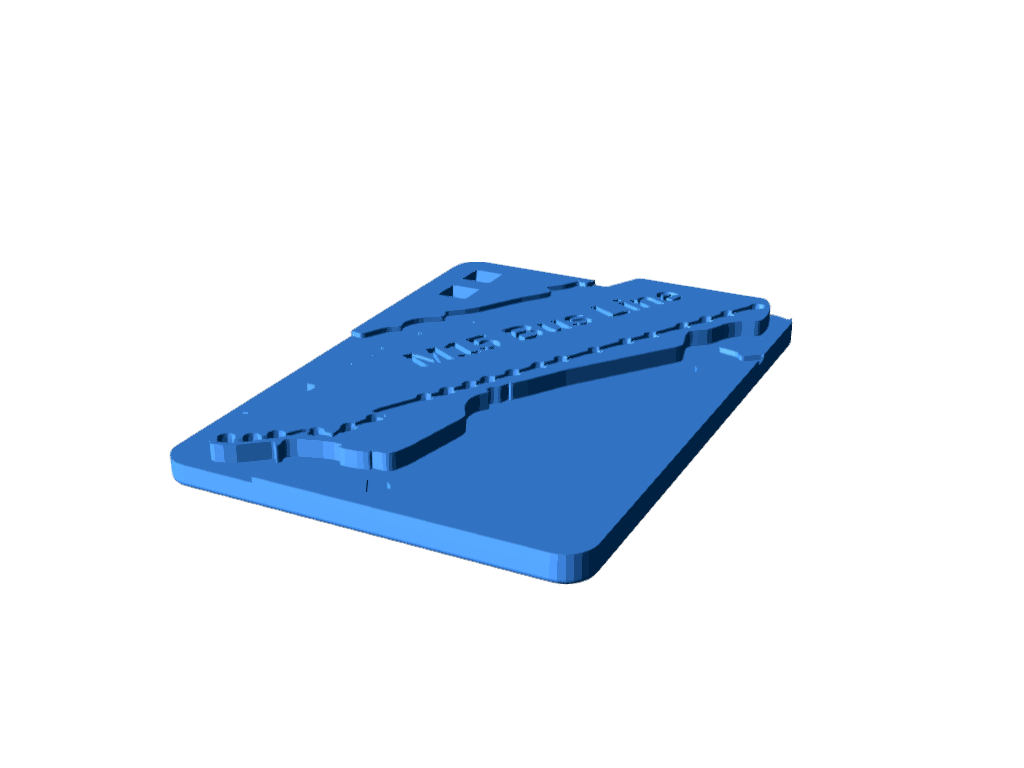
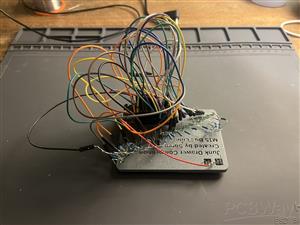
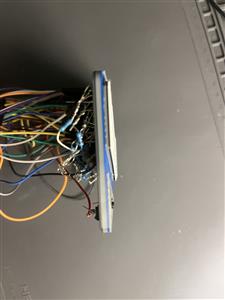
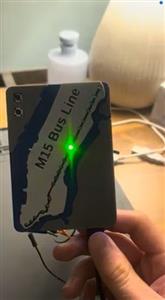
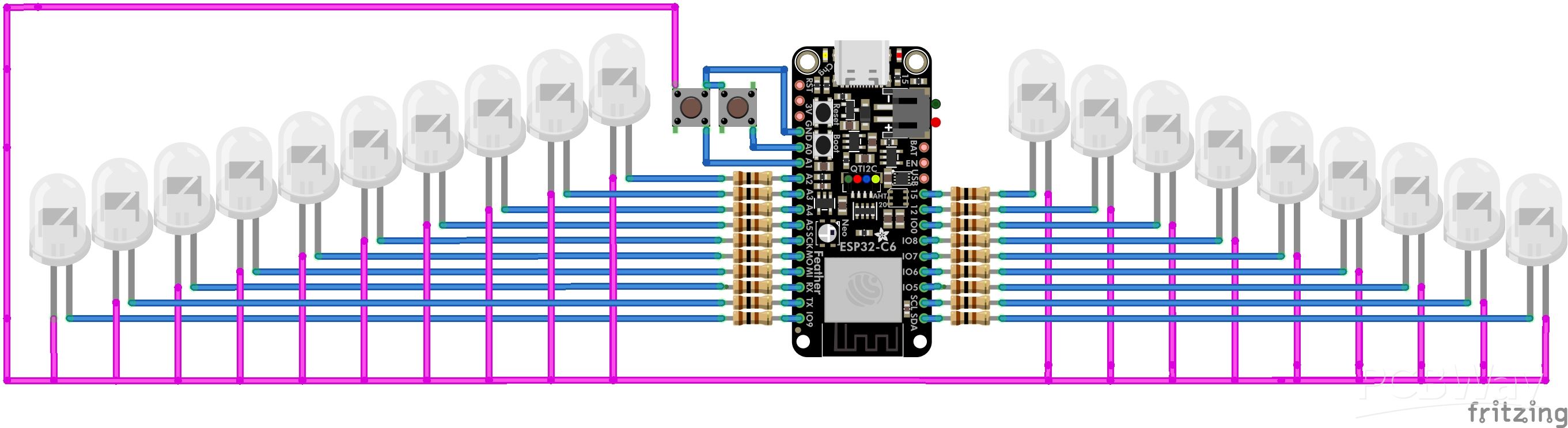
This year I started taking the M15 bus line to my classes at least every day. I wanted to make a real time tracker of the bus that is easy to view. I initially considered creating a PCB for this, and I might someday, but I decided that it would be better to make this project with components I already had. The project came together very quickly, but the code was the most frustrating part, a common theme for all of my projects. I tried to make it compatible with other bus systems, so if someone wanted to emulate this project, they could have it track a different bus. The greatest flaw of this project was the use of DuPont cables connecting to LED pins. This is because they have a tendency to fall off, and can be quite finicky, as well as creating quite the rats nest of wires! Ultimately, this was a fun and quick project that used items I already had, which was a refresher from doing CAD all day, while waiting for orders to ship. I 3D printed the map on the Bambu Labs A1 mini, and I was very happy with the results. While I don't have a AMS, it is still possible to print multi-color prints by manually swapping the colors. This is very time consuming, however, and it increases the chance of parts failing, which happened to me twice, as shown in the picture.
The code written for the ESP32 development board must be compiled using ESP-IDF. To install it, follow the instructions on the official ESP-IDF website. Then move the project source code into the downloaded folder.
Open the code in the main folder and edit the #define variables (the ones with comments) to your own. Follow the comments, which will guide you, and help you setup WIFI.
In addition to this you must include the files that are required for Protobuf decoding. Protobuf if the file format that the GTFS API (the bus tracker) downloads data in, and you must use a files compiled on your own computer to parse them. The goal end result of this is for two files named gtfs-realtime.pb.cc and gtfs-realtime.pb.h. Once you have these files, put them in a new folder named "components", and exit out of that folder. There are guides online for how to do this, and that will be the easiest approach.
Make sure to include the Cmake files, but these will be slightly different for each computer. For advice go to the ESP-IDF documentation. Generally, if you see an error for a unknown file this is the problem.
NOTE: Make sure to keep critical pins like TX/RX or EN on the ESP32 clear, but the positions for these vary based on the dev-board.
#include <string>
#include <vector>
#include <cmath>
#include "freertos/FreeRTOS.h"
#include "freertos/task.h"
#include "freertos/queue.h"
#include "esp_log.h"
#include "esp_wifi.h"
#include "esp_event.h"
#include "nvs_flash.h"
#include "esp_http_client.h"
#include "driver/gpio.h"

#include "gtfs-realtime.pb.h"

#define WIFI_SSID "" // Enter your WIFI network's name
#define WIFI_PASS "" // Enter your WIFI network's password
#define API_KEY "" // Enter your API key (only if service requires it)
#define GTFS_URL "" API_KEY // This is the URL that downloads the position of the buses (ex. https://gtfsrt.prod.obanyc.com/vehiclePositions?key=)
#define ROUTE_ID "MTA NYCT_M15"

static const char* TAG = "GTFS";

// ----- GPIOs -----
#define BUTTON_GPIO GPIO_NUM_0  // Example button GPIO, change it to your real IO pin.
#define DEBOUNCE_MS 200 // Avoid mechanical bounce errors

// ----- Bus stop struct -----
struct BusStop {
    const char* name;
    double lat;
    double lon;
    gpio_num_t pin;
};

// ----- M15 major stops with GPIOs -----
// You can replace these with other bus stop locations, as well as other GPIO pins
BusStop m15_stops[] = {
    {"South Ferry/Terminal", 40.7010, -74.0130, GPIO_NUM_2},
    {"Water St/Pine St", 40.7065, -74.0080, GPIO_NUM_4},
    {"Pearl St/Beekman St", 40.7120, -74.0000, GPIO_NUM_5},
    {"Madison St/Catherine St", 40.7150, -73.9970, GPIO_NUM_12},
    {"Allen St/Grand St", 40.7135, -73.9940, GPIO_NUM_13},
    {"1 Av/E 1 St", 40.7280, -73.9830, GPIO_NUM_14},
    {"1 Av/E 15 St", 40.7320, -73.9800, GPIO_NUM_15},
    {"1 Av/E 25 St", 40.7370, -73.9800, GPIO_NUM_16},
    {"1 Av/E 29 St", 40.7390, -73.9790, GPIO_NUM_17},
    {"1 Av/E 34 St", 40.7445, -73.9780, GPIO_NUM_18},
    {"1 Av/E 43 St", 40.7500, -73.9750, GPIO_NUM_19},
    {"1 Av/Mitchell Pl", 40.7510, -73.9740, GPIO_NUM_21},
    {"1 Av/E 57 St", 40.7600, -73.9670, GPIO_NUM_22},
    {"1 Av/E 67 St", 40.7645, -73.9610, GPIO_NUM_23},
    {"1 Av/E 81 St", 40.7780, -73.9550, GPIO_NUM_25},
    {"1 Av/E 86 St", 40.7805, -73.9535, GPIO_NUM_26},
    {"1 Av/E 97 St", 40.7880, -73.9490, GPIO_NUM_27},
    {"1 Av/E 106 St", 40.7940, -73.9450, GPIO_NUM_32},
    {"1 Av/E 116 St", 40.7975, -73.9400, GPIO_NUM_33}
};

// ----- Haversine -----
// Used to determine which bus stop is closest to a bus.
double haversine(double lat1, double lon1, double lat2, double lon2) {
    const double R = 6371000;
    double dLat = (lat2-lat1) * M_PI/180;
    double dLon = (lon2-lon1) * M_PI/180;
    double a = sin(dLat/2)*sin(dLat/2) +
               cos(lat1*M_PI/180)*cos(lat2*M_PI/180) *
               sin(dLon/2)*sin(dLon/2);
    return 2*R*atan2(sqrt(a), sqrt(1-a));
}

// ----- Find closest stop -----
// Loop through all stops to find the closest
BusStop find_closest_stop(double lat, double lon) {
    double min_dist = 1e9;
    BusStop closest = m15_stops[0];
    for (auto &stop : m15_stops) {
        double d = haversine(lat, lon, stop.lat, stop.lon);
        if (d < min_dist) { min_dist=d; closest=stop; }
    }
    return closest;
}

// ----- Wi-Fi init -----
void wifi_init() {
    ESP_ERROR_CHECK(nvs_flash_init());
    ESP_ERROR_CHECK(esp_netif_init());
    ESP_ERROR_CHECK(esp_event_loop_create_default());
    esp_netif_create_default_wifi_sta();
    wifi_init_config_t cfg = WIFI_INIT_CONFIG_DEFAULT();
    ESP_ERROR_CHECK(esp_wifi_init(&cfg));
    wifi_config_t wifi_config = {};
    strncpy((char*)wifi_config.sta.ssid, WIFI_SSID, sizeof(wifi_config.sta.ssid));
    strncpy((char*)wifi_config.sta.password, WIFI_PASS, sizeof(wifi_config.sta.password));
    ESP_ERROR_CHECK(esp_wifi_set_mode(WIFI_MODE_STA));
    ESP_ERROR_CHECK(esp_wifi_set_config(WIFI_IF_STA, &wifi_config));
    ESP_ERROR_CHECK(esp_wifi_start());
    ESP_LOGI(TAG, "Connecting to Wi-Fi...");
    ESP_ERROR_CHECK(esp_wifi_connect());
    vTaskDelay(pdMS_TO_TICKS(5000)); // Wait 5 seconds
}

// ----- GPIO init -----
// If all LED's are inverted change the 0 to a 1
void gpio_init() {
    for (auto &stop: m15_stops) {
        gpio_pad_select_gpio(stop.pin);
        gpio_set_direction(stop.pin, GPIO_MODE_OUTPUT);
        gpio_set_level(stop.pin, 0);
    }
    gpio_pad_select_gpio(BUTTON_GPIO);
    gpio_set_direction(BUTTON_GPIO, GPIO_MODE_INPUT);
    gpio_pullup_en(BUTTON_GPIO);
}

// ----- Bus info -----
struct BusInfo {
    std::string id;
    double lat;
    double lon;
    BusStop closest_stop;
};
std::vector<BusInfo> buses;
int selected_bus_index = 0;

// ----- Fetch GTFS -----
void fetch_gtfs_rt() {
    //Performs HTTP GET to fetch GTFS-realtime vehicle positions
    esp_http_client_config_t config = {};
    config.url = GTFS_URL;
    config.timeout_ms = 5000; // 5 second timeout
    esp_http_client_handle_t client = esp_http_client_init(&config);

    if (esp_http_client_perform(client) == ESP_OK) {
        int content_length = esp_http_client_get_content_length(client);
        if (content_length <= 0) { esp_http_client_cleanup(client); return; }
        std::vector<uint8_t> buffer(content_length);
        esp_http_client_read(client, reinterpret_cast<char*>(buffer.data()), content_length);
        //Parses the Protobuf feed
        TransitRealtime::FeedMessage feed;
        if (feed.ParseFromArray(buffer.data(), content_length)) {
            buses.clear();
            for (int i=0;i<feed.entity_size();i++) {
                const auto &entity = feed.entity(i);
                if (entity.has_vehicle()) {
                    const auto &vehicle = entity.vehicle();
                    if (vehicle.has_trip() && vehicle.trip().route_id() == ROUTE_ID) {
                        BusInfo b;
                        b.id = vehicle.vehicle().id();
                        b.lat = vehicle.position().latitude();
                        b.lon = vehicle.position().longitude();
                        b.closest_stop = find_closest_stop(b.lat, b.lon);
                        buses.push_back(b);
                    }
                }
            }
        }
    }
    esp_http_client_cleanup(client);
}

// ----- Update GPIOs -----
// Change the 0 and 1 if having inverted-LED problems
void update_bus_gpio() {
    // Clear all pins first
    for (auto &stop: m15_stops) gpio_set_level(stop.pin,0);
    if (!buses.empty()) {
        BusInfo &b = buses[selected_bus_index];
        gpio_set_level(b.closest_stop.pin,1);
        ESP_LOGI(TAG,"Selected Bus: %s -> %s (GPIO %d)", b.id.c_str(),
                 b.closest_stop.name, b.closest_stop.pin);
    }
}

// ----- Button Task -----
// Switches to next bus when button is pressed
void button_task(void *pv) {
    int last_state = 1;
    while(true) {
        int state = gpio_get_level(BUTTON_GPIO);
        if (state==0 && last_state==1) { // Falling edge
            selected_bus_index++;
            if (selected_bus_index >= buses.size()) selected_bus_index=0;
            update_bus_gpio();
            vTaskDelay(pdMS_TO_TICKS(DEBOUNCE_MS));
        }
        last_state = state;
        vTaskDelay(pdMS_TO_TICKS(50));
    }
}

// ----- GTFS Task -----
// Fetches GFTS data every 15 seconds
void gtfs_task(void *pv) {
    while(true) {
        fetch_gtfs_rt();
        update_bus_gpio(); // update selected bus after fetch
        vTaskDelay(pdMS_TO_TICKS(15000));
    }
}

// ----- Main -----
extern "C" void app_main() {
    wifi_init();
    gpio_init();
    xTaskCreate(gtfs_task,"gtfs_task",8192,NULL,5,NULL);
    xTaskCreate(button_task,"button_task",4096,NULL,5,NULL);
}
A custom 3D-printed Bus Map Tracker
Project images are for reference only. Actual production is based on the manufacturing files on the project page.
Please review the designer's notes (e.g., PCB thickness) and select the appropriate options.
PCBWay is not responsible
for issues caused by unsuitable parameter selections.
For more important ordering information, please refer to
Read More









Raspberry Pi 5 7 Inch Touch Screen IPS 1024x600 HD LCD HDMI-compatible Display for RPI 4B 3B+ OPI 5 AIDA64 PC Secondary Screen(Without Speaker)
BUY NOW


- Comments(0)
- Likes(1)
 More by Engineer
-
Programmable Mist Maker - XIAO / QT PY Extension
2274 2 2 -
RadioHAT - Raspberry Pi radio development platform
1954 0 4 -
-
-
-
ARPS-2 – Arduino-Compatible Robot Project Shield for Arduino UNO
4130 0 6 -
A Compact Charging Breakout Board For Waveshare ESP32-C3
4888 3 8 -
AI-driven LoRa & LLM-enabled Kiosk & Food Delivery System
5674 2 2 -





















