





|
KiCad 9.0 |
1551 RAMBOard
1551-RAMBOard
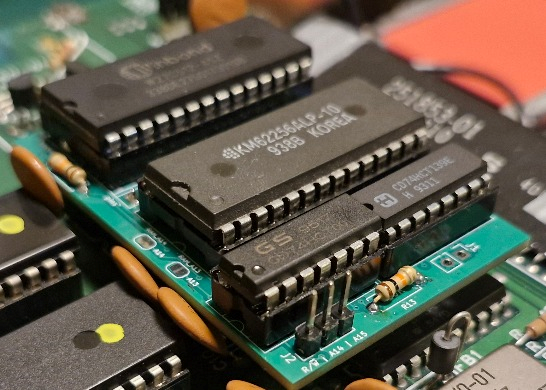
This project adds 8K of RAM and 8K of extra ROM space to a Commodore 1551 disk drive by replacing the ROM with a small daughterboard. The extra memory is used by a ROM patch to implement a simple track cache: read an entire track once, then serve subsequent sector reads from RAM.
The mod and patched ROM are detected and utilized by [Parobek ROM]
Detailed documentation and software source code is in the projects' github repository [1551-RAMBOard]
What you get
- RAM expansion: `$8000-$9FFF` (8K) mapped to SRAM on the daughterboard.
- Extra ROM window: `$A000-$BFFF` (8K) mapped to the *upper* part of a larger ROM image.
- Two DOS ROMs: with a 64K ROM chip, you can add a switch to select either the stock 1551 ROM or the patched ROM
- HypaRAM: fastloader
- Parobek support: even faster fastloader startup when drivecode is embedded in patched ROM
Videos
1551 demonstration, loading a 108 block file
Pi1551 HypaRAM demonstration, loading a 220 block file
Hardware
This board plugs into the original ROM socket and adds:
- SRAM: 8Kx8 (6264) or 32Kx8 (e.g. 62256). Only 8K is used by default; the remaining space is reserved for future banking options.
- ROM: 27C512/27E512 (64K). The board maps the active 32K half into `$8000-$FFFF`, but `$8000-$9FFF` is covered by RAM, so effectively the ROM is visible at `$A000-$FFFF` (24K). This is exactly the same setup as DolphinDOS on 1571
Assembly
- Start by soldering the pin headers to the holes marked "pins". Make sure their longer sections point toward the bottom. The board uses these to plug into the existing ROM socket.
- Solder the remaining components: two resistors, then the sockets.
- Flash the EEPROM with the ROM image from the Releases tab. The 64K image contains the patched ROM in the top half (selected by default when `J1` is open), so you do not need to connect the switch yet.
- Insert the chips into their sockets.
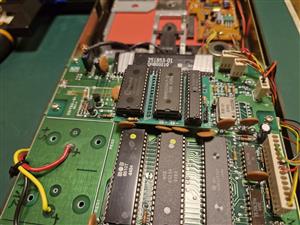
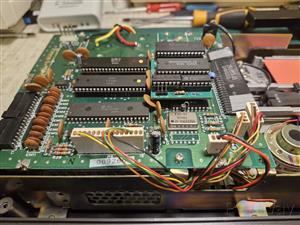
- Open the 1551, remove the ROM chip (U4), and plug the board in its place. Ensure correct pin alignment.
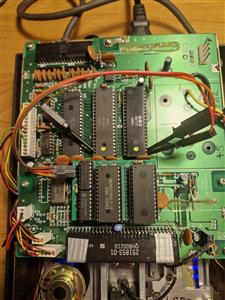
- Connect the remaining signals—`A14`, `A15`, and `R/~W`—as described below
Wiring
- J1 (ROM bank select for 27C512)
- short: bottom 32K of the 64K ROM
- open: top 32K of the 64K ROM
- J2 (3-wire tap from the 1551 mainboard):
- A14 from CPU U2 pin 21 (or U7 pin 7)
- A15 from CPU U2 pin 22 (or U7 pin 6)
- R/~W: do not take raw R/W directly from the CPU. Use the qualified R/~W that actually goes to RAM: onboard RAM U5 pin 21 or U3 pin 19
Jumpers
`RAM_A13` and `RAM_A14` jumpers are configured in such a way that you can plug in either SRAM 6264 (8K) or 62256 (32K) with no other changes.
If a method to latch two bits for the necessary port selection is found, then with 62256 (32K) four banks of 8K could be selected - e.g. for a permanent cache of the directory track.
Quickstart
- Install the hardware and keep J1 open
- Use a 27E512 ROM with provided 64K ROM file
- Try running a simple BASIC program to read the ROM at `$a000` - with J1 open it should be the top, patched half with `RAM` signature
- If you see `RAM` in the output and you can load the directory then everything works - directory track was already put into cache
10 open 15,8,15,"m-r"+chr$(0)+chr$(160)+chr$(3)
20 for i=1 to 3
30 get#15,b$
40 print asc(b$);b$
50 next
60 close 15
1551 RAMBOard
Project images are for reference only. Actual production is based on the manufacturing files on the project page.
Please review the designer's notes (e.g., PCB thickness) and select the appropriate options.
PCBWay is not responsible
for issues caused by unsuitable parameter selections.
For more important ordering information, please refer to
Read More









Raspberry Pi 5 7 Inch Touch Screen IPS 1024x600 HD LCD HDMI-compatible Display for RPI 4B 3B+ OPI 5 AIDA64 PC Secondary Screen(Without Speaker)
BUY NOW


- Comments(1)
- Likes(1)
More by Maciej Witkowiak
-
 C128 USB Keyboard adapter
This project is designed to allow a modern USB keyboard to be used with a Commodore 128D/DCR in plac...
C128 USB Keyboard adapter
This project is designed to allow a modern USB keyboard to be used with a Commodore 128D/DCR in plac...
-
 PI1551-HAT
This is the PI1551-HAT board with all the difficult SMD parts populated, most importantly R2 and D2 ...
PI1551-HAT
This is the PI1551-HAT board with all the difficult SMD parts populated, most importantly R2 and D2 ...
-
 1551 RAMBOard
1551-RAMBOardThis project adds 8K of RAM and 8K of extra ROM space to a Commodore 1551 disk drive by...
1551 RAMBOard
1551-RAMBOardThis project adds 8K of RAM and 8K of extra ROM space to a Commodore 1551 disk drive by...
-
 tcbm2sd - 1551 disk drive simulator
TCBM2SDCBM 1551 paddle replacement and/or mass storage using an SD card interfacing with the Commodo...
tcbm2sd - 1551 disk drive simulator
TCBM2SDCBM 1551 paddle replacement and/or mass storage using an SD card interfacing with the Commodo...
-
 1541 RAMBOard][ / DolphinDOS2
This is a recreation of CLD RAMBoard aimed at 1541-II drive with important change: 24K(32K) ROM supp...
1541 RAMBOard][ / DolphinDOS2
This is a recreation of CLD RAMBoard aimed at 1541-II drive with important change: 24K(32K) ROM supp...
-
 MagicDesk-like External ROM cartridge for C128
PROJECT PAGEKiCad project files and schematic: https:/...
MagicDesk-like External ROM cartridge for C128
MagicDesk-like External ROM cartridge for C128PROJECT PAGEKiCad project files and schematic: https:/...
-
Programmable Mist Maker - XIAO / QT PY Extension
2184 2 2 -
RadioHAT - Raspberry Pi radio development platform
1872 0 4 -
-
-
-
ARPS-2 – Arduino-Compatible Robot Project Shield for Arduino UNO
4064 0 6 -
A Compact Charging Breakout Board For Waveshare ESP32-C3
4817 3 8 -
AI-driven LoRa & LLM-enabled Kiosk & Food Delivery System
5621 2 2 -





















