



|
BleuIO - BLE USB dongleSmart Sensor Devices
|
x 1 | |
|
|
HibouAir air quality monitorSmart Sensor Devices
|
x 1 | |
|
Evaluation Kit for RA4M2 MCU GroupRenesas
|
x 1 |

|
FSP Platform InstallerRenesas
|
|

|
J-Link RTT ViewerSEGGER Microcontroller GmbH
|
Smart CO2-Based Fan Control Using Renesas RA4M2
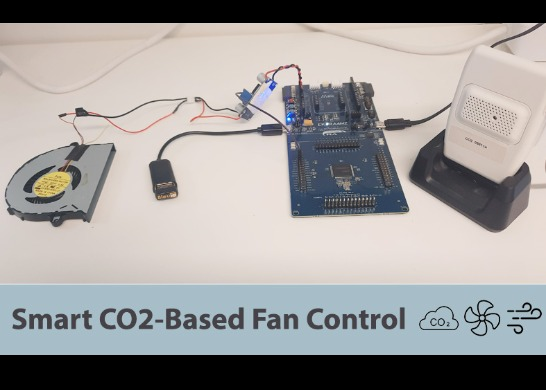
This project showcases how to integrate the Renesas EK-RA4M2 microcontroller with a BleuIO BLE USB dongle to create a smart air ventilation system. By using HibouAir‘s CO2 parameter, an air quality monitoring device, the system continuously monitors indoor air quality and automatically controls a fan based on CO2 levels.
The BleuIO dongle scans for HibouAir’s BLE advertising data to retrieve real-time CO2 readings. When the CO2 concentration exceeds 600 ppm, the system activates the fan to improve air circulation. Once the CO2 level drops below 550 ppm, the fan is turned off to conserve energy.
This implementation demonstrates a practical IoT-based air quality control solution, making indoor environments healthier and more efficient.
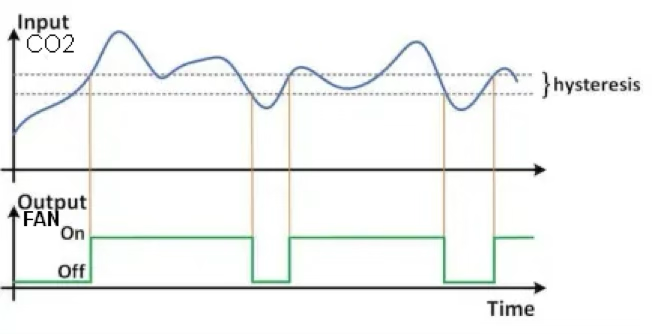
The EK-RA4M2 board prints the CO2 values, as they change, on the RTTViewer.
Requirements
- EK-RA4M2
- BleuIO – Bluetooth Low Energy USB Dongle
- FSP Platform Installer (Includes e² studio IDE, toolchain, and FSP packs)
- J-Link RTT Viewer
- USB OTG Cable (USB-A, USB-B micro)
- A fan
- A Power adapter
- HibouAir air quality monitor with CO2.
- Our example project [Download from GitHub]
Setup
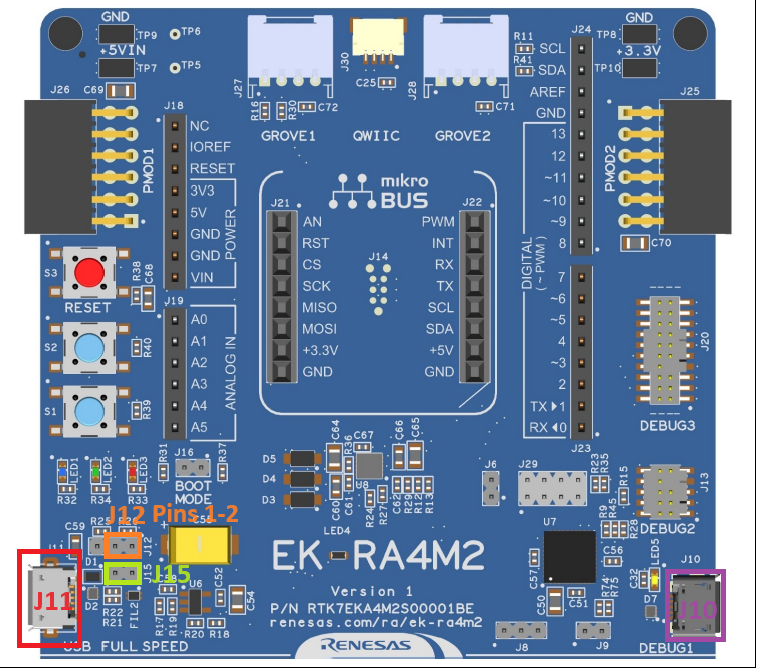
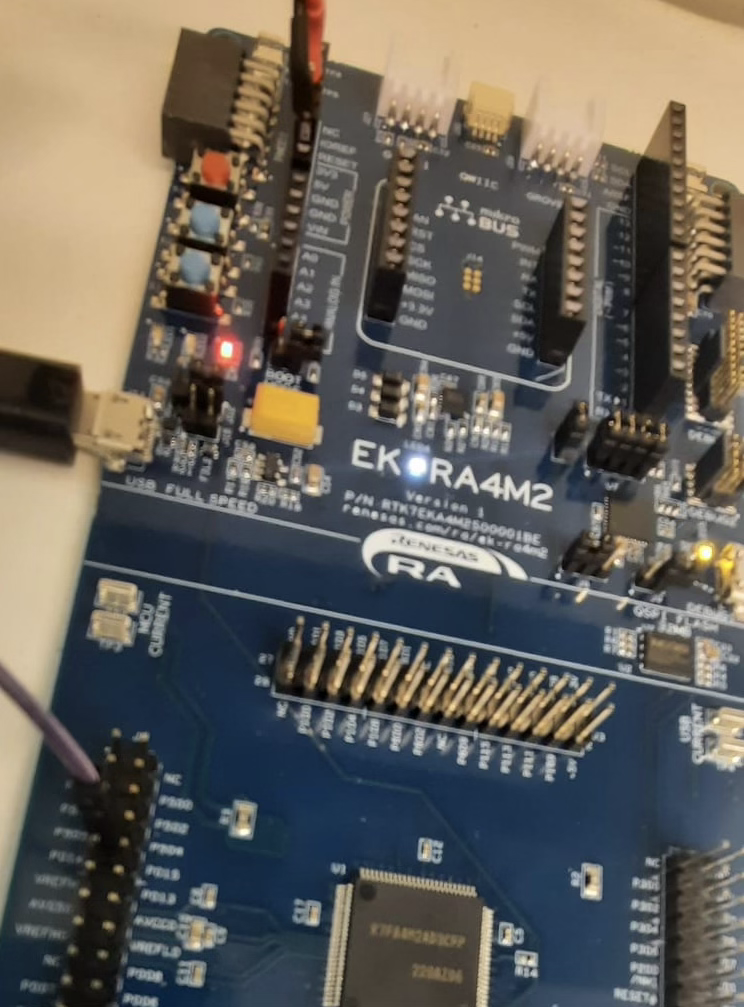
- Connect a Micro USB device cable (type-A male to micro-B male) between J10 (Debug1) and a Computer USB port.
- Plug in a BleuIO Dongle in the USB OTG Cable (type-A female to micro-B male) and connect it to J11 (USB Full Speed).
- Make sure Jumper J12 is placed on pins 1-2
- Remove Jumper J15 pins
- Connect the fan power adapter to 3V3 and GND on the developer kit like this:
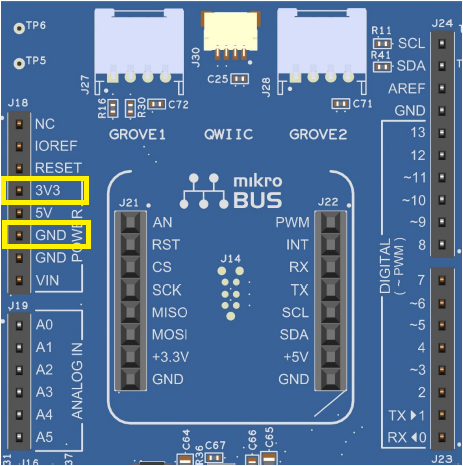
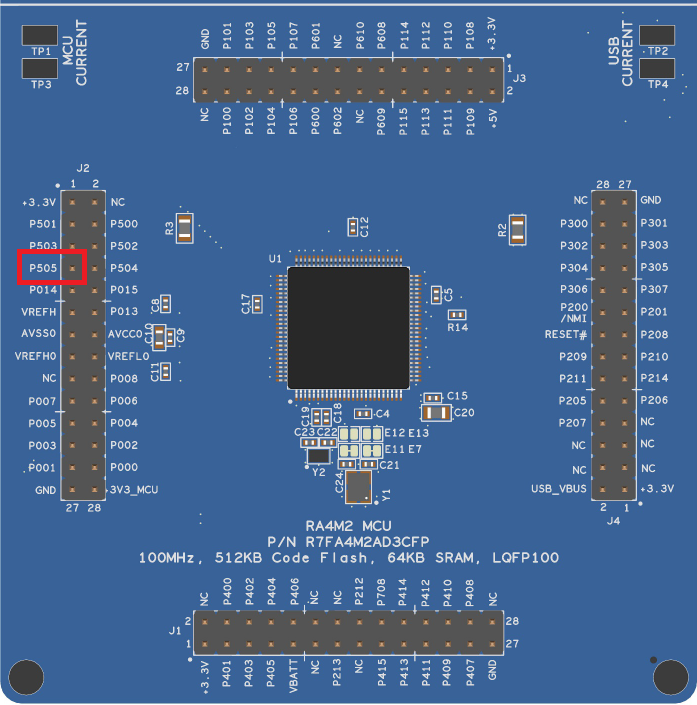
The fan power adapter will also need to be connected to GPIO pin 505 on the developer kit to turn it on and off:
Importing project
- Open e² studio IDE
- Choose a workspace and click ‘Launch’
- Download or clone the example project. Place the folder ‘bleuio_ra4m2_fan_example’ in workspace.
- Choose Import Project
- Select ‘Existing Projects into Workspace’ under the ‘General’ tab:
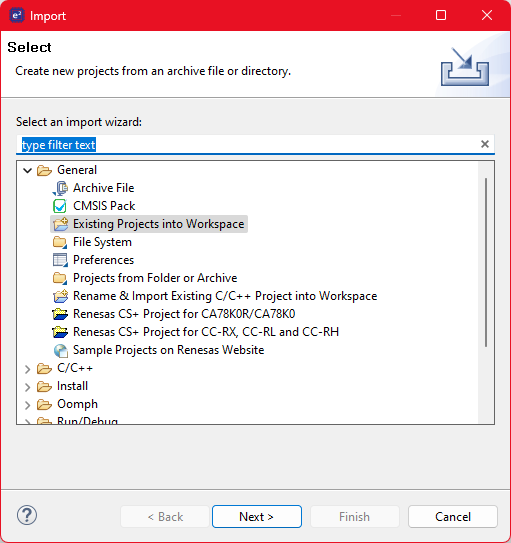
Click the ‘Browse…’ button and open the folder where the ‘bleuio_ra4m2_fan_example’ project folder is located:
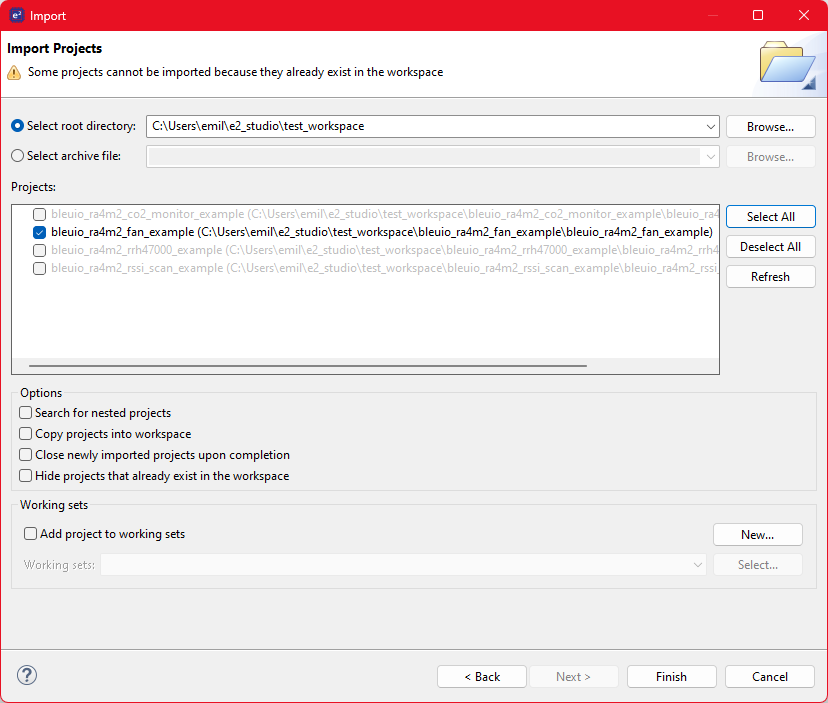
Finally select the project and click ‘Finish’. You have now imported the the project!
Running the example
- Go to file ‘usb_hcdc_app.c’ under ‘src/’ and edit line 41 to the board ID of the HibouAir Sensor:
- #define BOARD_ID_TO_SCAN “2202B3”
- The board ID is printed on the back of the HibouAir sensor:
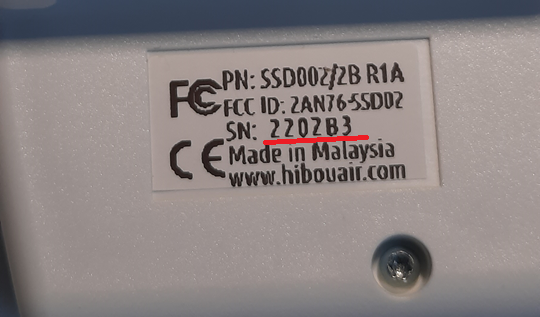
You can also threshold values to change when the fan should start and stop.
The defines can be found on row 45 and 47 in ‘usb_hcdc_app.c’ under ‘src/’:
/* CO2 threshold value 1. If at this value or above, the fan will start. */
#define CO2_FAN_ROOF 600
/* CO2 threshold value 2. If at this value or below, the fan will stop. */
#define CO2_FAN_FLOOR 550
Build the project by clicking the building icon: 
Use Debug to download and run the project. The first time you need to configure the debug settings. Click down arrow to the right of the Debug icon and select ‘Debug Configurations…’
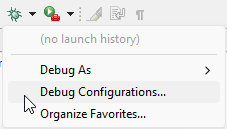
Under ‘Renesas GDB Hardware Debugging’ select ‘bleuio_ra4m2_fan_example.elf’ and click ‘Debug’
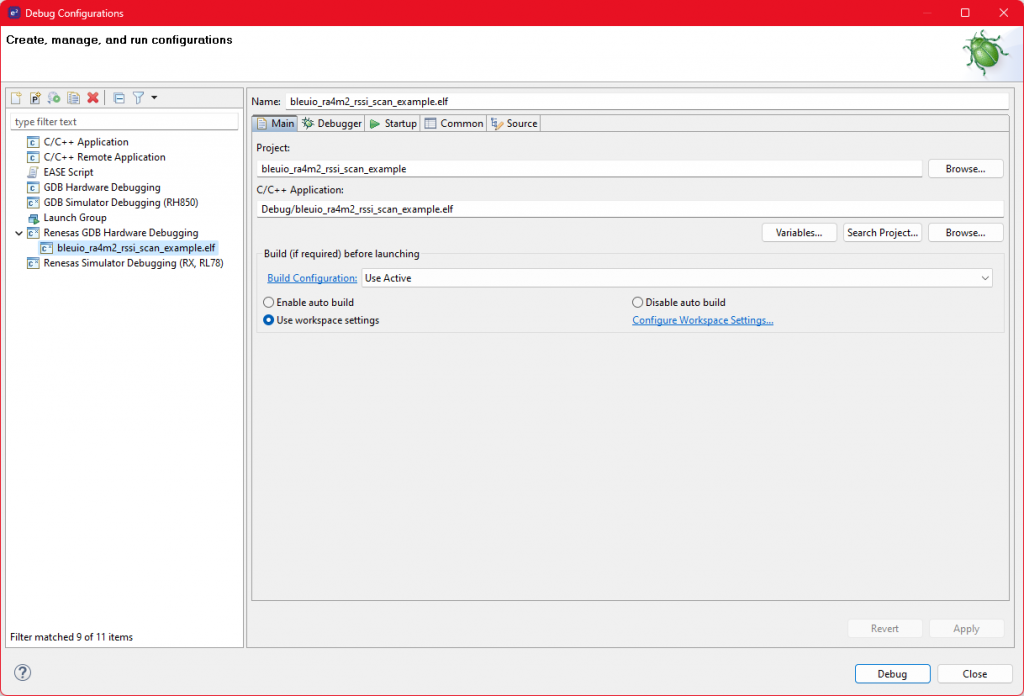
The debug is now configured and the ‘Debug’ icon can be used next time to run the project.
Open RTTViewer. Connect and use these settings:
Connection to J-Link: USB
Specify Target Device: R7FA4M2AD
Target Interface & Speed: SWD 4000kHz
RTT Control Block: Address 0x2000095c
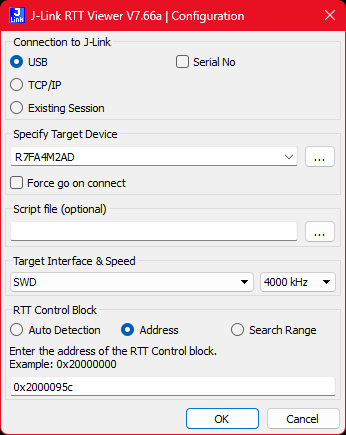
On the debugger screen in e² studio click the ‘Resume’ icon twice to run the project.
The application is now running. When starting up you should notice all LEDs lighting up for one second then only the red LED will be on. It will turn off as soon as the BleuIO is configured.
You should now see the output on the RTTViewer.
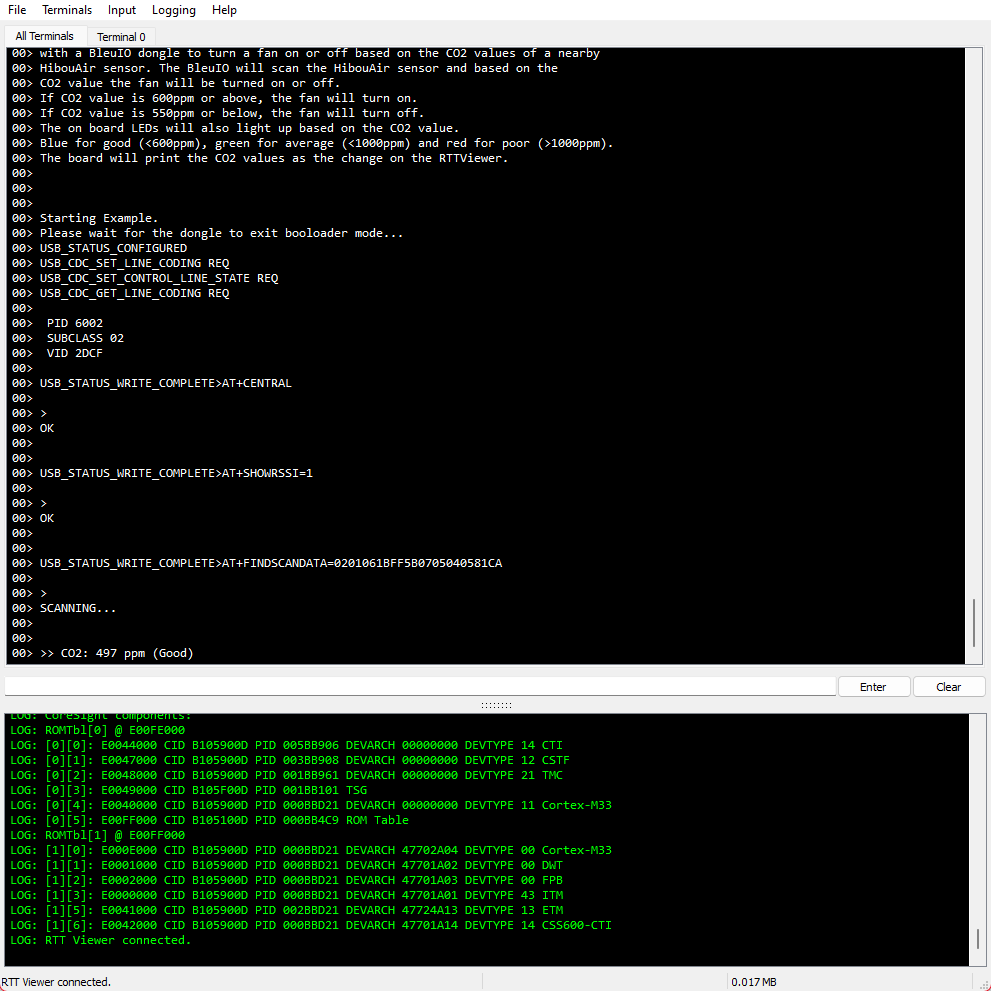
If CO2 value is 600ppm or above, the fan will turn on.
If CO2 value is 550ppm or below, the fan will turn off.
The LEDs will light up like the previous CO2 Monitor Example:
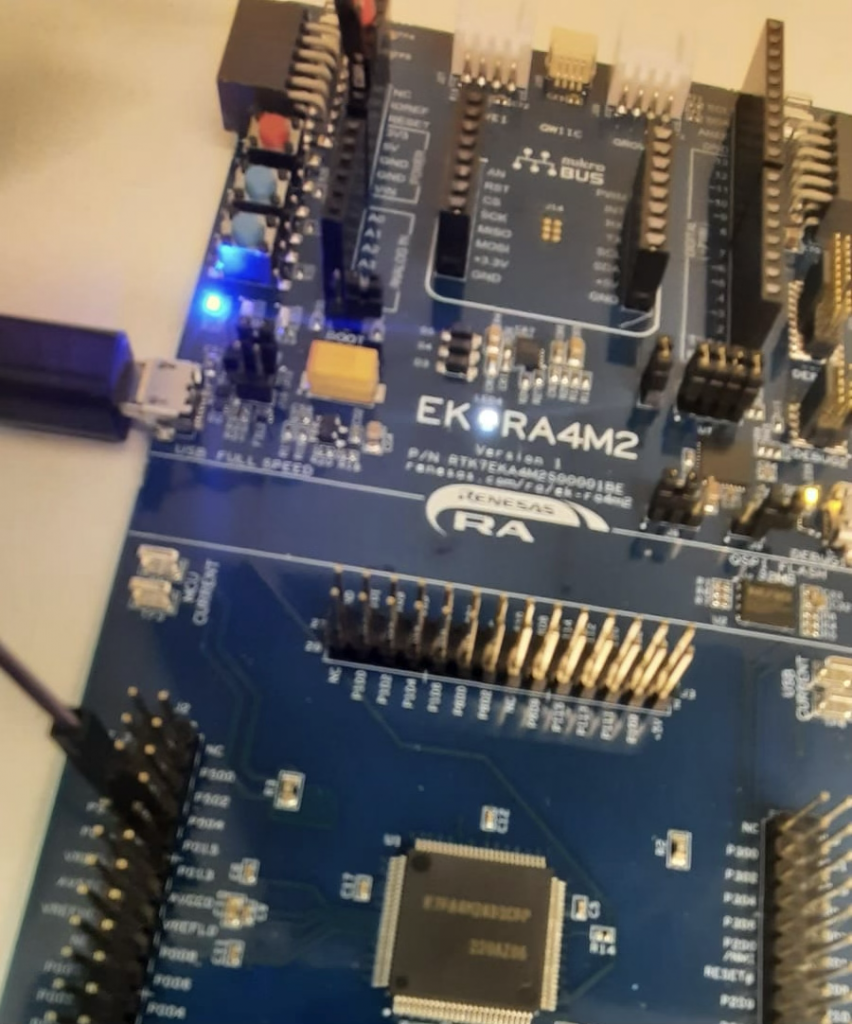
When the CO2 level is less than 600 ppm only the blue LED will be turned on.
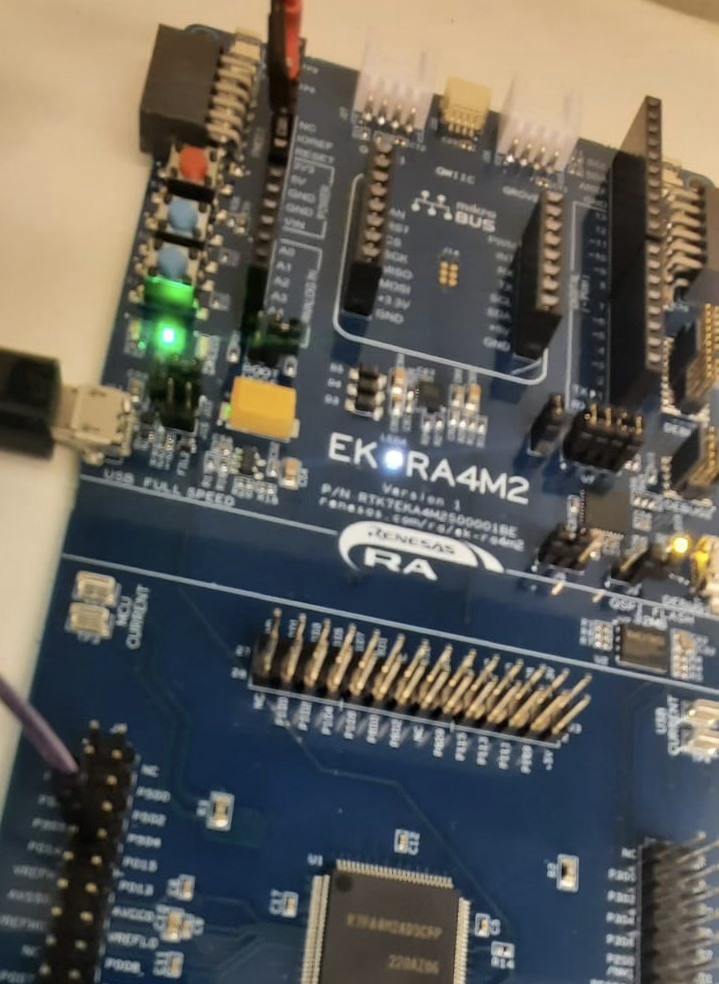
If the CO2 level is over 600 ppm but below 1000 ppm then the green LED will be on.
If the CO2 level is above 1000 ppm then the red LED will be on.
Smart CO2-Based Fan Control Using Renesas RA4M2









Raspberry Pi 5 7 Inch Touch Screen IPS 1024x600 HD LCD HDMI-compatible Display for RPI 4B 3B+ OPI 5 AIDA64 PC Secondary Screen(Without Speaker)
BUY NOW


- Comments(3)
- Likes(0)
 More by bleuio
-
 Smart CO2-Based Fan Control Using Renesas RA4M2
This project showcases how to integrate the Renesas EK-RA4M2 microcontroller with a BleuIO BLE USB d...
Smart CO2-Based Fan Control Using Renesas RA4M2
This project showcases how to integrate the Renesas EK-RA4M2 microcontroller with a BleuIO BLE USB d...
-
 Real-Time CO2 Status Indicator and Monitor with BleuIO and Renesas EK-RA4M2
IntroductionIn an age where air quality has become increasingly important, monitoring CO2 levels in ...
Real-Time CO2 Status Indicator and Monitor with BleuIO and Renesas EK-RA4M2
IntroductionIn an age where air quality has become increasingly important, monitoring CO2 levels in ...
-
 Smart Phone Controlled Home Automation using Raspberry Pi
IntroductionThis example is showing how to control a GPIO pin on a RaspberryPi remotely from a smart...
Smart Phone Controlled Home Automation using Raspberry Pi
IntroductionThis example is showing how to control a GPIO pin on a RaspberryPi remotely from a smart...
-
 Show Bluetooth LE Sensor readings on LCD screen connected to STM32
1. IntroductionThe project is based on STM32 Nucleo-144 which controls LCD display using BleuIO.For ...
Show Bluetooth LE Sensor readings on LCD screen connected to STM32
1. IntroductionThe project is based on STM32 Nucleo-144 which controls LCD display using BleuIO.For ...
-
 Sensor data collection from STM32 and SHT85 using Bluetooth Low Energy
When the BleuIO Dongle is connected to the Nucleo boards USB port, the STM32 will recognize it and s...
Sensor data collection from STM32 and SHT85 using Bluetooth Low Energy
When the BleuIO Dongle is connected to the Nucleo boards USB port, the STM32 will recognize it and s...
-
 Make a BLE enabled Smart Bulb with STM32
Home automation involves automating household environment equipment. To achieve that, we have create...
Make a BLE enabled Smart Bulb with STM32
Home automation involves automating household environment equipment. To achieve that, we have create...
-
 Bluetooth Low Energy (BLE) Tutorial for Beaglebone
1. IntroductionThis is a simple example showcasing how to control a BleuIO dongle connected to Beagl...
Bluetooth Low Energy (BLE) Tutorial for Beaglebone
1. IntroductionThis is a simple example showcasing how to control a BleuIO dongle connected to Beagl...
-
 Bluetooth Low Energy (BLE) Tutorial for Arduino using BleuIO
IntroductionThe project is a simple example showcasing a quick way to setup an Arduino with a USB Ho...
Bluetooth Low Energy (BLE) Tutorial for Arduino using BleuIO
IntroductionThe project is a simple example showcasing a quick way to setup an Arduino with a USB Ho...
-
 Create BLE project with STM32
IntroductionThe project is a simple example showcasing a quick way to set up a STM32Cube project as ...
Create BLE project with STM32
IntroductionThe project is a simple example showcasing a quick way to set up a STM32Cube project as ...
-
Programmable Mist Maker - XIAO / QT PY Extension
2220 2 2 -
RadioHAT - Raspberry Pi radio development platform
1909 0 4 -
-
-
-
ARPS-2 – Arduino-Compatible Robot Project Shield for Arduino UNO
4088 0 6 -
A Compact Charging Breakout Board For Waveshare ESP32-C3
4849 3 8 -
AI-driven LoRa & LLM-enabled Kiosk & Food Delivery System
5643 2 2 -





















