



|
KiCad 9.0 |
Safari Multi-IO STEM Board
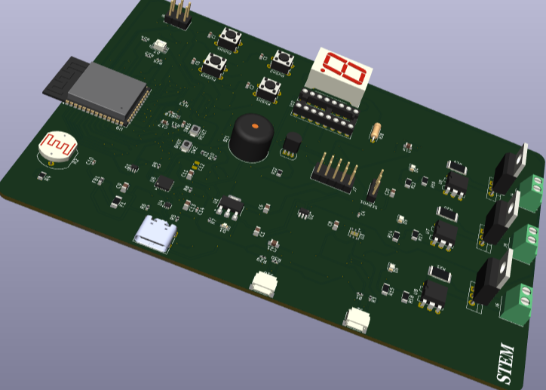
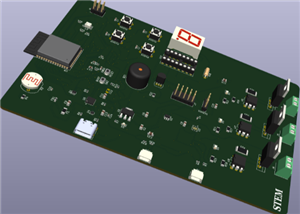
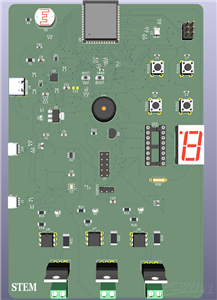
This project is a compact ESP-based smart control and sensing board designed for STEM learning, rapid prototyping, and real-world automation applications. I developed this board to simplify embedded system development by integrating multiple essential features into a single, easy-to-use platform that can also be used to teach STEM concepts and enhance technical education within my community.
The board combines a temperature and humidity sensor and an LDR for environmental monitoring, along with electronic relays for controlling external devices. It also provides multiple GPIO pins for flexible expansion and interfacing with additional modules. For user interaction and feedback, the system includes a buzzer, and it is powered through a modern USB Type-C interface, ensuring convenience and reliability.
At its core, the ESP microcontroller reads environmental data in real-time and processes it based on programmed logic. Depending on the conditions, the system can activate relays to control appliances, trigger alerts through the buzzer, or communicate with external systems via GPIO. This makes the board suitable for applications such as smart home automation, safety monitoring systems, and hands-on educational experiments.
The main goal of this project is to provide an all-in-one, accessible development platform that reduces complexity, supports learning, and enables students and developers to quickly build and experiment with intelligent systems.
#include <DHT.h>

// ---------------- PIN DEFINITIONS ----------------
#define DHTPIN 4
#define DHTTYPE DHT11   // change to DHT22 if needed

#define LDR_PIN 34

#define RELAY1 25
#define RELAY2 26
#define RELAY3 27

#define BUZZER 14

#define BUTTON1 32
#define BUTTON2 33

// 7-segment pins (example - adjust to your board)
int segPins[7] = {5, 18, 19, 21, 22, 23, 2}; // a,b,c,d,e,f,g

DHT dht(DHTPIN, DHTTYPE);

// ---------------- VARIABLES ----------------
float temperature = 0;
float humidity = 0;
int ldrValue = 0;

// 7-segment digits (0–9)
byte digits[10][7] = {
  {1,1,1,1,1,1,0}, //0
  {0,1,1,0,0,0,0}, //1
  {1,1,0,1,1,0,1}, //2
  {1,1,1,1,0,0,1}, //3
  {0,1,1,0,0,1,1}, //4
  {1,0,1,1,0,1,1}, //5
  {1,0,1,1,1,1,1}, //6
  {1,1,1,0,0,0,0}, //7
  {1,1,1,1,1,1,1}, //8
  {1,1,1,1,0,1,1}  //9
};

// ---------------- FUNCTIONS ----------------
void displayDigit(int num) {
  for(int i = 0; i < 7; i++) {
    digitalWrite(segPins[i], digits[num][i]);
  }
}

void buzzerBeep(int duration) {
  digitalWrite(BUZZER, HIGH);
  delay(duration);
  digitalWrite(BUZZER, LOW);
}

// ---------------- SETUP ----------------
void setup() {
  Serial.begin(115200);
  dht.begin();

  pinMode(RELAY1, OUTPUT);
  pinMode(RELAY2, OUTPUT);
  pinMode(RELAY3, OUTPUT);

  pinMode(BUZZER, OUTPUT);

  pinMode(BUTTON1, INPUT_PULLUP);
  pinMode(BUTTON2, INPUT_PULLUP);

  for(int i = 0; i < 7; i++) {
    pinMode(segPins[i], OUTPUT);
  }

  // Turn off relays initially
  digitalWrite(RELAY1, LOW);
  digitalWrite(RELAY2, LOW);
  digitalWrite(RELAY3, LOW);
}

// ---------------- LOOP ----------------
void loop() {

  // Read sensors
  temperature = dht.readTemperature();
  humidity = dht.readHumidity();
  ldrValue = analogRead(LDR_PIN);

  Serial.print("Temp: ");
  Serial.print(temperature);
  Serial.print(" C | Hum: ");
  Serial.print(humidity);
  Serial.print(" % | LDR: ");
  Serial.println(ldrValue);

  // ---------------- AUTOMATION LOGIC ----------------

  // Relay 1: Temperature control
  if (temperature > 30) {
    digitalWrite(RELAY1, HIGH);
    buzzerBeep(200);
  } else {
    digitalWrite(RELAY1, LOW);
  }

  // Relay 2: Light control
  if (ldrValue < 1500) { // dark
    digitalWrite(RELAY2, HIGH);
  } else {
    digitalWrite(RELAY2, LOW);
  }

  // Relay 3: Manual button control
  if (digitalRead(BUTTON1) == LOW) {
    digitalWrite(RELAY3, HIGH);
    buzzerBeep(100);
  }
  if (digitalRead(BUTTON2) == LOW) {
    digitalWrite(RELAY3, LOW);
  }

  // ---------------- DISPLAY ----------------
  // Show temperature (last digit only)
  int tempDisplay = (int)temperature % 10;
  displayDigit(tempDisplay);

  delay(1000);
}
Safari Multi-IO STEM Board
Project images are for reference only. Actual production is based on the manufacturing files on the project page.
Please review the designer's notes (e.g., PCB thickness) and select the appropriate options.
PCBWay is not responsible
for issues caused by unsuitable parameter selections.
For more important ordering information, please refer to
Read More









Raspberry Pi 5 7 Inch Touch Screen IPS 1024x600 HD LCD HDMI-compatible Display for RPI 4B 3B+ OPI 5 AIDA64 PC Secondary Screen(Without Speaker)
BUY NOW

- Comments(0)
- Likes(1)
 More by Engineer
-
SmallOLED - Live PC Stats, Animated Clocks & Audio Visualizer
771 0 3 -
"Talking Multimeter": Arduino-Based Speech Add-on for Multimeters with SCPI Protocol
437 0 1 -
Programmable Mist Maker - XIAO / QT PY Extension
2889 2 3 -
RadioHAT - Raspberry Pi radio development platform
2468 0 4 -
-
-
-
ARPS-2 – Arduino-Compatible Robot Project Shield for Arduino UNO
4550 0 6


















