



|
|
RFM95W-868S2 |
x 1 | |
|
|
Ra-01Ai-Thinker
|
x 1 | |
|
|
ESP8266EXEspressif Systems
|
x 1 |
LoRa Module for Raspberry Pi & Arduino, ESP8266 - Testing LoRa under sea

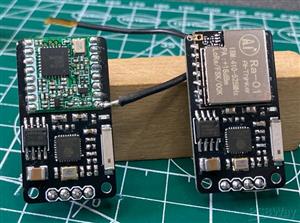
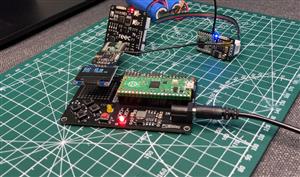
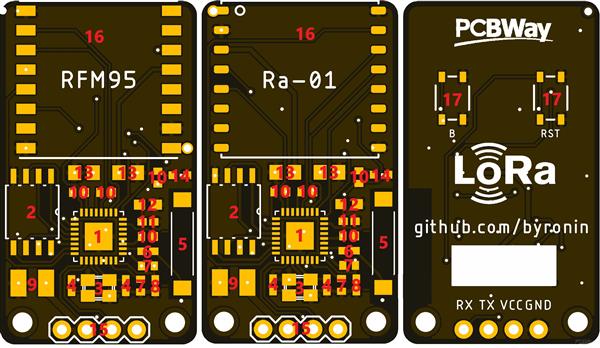
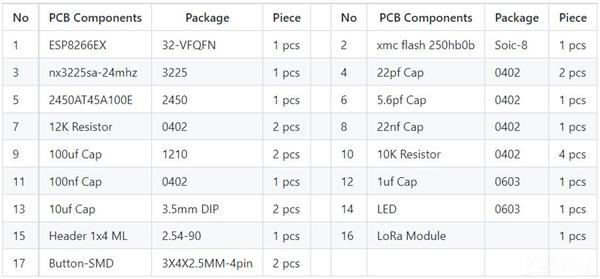
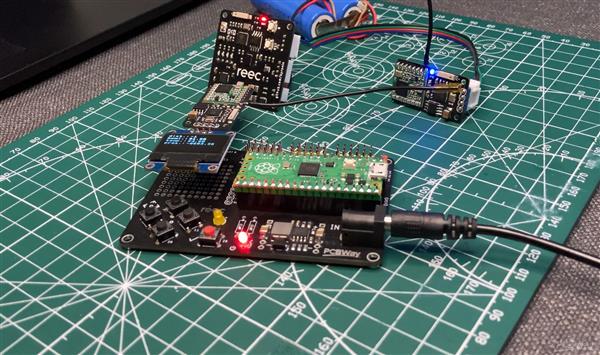
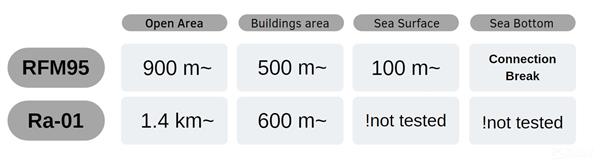
There are many lora modules and many boards that contain lora module on the market. Its modules are difficult to use alone, and the boards never fully meet our needs. I designed a programmable lora module so that it would be easy to use with all kinds of boards. The mcu controlling the module is an esp8266 chip. In this way, our module gained Wi-Fi feature. In particular I did a few tests with the Raspberry Pi Pico, which gives the pico board the Wi-Fi feature. You can program the board as you wish with the ESP8266EX method. I just wrote a code that will enable two lora modules to communicate with each other. The rest of the development process is in your hands. Below are two different board designs and test results. I hope this module will help you improve your projects.Feel free to contact me for any problem & you can check my github page : github.com/byronin/LoRa_Wi-Fi_Module

TEST
#include <SPI.h>
#include <LoRa.h>

void setup() {
  Serial.begin(9600);
  pinMode(0, OUTPUT);
  //SPI.begin();
  LoRa.setPins(5, 16, 4);
  while (!Serial);

  Serial.println("LoRa Sender");

  if (!LoRa.begin(868E6)) {
    Serial.println("Starting LoRa failed!");
    while (1);
  }
}

void loop() {
  if (Serial.available() > 0) {
    digitalWrite(0, HIGH);
    LoRa.beginPacket();
    LoRa.print(Serial.readString());
    LoRa.endPacket();
    delay(50);
    digitalWrite(0, LOW);
  }
  int packetSize = LoRa.parsePacket();
  if (packetSize) {
    digitalWrite(0, HIGH);
    // received a packet
    Serial.print("Received packet '");
    // read packet
    while (LoRa.available()) {
      Serial.print((char)LoRa.read());
    }
    // print RSSI of packet
    Serial.print("' with RSSI ");
    Serial.println(LoRa.packetRssi());
    delay(50);
    digitalWrite(0, LOW);
  }

}

LoRa Module for Raspberry Pi & Arduino, ESP8266 - Testing LoRa under sea
*PCBWay community is a sharing platform. We are not responsible for any design issues and parameter issues (board thickness, surface finish, etc.) you choose.






- Comments(1)
- Likes(3)
- 1 USER VOTES
- YOUR VOTE 0.00 0.00

-
8design
-
8usability
-
7creativity
-
6content
More by Abdullah Yıldırım
-
 Raspberry Pi Pico Robot Controller & Mini Sumo Robot
I built a mini sumo robot using a control board I designed with Raspberry Pi Pico. This control boar...
Raspberry Pi Pico Robot Controller & Mini Sumo Robot
I built a mini sumo robot using a control board I designed with Raspberry Pi Pico. This control boar...
-
 LoRa Module for Raspberry Pi & Arduino, ESP8266 - Testing LoRa under sea
There are many lora modules and many boards that contain lora module on the market. Its modules are ...
LoRa Module for Raspberry Pi & Arduino, ESP8266 - Testing LoRa under sea
There are many lora modules and many boards that contain lora module on the market. Its modules are ...
-
 Proto Shield for Raspberry Pi Pico with Game & Robotic Arm Sample
These pcbs turn into an excellent Raspberry Pi Pico prototyping shield. You can order via PCBWay. Yo...
Proto Shield for Raspberry Pi Pico with Game & Robotic Arm Sample
These pcbs turn into an excellent Raspberry Pi Pico prototyping shield. You can order via PCBWay. Yo...
-
 WiFi Sense Board with ESP8266EX
This project is an IoT board with MPU6050, VL53l0X, BMP280 & DHT11. Its main MCU is ESP8266EX so...
WiFi Sense Board with ESP8266EX
This project is an IoT board with MPU6050, VL53l0X, BMP280 & DHT11. Its main MCU is ESP8266EX so...
-
 WiFi Motor Controller Board - Usable with Python & Raspberry Pi
We produced a Motor Driver PCB board that you can control with Wifi. We control this board with Pyth...
WiFi Motor Controller Board - Usable with Python & Raspberry Pi
We produced a Motor Driver PCB board that you can control with Wifi. We control this board with Pyth...
-
 P10 Display DMD Text Box with ESP8266 MQTT / P10 Display Wi-Fi Controller
It is very difficult to use P10 Displays with arduino or Esp8266. I designed an easy to use and tiny...
P10 Display DMD Text Box with ESP8266 MQTT / P10 Display Wi-Fi Controller
It is very difficult to use P10 Displays with arduino or Esp8266. I designed an easy to use and tiny...
-
-
-
-
Tester for Touch Screen Digitizer without using microcontroller
324 2 2 -
Audio reactive glow LED wristband/bracelet with NFC / RFID-Tags
308 0 1 -
-
-