




|
TB004-508-02BESame Sky (Formerly CUI Devices)
|
x 5 | |
|
|
ESP32-C3 SUPER MINI V2Maker go
|
x 1 |

|
Soldering Iron Kit |
|

|
Solder Wire, Lead Free |
|

|
Smart Soldering Iron TS101-BC2 |
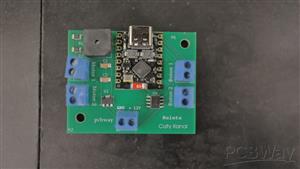
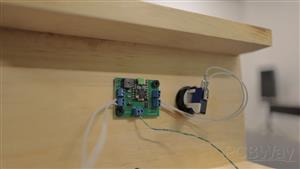
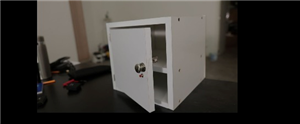
CIRCUIT WITH ESP32 C3 TO CONTROL ELECTRIC LOCK
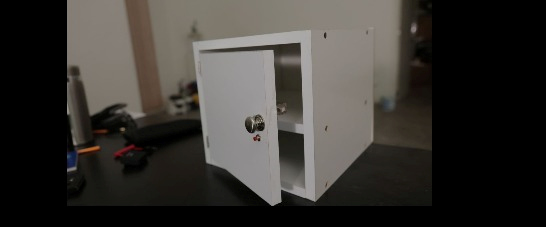
I will apply this circuit to build a safe to store the phone and thus not use it for a long time and get rid of my addiction to it.
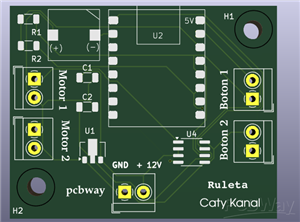
Lista de materiales completa:
2 Capacitores SMD 1206 100nF
5 Borneras 3.5 mm de 2 terminales
1 Buzzer SMD 9650
2 Resistencias SMD 1206 10K
1 ESP 32 C3 SUPERMINI
1 Regulador de voltaje AMS 1117 SOT89
1 Puenrte H L9110S
See more details about the plate and the project that uses this lock in the following tutorial
// Definición de pines
const int botonPin = 3;      // Pin de entrada para el botón (GPIO 3)
const int cerraduraPin = 4;  // Pin de salida para la cerradura (GPIO 4)
const int buzzerPin = 6;     // Pin de salida para el buzzer (GPIO 6)

// Variables para millis()
unsigned long tiempoInicio = 0;
bool enSecuencia = false;
int pasoSecuencia = 0;

void setup() {
  pinMode(botonPin, INPUT_PULLUP);
  pinMode(cerraduraPin, OUTPUT);
  pinMode(buzzerPin, OUTPUT);
  digitalWrite(cerraduraPin, LOW);  // Cerradura inicialmente desbloqueada
  digitalWrite(buzzerPin, LOW);     // Buzzer apagado
}

void loop() {
  int estadoBoton = digitalRead(botonPin);

  // Iniciar secuencia con primera pulsación
  if (!enSecuencia && estadoBoton == LOW) {
    enSecuencia = true;
    tiempoInicio = millis();
    pasoSecuencia = 1;
    digitalWrite(buzzerPin, HIGH);  // Paso 1: Pitido 0.5s
  }

  if (enSecuencia) {
    unsigned long tiempoActual = millis();

    switch (pasoSecuencia) {
      case 1:  // Buzzer 0.5s
        if (tiempoActual - tiempoInicio >= 500) {
          digitalWrite(buzzerPin, LOW);
          digitalWrite(cerraduraPin, HIGH);  // Paso 2: Activar cerradura 1s
          tiempoInicio = tiempoActual;
          pasoSecuencia = 2;
        }
        break;

      case 2:  // Cerradura 1s
        if (tiempoActual - tiempoInicio >= 1000) {
          digitalWrite(cerraduraPin, LOW);
          tiempoInicio = tiempoActual;
          pasoSecuencia = 3;  // Paso 3: Esperar 8s
        }
        break;

      case 3:  // Espera 8s
        if (tiempoActual - tiempoInicio >= 8000) {
          digitalWrite(buzzerPin, HIGH);  // Paso 4: Buzzer 3s
          tiempoInicio = tiempoActual;
          pasoSecuencia = 4;
        }
        break;

      case 4:  // Buzzer 3s
        if (tiempoActual - tiempoInicio >= 3000) {
          digitalWrite(buzzerPin, LOW);
          pasoSecuencia = 5;  // Paso 5: Esperar segunda pulsación
        }
        break;

      case 5:  // Esperar segunda pulsación
        if (estadoBoton == LOW) {
          digitalWrite(cerraduraPin, HIGH);  // Paso 6: Activar cerradura 5s
          tiempoInicio = tiempoActual;
          pasoSecuencia = 6;
        }
        break;

      case 6:  // Cerradura 5s
        if (tiempoActual - tiempoInicio >= 5000) {
          digitalWrite(cerraduraPin, LOW);
          enSecuencia = false;  // Reiniciar sistema
        }
        break;
    }
  }
}
// Definición de pines
const int botonPin = 3;      // Pin de entrada para el botón (GPIO 3)
const int cerraduraPin = 4;  // Pin de salida para la cerradura (GPIO 4)
const int buzzerPin = 6;     // Pin de salida para el buzzer (GPIO 6)

// Variables para millis()
unsigned long tiempoInicio = 0;
bool enSecuencia = false;
int pasoSecuencia = 0;

void setup() {
  pinMode(botonPin, INPUT_PULLUP);
  pinMode(cerraduraPin, OUTPUT);
  pinMode(buzzerPin, OUTPUT);
  digitalWrite(cerraduraPin, LOW);  // Cerradura inicialmente desbloqueada
  digitalWrite(buzzerPin, LOW);     // Buzzer apagado
}

void loop() {
  int estadoBoton = digitalRead(botonPin);

  // Iniciar secuencia con primera pulsación
  if (!enSecuencia && estadoBoton == LOW) {
    enSecuencia = true;
    tiempoInicio = millis();
    pasoSecuencia = 1;
    digitalWrite(buzzerPin, HIGH);  // Paso 1: Pitido 0.5s
  }

  if (enSecuencia) {
    unsigned long tiempoActual = millis();

    switch (pasoSecuencia) {
      case 1:  // Buzzer 0.5s
        if (tiempoActual - tiempoInicio >= 500) {
          digitalWrite(buzzerPin, LOW);
          digitalWrite(cerraduraPin, HIGH);  // Paso 2: Activar cerradura 1s
          tiempoInicio = tiempoActual;
          pasoSecuencia = 2;
        }
        break;

      case 2:  // Cerradura 1s
        if (tiempoActual - tiempoInicio >= 1000) {
          digitalWrite(cerraduraPin, LOW);
          tiempoInicio = tiempoActual;
          pasoSecuencia = 3;  // Paso 3: Esperar 8s
        }
        break;

      case 3:  // Espera 8s
        if (tiempoActual - tiempoInicio >= 8000) {
          digitalWrite(buzzerPin, HIGH);  // Paso 4: Buzzer 3s
          tiempoInicio = tiempoActual;
          pasoSecuencia = 4;
        }
        break;

      case 4:  // Buzzer 3s
        if (tiempoActual - tiempoInicio >= 3000) {
          digitalWrite(buzzerPin, LOW);
          pasoSecuencia = 5;  // Paso 5: Esperar segunda pulsación
        }
        break;

      case 5:  // Esperar segunda pulsación
        if (estadoBoton == LOW) {
          digitalWrite(cerraduraPin, HIGH);  // Paso 6: Activar cerradura 5s
          tiempoInicio = tiempoActual;
          pasoSecuencia = 6;
        }
        break;

      case 6:  // Cerradura 5s
        if (tiempoActual - tiempoInicio >= 5000) {
          digitalWrite(cerraduraPin, LOW);
          enSecuencia = false;  // Reiniciar sistema
        }
        break;
    }
  }
}

CIRCUIT WITH ESP32 C3 TO CONTROL ELECTRIC LOCK
Project images are for reference only. Actual production is based on the manufacturing files on the project page.
Please review the designer's notes (e.g., PCB thickness) and select the appropriate options.
PCBWay is not responsible
for issues caused by unsuitable parameter selections.
For more important ordering information, please refer to
Read More









Raspberry Pi 5 7 Inch Touch Screen IPS 1024x600 HD LCD HDMI-compatible Display for RPI 4B 3B+ OPI 5 AIDA64 PC Secondary Screen(Without Speaker)
BUY NOW


- Comments(0)
- Likes(0)
More by Catia Diaz
-
 Led strip 5630 SMD with screw terminal
This project is designed for 2 things. The first is so that people can practice soldering SMD compon...
Led strip 5630 SMD with screw terminal
This project is designed for 2 things. The first is so that people can practice soldering SMD compon...
-
 Motion detector and notification on Telegram
Crea una alarma que te notifique en Telegram cuando alguien es detectado sin permiso en tu propiedad...
Motion detector and notification on Telegram
Crea una alarma que te notifique en Telegram cuando alguien es detectado sin permiso en tu propiedad...
-
 Level detector with ultrasonic sensor and telegram
Crea una alarma que te notifique cuando se le terminara la comida a tu perro en TelegramCon esta tar...
Level detector with ultrasonic sensor and telegram
Crea una alarma que te notifique cuando se le terminara la comida a tu perro en TelegramCon esta tar...
-
 Bluetooth control for LED lights or motors with ESP32 C3
Con esta tarjeta puedes controlar vía Bluetooth motores o luces led con ayuda del ESP32 C3 (yo utili...
Bluetooth control for LED lights or motors with ESP32 C3
Con esta tarjeta puedes controlar vía Bluetooth motores o luces led con ayuda del ESP32 C3 (yo utili...
-
 Control de luces led con servidor web y ESP32 C3
Te comparto todos los archivos que necesitas para realizar esta practica, encontraras 2 códigos de p...
Control de luces led con servidor web y ESP32 C3
Te comparto todos los archivos que necesitas para realizar esta practica, encontraras 2 códigos de p...
-
 CIRCUIT WITH ESP32 C3 TO CONTROL ELECTRIC LOCK
I will apply this circuit to build a safe to store the phone and thus not use it for a long time and...
CIRCUIT WITH ESP32 C3 TO CONTROL ELECTRIC LOCK
I will apply this circuit to build a safe to store the phone and thus not use it for a long time and...
-
 Tarjeta para controlar un motor para Ruleta con ESP32 C3 Super Mini
Lista de materiales completa:2 Capacitores SMD 1206 100nF5 Borneras 3.5 mm de 2 terminales1 Buzzer S...
Tarjeta para controlar un motor para Ruleta con ESP32 C3 Super Mini
Lista de materiales completa:2 Capacitores SMD 1206 100nF5 Borneras 3.5 mm de 2 terminales1 Buzzer S...
-
 Tira led circular 2835 de 12V
Lista de materiales para la PCB:6 Leds 2835 (naranja)2 Resistencias 1206 100 Ohms1 Bornera 2 tornill...
Tira led circular 2835 de 12V
Lista de materiales para la PCB:6 Leds 2835 (naranja)2 Resistencias 1206 100 Ohms1 Bornera 2 tornill...
-
 Números aleatorios para dinámicas divertidas de participación
Lista de materiales completa:5 Borneras de 2 terminales cada una2 Cap 100n (SMD 1206)2 Resistencias ...
Números aleatorios para dinámicas divertidas de participación
Lista de materiales completa:5 Borneras de 2 terminales cada una2 Cap 100n (SMD 1206)2 Resistencias ...
-
 Numeros aleatorios matriz-
Se trata de una PCB con esp32 que permite controlar una matriz de leds ws2812bLista de materiales co...
Numeros aleatorios matriz-
Se trata de una PCB con esp32 que permite controlar una matriz de leds ws2812bLista de materiales co...
-
 Esp 32 wireless communication card
Here you can see more details of the programming process
Esp 32 wireless communication card
Here you can see more details of the programming process
-
 Card for LED light sequence and memory game
Here you can find the complete tutorial to see how this game works.Characteristics of the assembly o...
Card for LED light sequence and memory game
Here you can find the complete tutorial to see how this game works.Characteristics of the assembly o...
-
 Timer with 5-position selector and ESP 32 C3 super mini
Full tutorial in the following video
Timer with 5-position selector and ESP 32 C3 super mini
Full tutorial in the following video
-
 USB Charger
Its a charger with a 7 segments display to stop with the time the charge, its controlled with a esp3...
USB Charger
Its a charger with a 7 segments display to stop with the time the charge, its controlled with a esp3...
-
 PCB for charging AA rechargeable batteries
With this card you can charge from 1 to 5 AA batteries independently. With the charger you can selec...
PCB for charging AA rechargeable batteries
With this card you can charge from 1 to 5 AA batteries independently. With the charger you can selec...
-
 H bridge module to control crank
With the help of this H-bridge circuit we can control the rotation of a motor, and better yet, if we...
H bridge module to control crank
With the help of this H-bridge circuit we can control the rotation of a motor, and better yet, if we...
-
 Design to control 7 segment display with switches
One way to connect a 7-segment display is using cables and switches.In order to form a number you wi...
Design to control 7 segment display with switches
One way to connect a 7-segment display is using cables and switches.In order to form a number you wi...
-
 Wireless control for motor dc
It is a pair of PCBs that allow transmitting a signal that is sent through 4 buttons and received by...
Wireless control for motor dc
It is a pair of PCBs that allow transmitting a signal that is sent through 4 buttons and received by...
-
Programmable Mist Maker - XIAO / QT PY Extension
2116 2 2 -
RadioHAT - Raspberry Pi radio development platform
1797 0 4 -
-
-
-
ARPS-2 – Arduino-Compatible Robot Project Shield for Arduino UNO
4012 0 6 -
A Compact Charging Breakout Board For Waveshare ESP32-C3
4746 3 8 -
AI-driven LoRa & LLM-enabled Kiosk & Food Delivery System
5562 2 2 -





















