

|
KiCad 9.0 |
C64 Keyboard to USB
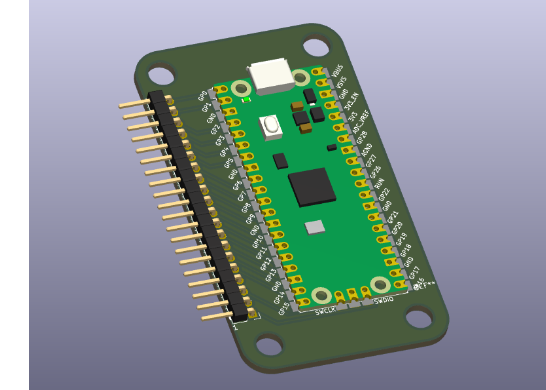
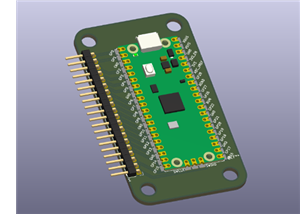
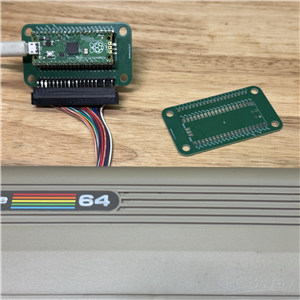
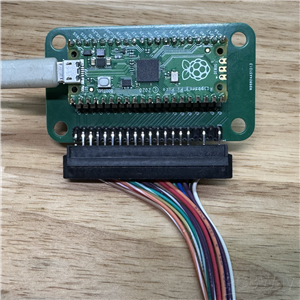
Commodore 64 USB Keyboard Adaptor – Powered by Raspberry Pi Pico
Bring your original Commodore 64 keyboard back to life!
This project uses a Raspberry Pi Pico and a custom USB adaptor board to connect your vintage C64 (or compatible) keyboard directly to a modern computer or emulator — no soldering (you will need to solder on a socket for the PICO and a header for the keyboard connector if they are not included in your PCBWay order ), rewiring, or expensive interface boards required.
Once the Pico is flashed with the provided open-source firmware (available on GitHub), the adaptor works as a plug-and-play USB keyboard, with full key mapping for the original Commodore layout. It’s the simplest, most affordable, and authentic way to experience retro computing on today’s systems.
- Low-cost design: Uses a Raspberry Pi Pico instead of pricey interface chips.
- Plug and play: Just program the Pico, plug in your keyboard, and connect via USB.
- Fully mapped keys: Complete keyboard support for C64 emulators and modern OSs.
- Maker-friendly: Open hardware + firmware hosted on GitHub.
- Perfect for retro restorations, emulator builds, and DIY retro PCs.
Project Type: Raspberry Pi Pico USB Adaptor Board
Purpose: Connect Commodore 64 (and compatible) keyboards to USB hosts via Pico
Difficulty: Easy – Intermediate
License: Open Source (hardware + firmware)
Get the software for this project here: https://github.com/rumbledethumps/cbm2usb
Get the uf2 file to copy to your PICO board here: https://github.com/rumbledethumps/cbm2usb/releases/tag/V1.2
For RPi Pico Flashing Instructions go here: https://learn.adafruit.com/getting-started-with-raspberry-pi-pico-circuitpython/circuitpython and use the kb6.uf2 (or later) image instead of the one mentioned in the article.
C64 Keyboard to USB
Project images are for reference only. Actual production is based on the manufacturing files on the project page.
Please review the designer's notes (e.g., PCB thickness) and select the appropriate options.
PCBWay is not responsible
for issues caused by unsuitable parameter selections.
For more important ordering information, please refer to
Read More


Raspberry Pi 5 7 Inch Touch Screen IPS 1024x600 HD LCD HDMI-compatible Display for RPI 4B 3B+ OPI 5 AIDA64 PC Secondary Screen(Without Speaker)
BUY NOW

- Comments(1)
- Likes(6)
More by William A Henderson

-
Émetteur Récepteur Optique Expérimental (communication UART ATtiny + fibre optique)
152 0 1 -
SmallOLED - Live PC Stats, Animated Clocks & Audio Visualizer
1002 0 3 -
"Talking Multimeter": Arduino-Based Speech Add-on for Multimeters with SCPI Protocol
574 0 1 -
Programmable Mist Maker - XIAO / QT PY Extension
3044 2 3 -
RadioHAT - Raspberry Pi radio development platform
2590 0 4 -
-
-