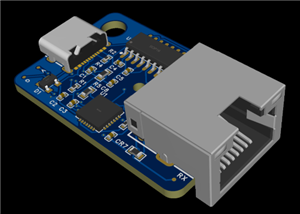
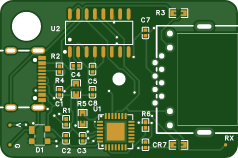
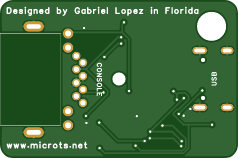
Console Cable Plug — USB-C to RJ45 Console Adapter
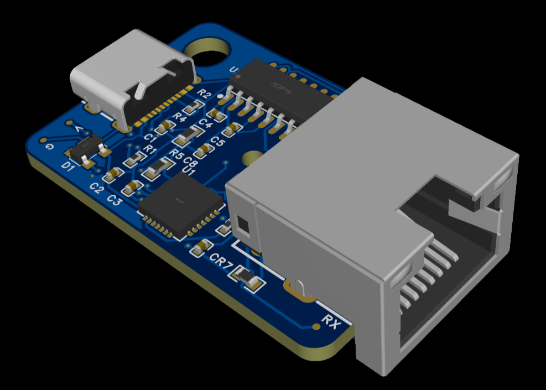
The Console Cable Plug takes the classic Cisco-style console cable and compresses it into a small PCB plug. Instead of relying on a fixed, short, proprietary cable, it lets you use any standard Ethernet cable to get console access up to 100 meters (328 ft) — just connect the plug to your computer via USB-C, and to the console port using any RJ45 Ethernet cable.
Compatible with standard RJ45 console ports.
Why it's better than the classic console cable:
- Trusted from day one — great for CCNA students too, whether you're a working network engineer or just starting your CCNA journey, the Console Cable Plug is a reliable tool to have in your kit from the beginning. Its durability and flexibility make it a great choice for lab practice, home labs, and hands-on study — one less thing to worry about when you're troubleshooting a broken console connection instead of your actual lab or work .
- No more short-distance limitations. Traditional console cables are fixed-length and often too short to reach console ports in tight or awkward spaces (racks, cabinets, under-desk equipment). With this design, you can use any Ethernet cable from 1 to 100 meters (3 to 328 ft).
- No more worn-out or bent pins killing your connection. The RJ45 port on classic console cables is a common failure point — the pins wear out or bend over time, causing intermittent or lost connections. If that happens here, you simply swap in a new Ethernet cable and get back to work.
- Durable and field-repairable. If a cable or pin ever fails, you're not stuck replacing the whole tool — just the cable.
Compact and reliable EDC for network engineers.
Its small, cube-like form factor makes it easy to carry in a laptop bag or tool kit. Whether you're doing rack work, fieldwork, or emergency troubleshooting, it's a reliable everyday-carry (EDC) tool that solves two of the most common console cable failure points — length and pin wear.
Console Cable Plug — USB-C to RJ45 Console Adapter
Project images are for reference only. Actual production is based on the manufacturing files on the project page.
Please review the designer's notes (e.g., PCB thickness) and select the appropriate options.
PCBWay is not responsible
for issues caused by unsuitable parameter selections.
For more important ordering information, please refer to
Read More

- ✖ | No sharing or redistributing in any way of the 3D files or derivatives
- ✖ | No remixing
- ✖ | Non-commercial Use (only for personal use)


Raspberry Pi 5 7 Inch Touch Screen IPS 1024x600 HD LCD HDMI-compatible Display for RPI 4B 3B+ OPI 5 AIDA64 PC Secondary Screen(Without Speaker)
BUY NOW


- Comments(0)
- Likes(1)
More by MicroTS Networks
-
Émetteur Récepteur Optique Expérimental (communication UART ATtiny + fibre optique)
182 0 1 -
SmallOLED - Live PC Stats, Animated Clocks & Audio Visualizer
1056 0 3 -
"Talking Multimeter": Arduino-Based Speech Add-on for Multimeters with SCPI Protocol
606 0 1 -
Programmable Mist Maker - XIAO / QT PY Extension
3070 2 3 -
RadioHAT - Raspberry Pi radio development platform
2619 0 4 -
-