




|
|
EasyEDA |
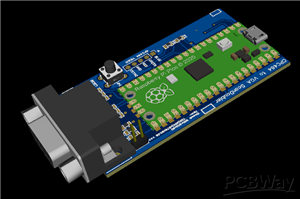
Amstrad/Schneider CPC464/664/6128 VGA Output
This is a proven working project.
The original project can be found here : https://github.com/grzegorz-gr/vga4cpc
Kudos and credits to the original creator.
"The goal of this project was to build a scandoubler for Amstrad CPC that is cheap, simple to build and can handle the most popular tricks that Amstrad software does (e.g. smooth scroll) that standard scandoublers usually don't support.
It should work with most LCD monitors. It supports 50.08 FPS to make animations look smoother, but there is also an option to use 60 FPS, if your monitor does not support low frequencies."
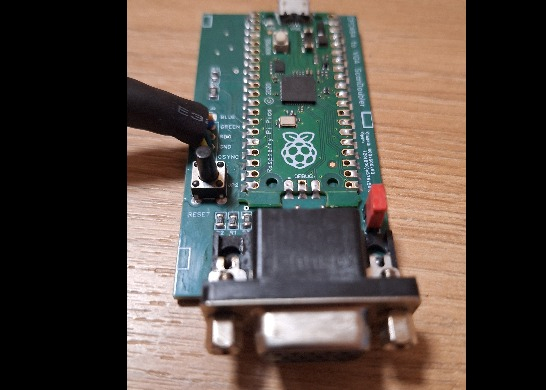
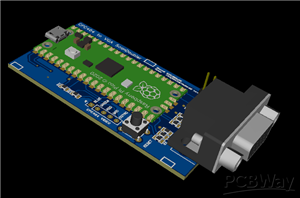
I have redesigned the PCB for SMD component use, smaller PCB and better signal integrity.
After (or before) building the PCB you just need to upload the software to RPI Pico. Connect it with USB cable to PC/Mac, keeping the small button on Pico board pressed. It should mount as a storage device. Just copy uf2 file there. Pico should unmount and restart then.
Firmware for the Pi-Pico can be downloaded from the Github site.
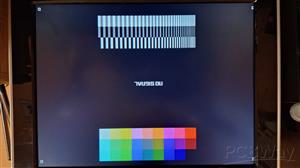
After switching it on, the board should porvide a test-pattern on the VGA output. You can check if everything is OK with the picture.
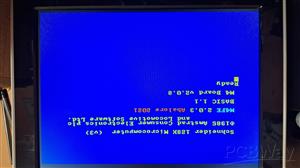
It will switch to normal output when it detects a video signal on the input.
Sometimes it can mess up the picture and/or produce a blank screen when a game switches resolution. In that case, just press the RESET biutton.
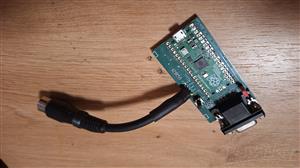
For the connection to the CPC, you can use the video output DIN6 connector, or you can solder the wires directly to the CPC board ( not recommended ). CPC Video output pinout can be found easily on the internet.
The 2pin header with a jumper on it provides selection between 50/60Hz mode. Experiment with it to get the best result for your monitor.
Output is standard VGA 15pin
The board needs to be powered via the USB port of the Pico. You can use any cheap 5V USB phone charger.
EDIT : This could potentially work with Amiga500 video output too, since it has the same 4 signals (RGB+Sync). Do not have an Amiga to try.
Amstrad/Schneider CPC464/664/6128 VGA Output
Project images are for reference only. Actual production is based on the manufacturing files on the project page.
Please review the designer's notes (e.g., PCB thickness) and select the appropriate options.
PCBWay is not responsible
for issues caused by unsuitable parameter selections.
For more important ordering information, please refer to
Read More









Raspberry Pi 5 7 Inch Touch Screen IPS 1024x600 HD LCD HDMI-compatible Display for RPI 4B 3B+ OPI 5 AIDA64 PC Secondary Screen(Without Speaker)
BUY NOW


- Comments(7)
- Likes(5)

More by Attila Kalinka
-
 ZX Spectrum Diagnostic/Game cartridge
Simple and small 4 in 1 diagnostic / game cartridge for ZX Spectrum 48k/128/+2I am using it as a dia...
ZX Spectrum Diagnostic/Game cartridge
Simple and small 4 in 1 diagnostic / game cartridge for ZX Spectrum 48k/128/+2I am using it as a dia...
-
 ZX Spectrum 48k Bluetooth Loader and Kempston Joystick Interface
This is a Bluetooth loader and a joystick interface for ZX Spectrum 48k computers.it's a proven / te...
ZX Spectrum 48k Bluetooth Loader and Kempston Joystick Interface
This is a Bluetooth loader and a joystick interface for ZX Spectrum 48k computers.it's a proven / te...
-
 Amstrad/Schneider CPC464/6128 RGB to Composite / SVIDEO Converter
This board converts CPC464/6128 video output to Composite and S-VIDEO signals.so you can use any TV ...
Amstrad/Schneider CPC464/6128 RGB to Composite / SVIDEO Converter
This board converts CPC464/6128 video output to Composite and S-VIDEO signals.so you can use any TV ...
-
 Amstrad/Schneider CPC464/664/6128 VGA Output
This is a proven working project.The original project can be found here : https://github.com/grzegor...
Amstrad/Schneider CPC464/664/6128 VGA Output
This is a proven working project.The original project can be found here : https://github.com/grzegor...
-
 ZX Spectrum Microswitch SMD Keyboard Membrane Replacement
Perfect fit PCB based keyboard for ZX Spectrum 16/48k.PCB MUST BE 0.6mm thick ! Pay attention when o...
ZX Spectrum Microswitch SMD Keyboard Membrane Replacement
Perfect fit PCB based keyboard for ZX Spectrum 16/48k.PCB MUST BE 0.6mm thick ! Pay attention when o...
-
 C64/C128 MOS8701 replacement based on dodgypll
This is proven working project. Only applicable for PAL Commodore 64/128Project is based on this pro...
C64/C128 MOS8701 replacement based on dodgypll
This is proven working project. Only applicable for PAL Commodore 64/128Project is based on this pro...
-
Programmable Mist Maker - XIAO / QT PY Extension
2216 2 2 -
RadioHAT - Raspberry Pi radio development platform
1904 0 4 -
-
-
-
ARPS-2 – Arduino-Compatible Robot Project Shield for Arduino UNO
4085 0 6 -
A Compact Charging Breakout Board For Waveshare ESP32-C3
4845 3 8 -
AI-driven LoRa & LLM-enabled Kiosk & Food Delivery System
5641 2 2 -





















