



|
|
CH552G SOP-16 |
x 1 | |
|
|
10 µF 16 V X5R 0805 |
x 1 | |
|
|
100 nF 50 V X7R 0805 |
x 2 | |
|
|
1 kΩ 1% 0805 |
x 2 | |
|
|
10 kΩ 1% 0805 |
x 2 | |
|
|
Red LED 630 nm 0805 |
x 1 | |
|
|
Tactile switch SPST SMD 5.2×5.2 mm |
x 2 | |
|
|
1×4 pin header 2.54 mm THT |
x 1 |
USB Business Card Badge - CH552G, Native USB & Capacitive Touch
USB Business Card (CH552G)
What it is
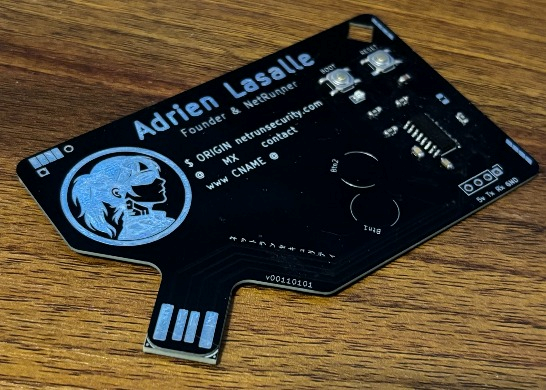
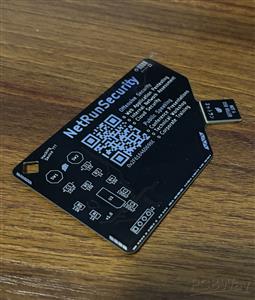
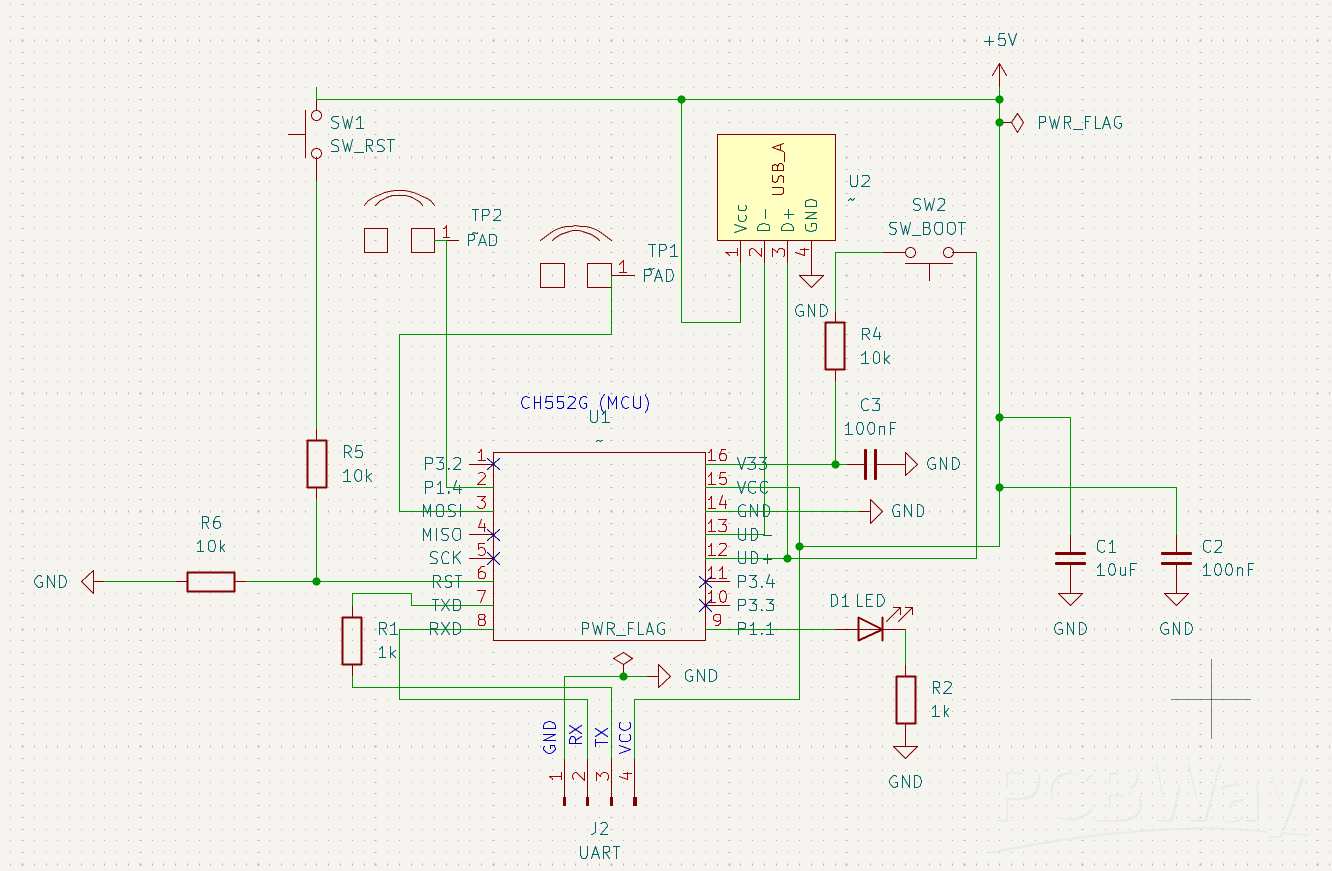
A real, working USB business card. It looks like a card, but the bottom edge is cut into a USB-A male connector. Plug it straight into any USB port, with no cable and no adapter. It runs on a CH552G with native USB (no USB-to-serial bridge chip), two capacitive touch pads, a status LED, and a UART debug header.
This is V3, the revision that works. Getting here took three board spins and two dead chips.
Why it is interesting
Native USB, no bridge chip. The CH552G handles USB in hardware, so the card enumerates directly off the PCB edge connector. No CH340, no FTDI, nothing extra to source.
Capacitive touch through the solder mask. The two pads work without exposing bare copper. The CH552G Touch-Key peripheral reads through the mask, so the front artwork stays clean.
A business card you can actually use. Plug it in and it runs firmware: HID payloads, a serial CLI, a touch demo. It starts a conversation and it does something.
The story: V1 to V4
The interesting part is not that it works. It is everything that had to fail first. Three iterations, two dead chips, a stack of lessons.
- ERR_01, reversed USB edge connector (V2). Every CH552G burned within seconds of plug-in. A USB power meter showed 3.7 A on connection, a dead short. Cold multimeter checks showed nothing (open on every rail), because reversed polarity does not read as a short until power is applied. Root cause: the USB edge pads were ordered the wrong way, so VCC sat on the socket ground contact and ground sat on VCC. Lesson: cold resistance checks do not catch reversed polarity. Verify edge-connector pad orientation physically, before ordering.
- ERR_02, PCB thickness mismatch. A standard 1.6 mm PCB is thinner than the roughly 2 mm a USB-A socket expects, so the card sat loose in the port. V3 fixes this with a dedicated PCB shim glued under the USB tab, which is cleaner and more reliable than a paper shim.
V3 corrects all three: right polarity, validated power-up, proper mechanical fit. V4 keeps the same circuit and only removes a redundant unpopulated resistor footprint (R6) and updates the silkscreen text, so V3 and V4 are electrically identical.
Hardware
- MCU: WCH CH552G (8051 core, native USB)
- USB: PCB-edge USB-A male connector, no bridge IC
- Input: 2 capacitive Touch-Key pads, reading through the solder mask
- Indicator: status LED
- Debug and flash: 1x4 UART header plus BOOT and RESET buttons
- Mechanical: card plus glued USB-tab shim for a snug USB-A fit
- Designed in KiCad
Firmware
The board ships with several firmwares, each showing a different capability of the platform:
- Rubber ducky: enumerates as a USB keyboard and types a payload (opens a URL on plug-in). Native USB HID, no bridge chip.
- Touch demo: exercises the two Touch-Key pads and the status LED.
- Serial CTF: a USB serial CLI with a small command set and hidden flags. A self-contained puzzle on a business card.
- USB to UART bridge (in progress): bridges the on-board UART header to the host for debugging IoT targets.
- Flashing: hold BOOT, plug the card in, release BOOT after about one second, open WCHISPTool, flash, then replug.
Build your own
The full KiCad sources, schematic, gerbers and BOM (with LCSC part numbers) are open source on GitHub. Gerber download is enabled on this project.
Open source and license
Open hardware, dual-licensed. The PCB design, schematic and gerbers use the TAPR Open Hardware License. The firmware uses GPL-3.0. Derivatives are welcome. Credit the original and state your changes.
GitHub: https://github.com/NetRunSecurity/BusinessCardUSB
Author
Designed by Adrien, NetRunSecurity. Wiki and more projects: https://wiki.netrunsecurity.com
USB Business Card Badge - CH552G, Native USB & Capacitive Touch
Project images are for reference only. Actual production is based on the manufacturing files on the project page.
Please review the designer's notes (e.g., PCB thickness) and select the appropriate options.
PCBWay is not responsible
for issues caused by unsuitable parameter selections.
For more important ordering information, please refer to
Read More









Raspberry Pi 5 7 Inch Touch Screen IPS 1024x600 HD LCD HDMI-compatible Display for RPI 4B 3B+ OPI 5 AIDA64 PC Secondary Screen(Without Speaker)
BUY NOW

- Comments(0)
- Likes(2)
More by Adrien Lasalle
-
Programmable Mist Maker - XIAO / QT PY Extension
2118 2 2 -
RadioHAT - Raspberry Pi radio development platform
1798 0 4 -
-
-
-
ARPS-2 – Arduino-Compatible Robot Project Shield for Arduino UNO
4012 0 6 -
A Compact Charging Breakout Board For Waveshare ESP32-C3
4749 3 8 -
AI-driven LoRa & LLM-enabled Kiosk & Food Delivery System
5562 2 2 -





















