



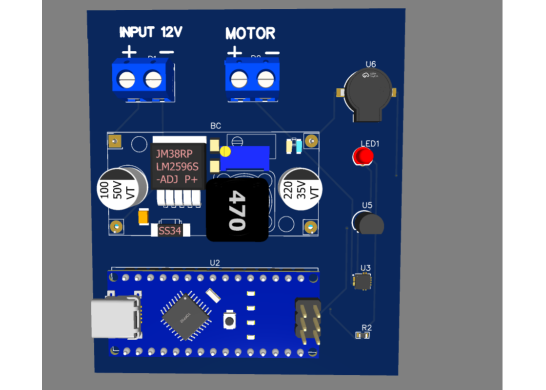

Smart Motor Safety and Monitoring System Using Arduino Nano
This project is a smart motor monitoring system using an Arduino Nano that keeps an eye on current, temperature, and vibration in real time. It uses an ACS712 sensor to track current, an LM35 to measure temperature, and a piezo sensor to detect vibrations. Whenever any parameter goes beyond safe limits, the system immediately alerts you with an LED and buzzer, helping prevent motor damage. All components share a common 5V supply and ground, and the motor connects via simple terminal pins, making it modular and easy to test. This compact setup is ideal for ensuring motor safety and monitoring performance efficiently.
const int currentPin = A0;
const int tempPin    = A1;
const int vibPin     = 2;
const int ledPin     = 8;
const int buzzerPin  = 9;

const float currentThreshold = 2.0;
const float tempThreshold    = 50.0;
const int vibrationThreshold  = HIGH;

const float ACSSensitivity = 0.185;
const float ACSZeroCurrent = 2.5;

void setup() {
  Serial.begin(9600);
  pinMode(vibPin, INPUT);
  pinMode(ledPin, OUTPUT);
  pinMode(buzzerPin, OUTPUT);
  digitalWrite(ledPin, LOW);
  digitalWrite(buzzerPin, LOW);
}

void loop() {
  int currentRaw = analogRead(currentPin);
  float currentVoltage = (currentRaw / 1023.0) * 5.0;
  float current = (currentVoltage - ACSZeroCurrent) / ACSSensitivity;

  int tempRaw = analogRead(tempPin);
  float tempVoltage = (tempRaw / 1023.0) * 5.0;
  float temperature = tempVoltage * 100.0;

  int vibration = digitalRead(vibPin);

  bool overCurrent = current > currentThreshold;
  bool overTemp    = temperature > tempThreshold;
  bool vibrated    = vibration == vibrationThreshold;

  if (overCurrent || overTemp || vibrated) {
    digitalWrite(ledPin, HIGH);
    digitalWrite(buzzerPin, HIGH);
  } else {
    digitalWrite(ledPin, LOW);
    digitalWrite(buzzerPin, LOW);
  }

  Serial.print("Current: "); Serial.print(current); Serial.print(" A, ");
  Serial.print("Temp: "); Serial.print(temperature); Serial.print(" C, ");
  Serial.print("Vibration: "); Serial.println(vibration);

  delay(500);
}
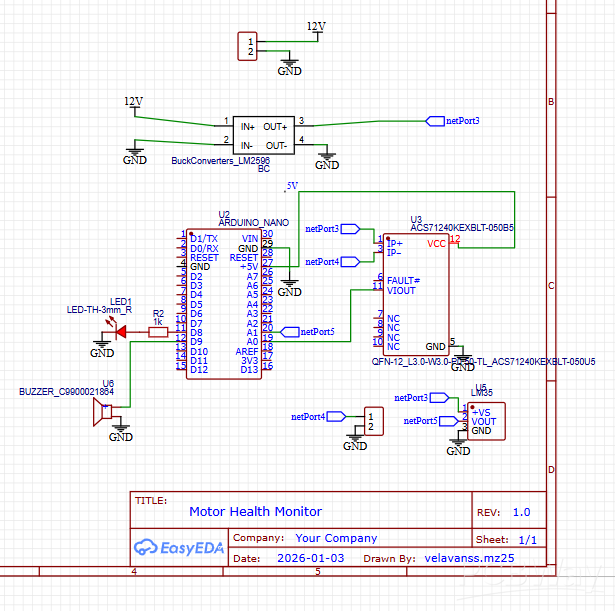
Smart Motor Safety and Monitoring System Using Arduino Nano
Project images are for reference only. Actual production is based on the manufacturing files on the project page.
Please review the designer's notes (e.g., PCB thickness) and select the appropriate options.
PCBWay is not responsible
for issues caused by unsuitable parameter selections.
For more important ordering information, please refer to
Read More









Raspberry Pi 5 7 Inch Touch Screen IPS 1024x600 HD LCD HDMI-compatible Display for RPI 4B 3B+ OPI 5 AIDA64 PC Secondary Screen(Without Speaker)
BUY NOW


- Comments(3)
- Likes(0)
More by VELAVAN S S
-
Programmable Mist Maker - XIAO / QT PY Extension
2374 2 2 -
RadioHAT - Raspberry Pi radio development platform
2055 0 4 -
-
-
-
ARPS-2 – Arduino-Compatible Robot Project Shield for Arduino UNO
4209 0 6 -
A Compact Charging Breakout Board For Waveshare ESP32-C3
4984 3 8 -
AI-driven LoRa & LLM-enabled Kiosk & Food Delivery System
5749 2 2 -





















