PCB layout involves more than simply placing components and routing traces. Component spacing, decoupling capacitor placement, pad connections, thermal management, and manufacturing constraints all affect PCB assembly quality and long-term reliability. The following PCB layout guidelines cover 12 practical details that engineers should consider during PCB component placement and design.
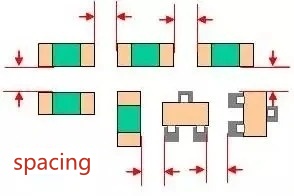
The spacing between surface-mount technology (SMT) components is an important consideration in PCB layout. Insufficient spacing can make solder paste printing and component placement more difficult, increase the risk of solder bridging, and complicate rework and maintenance.
The following values can serve as preliminary references for PCB component spacing:
These values are for reference only and are not universal manufacturing standards. Actual PCB component spacing should be determined based on component packages, pad dimensions, solder paste printing, placement equipment, and the manufacturing and assembly capabilities of the PCB supplier.
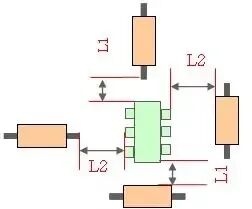
Adequate spacing should also be maintained between through-hole components and SMT components to prevent interference during component placement, soldering, and subsequent rework.
A spacing of 1–3 mm can serve as a general reference, but the actual distance depends on component dimensions, lead positions, soldering methods, and maintenance requirements.
For PCBs assembled using wave soldering, engineers should also consider component orientation, shadowing effects caused by adjacent components, and whether solder can reach the joints effectively.
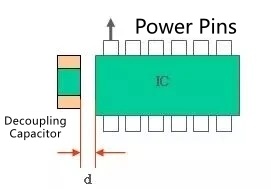
Decoupling capacitors should be placed as close as practical to the corresponding IC power pins. This helps shorten the current loop between the power supply and ground, reducing parasitic inductance and power supply noise.
When an IC has multiple power pins, the number, capacitance, and placement of decoupling capacitors should be determined according to the datasheet, power distribution network, and actual current requirements. Where individual power pins require dedicated decoupling, the corresponding capacitors should be placed as close to those pins as possible.
The grounding path is equally important. Keep the connections between the power pin, decoupling capacitor, and ground as short as practical. Unnecessarily long traces or excessive vias can reduce decoupling effectiveness, particularly at high frequencies.
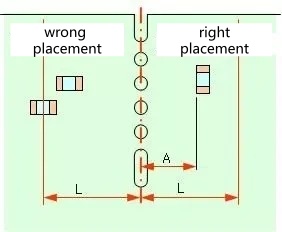
PCBs often undergo routing, V-scoring, or other depanelization processes. Components near PCB edges therefore require special attention to their orientation and clearance.
First, consider the mechanical stress generated during depanelization. Ceramic capacitors, connectors, and other mechanically sensitive components should be positioned to minimize stress concentration at solder joints and component bodies. Component orientation should be determined by the depanelization method, pad geometry, and component characteristics rather than by a universal rule that all components must be parallel to the cutting direction.
Second, sufficient component-free space should be maintained near PCB edges to prevent damage from cutting tools or depanelization equipment. The required clearance depends on the depanelization method, such as V-scoring, routing, or mouse bites, as well as component dimensions and the PCB manufacturer's capabilities.
For components that are particularly sensitive to mechanical stress, consider using a depanelization method that reduces stress on the board and solder joints.
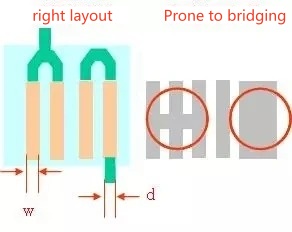
When adjacent pads must be connected to the same net, the copper connections and trace widths should be planned carefully. Poorly designed copper connections may reduce the effective clearance between pads and increase the risk of solder bridging.
During PCB layout, maintain adequate electrical clearance between pads and select trace widths according to current-carrying requirements. For fine-pitch components, pay particular attention to the relationship between pads, traces, and solder mask openings to avoid problems with solder paste printing and soldering quality.
After completing the layout, run design rule checks (DRC) and verify that the design meets the PCB manufacturer's fabrication and assembly requirements.
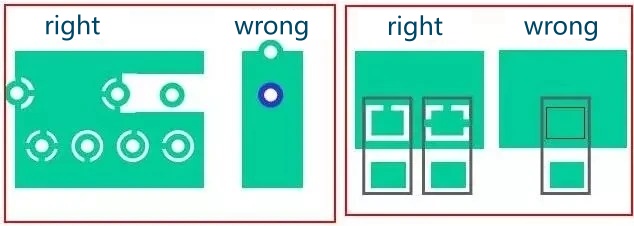
When a pad is connected to a copper plane, the connection method should be selected based on soldering requirements, current-carrying capacity, and thermal performance.
Two common methods are thermal relief connections and solid copper connections.
A thermal relief connection uses several narrow copper spokes to connect the pad to the surrounding copper plane. This reduces heat transfer from the pad into the larger copper area during soldering, making soldering and rework easier in many cases.
A solid copper connection directly connects the pad to the copper plane. It generally provides lower electrical and thermal resistance, but the larger copper area can draw heat away from the pad, making it more difficult to reach the required soldering temperature.
The appropriate method depends on current requirements, heat dissipation, soldering processes, and rework needs. For high-current or thermally demanding connections, do not reduce the number or width of copper spokes solely to make soldering easier without evaluating the electrical and thermal consequences.
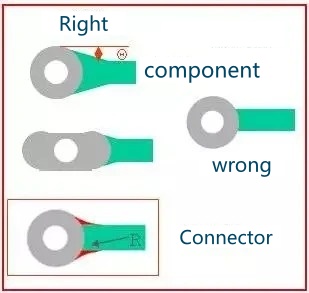
When a trace connects to a pad or via through a narrow junction, a teardrop can be added where appropriate to create a smoother transition between the trace and the connection point.
Teardrops offer several potential benefits:
However, teardrops are not necessary in every situation. For high-speed or impedance-sensitive traces, engineers should evaluate whether the resulting geometric changes could affect impedance continuity or signal integrity.
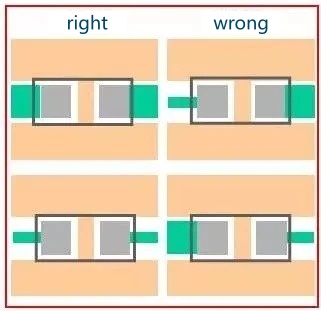
During PCB layout, trace widths near component pads should be selected according to the electrical and mechanical requirements of the design.
For differential signals, symmetrical analog circuits, and connections requiring balanced current distribution, trace symmetry, width matching, and length matching may be important for maintaining signal integrity and circuit performance.
However, ordinary signal traces do not always need to have identical widths on both sides of a pad. Trace widths should be determined by current-carrying capacity, impedance requirements, pad dimensions, and manufacturing capabilities. Avoid unnecessary abrupt changes in trace width near pad connections.
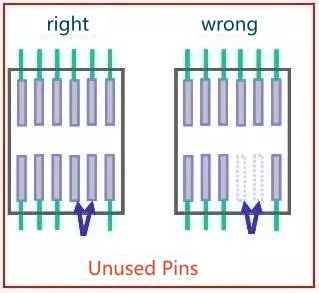
Unused IC pins must be handled according to the device datasheet and application requirements. They should not all be connected to ground or left floating indiscriminately.
For example:
For physical pins that are present on the IC but not used in the application, ensure that the PCB footprint correctly represents the actual package. Whether the corresponding pads should be connected to ground or handled in another way depends on the pin function and the device manufacturer's recommendations.
Adding a pad and connecting it to ground does not necessarily provide effective shielding. An incorrect connection may instead cause a short circuit or interfere with normal device operation.
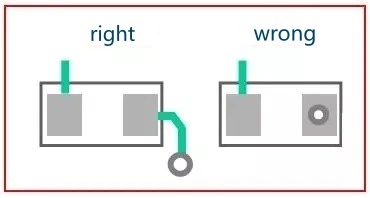
During PCB layout, placing a conventional open via directly within a pad can cause solder to flow into the hole during assembly. This may result in insufficient solder at the joint, poor soldering quality, or other assembly defects.
For ordinary SMT pads, avoid placing untreated open vias directly within the pads, particularly for fine-pitch components, unless the manufacturing process supports the design.
However, vias are not universally prohibited within pads. Via-in-pad is a common design approach for packages such as BGAs, where routing density and electrical performance may require it. Depending on the application, via filling, capping, or other appropriate via treatments may be needed to prevent solder loss and ensure reliable assembly.
Select the appropriate approach based on the component package, via structure, and PCB manufacturer's process capabilities.

Copper traces, pads, and components should maintain adequate clearance from PCB edges to prevent damage during fabrication, depanelization, and subsequent assembly.
If copper features or pads are too close to the board edge, routing, V-scoring, or other depanelization processes may damage the copper, expose conductors, or compromise electrical reliability.
For single-sided boards and substrates with relatively low mechanical strength, additional attention should be paid to structural integrity and component placement near the edges.
The required PCB edge clearance should be determined according to the board material, thickness, depanelization method, and manufacturer's capabilities. Include these clearances in the PCB design rules and verify them before manufacturing.
Electrolytic capacitors are sensitive to operating temperature. Prolonged exposure to elevated temperatures can accelerate electrolyte loss and shorten capacitor service life.
During PCB layout, avoid placing electrolytic capacitors too close to power resistors, power semiconductors, transformers, or other heat-generating components whenever possible. If close placement is unavoidable, evaluate the thermal impact based on component temperature rise, airflow direction, and the actual operating environment.
Also consider the capacitor's rated operating temperature, ripple current, and self-heating to ensure that it operates within acceptable limits under real-world conditions.
Distance from a heat source alone is not sufficient to determine whether a capacitor is safe. Thermal design and the operating conditions of the complete product must also be considered.
PCB layout affects not only electrical performance but also manufacturability, soldering quality, and long-term reliability. In addition to routing and component placement, engineers should consider assembly processes, mechanical stress, thermal requirements, and the recommendations provided in component datasheets.
After completing the PCB design, perform design rule checks and verify the layout against the PCB manufacturer's capabilities and assembly requirements. Careful attention to these PCB layout guidelines can help reduce design issues and improve PCB fabrication and assembly reliability



