In this tutorial, let’s see how to generate BOM (Bill of Materials) and CPL (Component Placement List) in Proteus.
This tutorial was written for Proteus 8.13 version and the "dsPIC33_REC " sample project shipped with Proteus is used.
Generating the BOM
1. First, click the Bill of Materials icon (the Dollar sign icon) on the toolbar and the Bill of Materials tab will show up.

Figure 1.Proteus BOM Icon
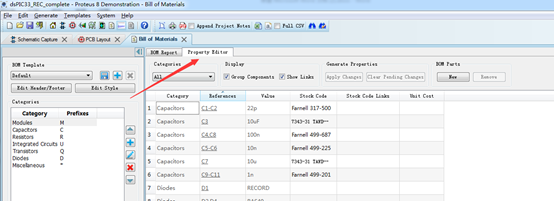
Figure 2.Bom list
2. It’s time to generate the BOM. Menu operation: Generate → CSV

Figure 3.Export Bom
Generating the Pick and Place File
1.First, switch to PCB Layout Tab and click the Toggle Metric/Imperial icon to change the unit to metric.

Figure 4. Switch to Metric
2.Execute Output → Generate Pick and Place File
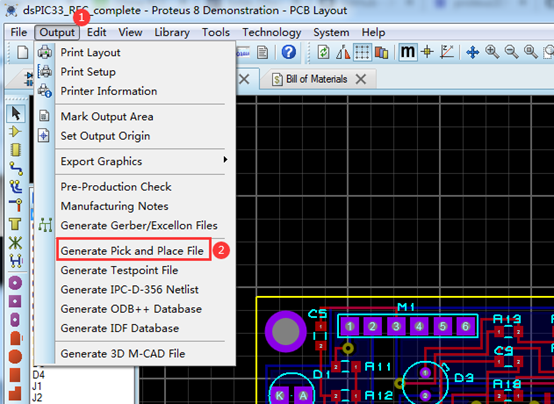
Figure 5. Generate Pick and Place File Menu Operation
3.Export to CSV file and save

Figure 6. Output CSV file



